The evolution of mobile telephony has transitioned the iPhone from a mere communication device into a sophisticated optical instrument capable of rivaling entry-level Digital Single-Lens Reflex (DSLR) cameras. Central to this transformation is the ability to produce "bokeh"—a Japanese term referring to the aesthetic quality of the out-of-focus blur in a photograph. While professional photographers traditionally achieved this through expensive wide-aperture lenses, Apple has democratized the effect through a combination of dual-lens hardware and advanced computational photography. Understanding the methodologies for background blurring is essential for users seeking to elevate their visual storytelling, whether through native hardware features, physical optical principles, or post-production software.
The Technological Evolution of Depth Mapping on iPhone
The chronology of background blurring on the iPhone began in earnest in 2016 with the release of the iPhone 7 Plus. This device introduced the first dual-camera system, utilizing a wide-angle lens and a telephoto lens simultaneously to create a "depth map." By comparing the slight offset between the two images—a process known as parallax—the iPhone’s Image Signal Processor (ISP) could distinguish the subject from the background.
Since then, Apple has iteratively refined this technology. The introduction of the A12 Bionic chip in the iPhone XS brought "Depth Control," allowing users to adjust the intensity of the blur after the photo was taken. More recently, the inclusion of LiDAR (Light Detection and Ranging) scanners on Pro models has significantly enhanced depth accuracy, particularly in low-light environments. LiDAR pulses lasers to measure the distance to objects in a room, creating a precise 3D map that ensures the software-generated blur does not "bleed" into the edges of the subject’s hair or clothing.
Utilizing Native Portrait Mode for Real-Time Depth Effects
Portrait Mode remains the primary tool for most users to achieve professional-grade background blur. This feature is currently available on a wide range of devices, including the iPhone 15 and 14 series, the iPhone 13 and 12 series, the iPhone 11 series, and older models such as the XR, XS, and 8 Plus.
Operational Procedures for Portrait Mode
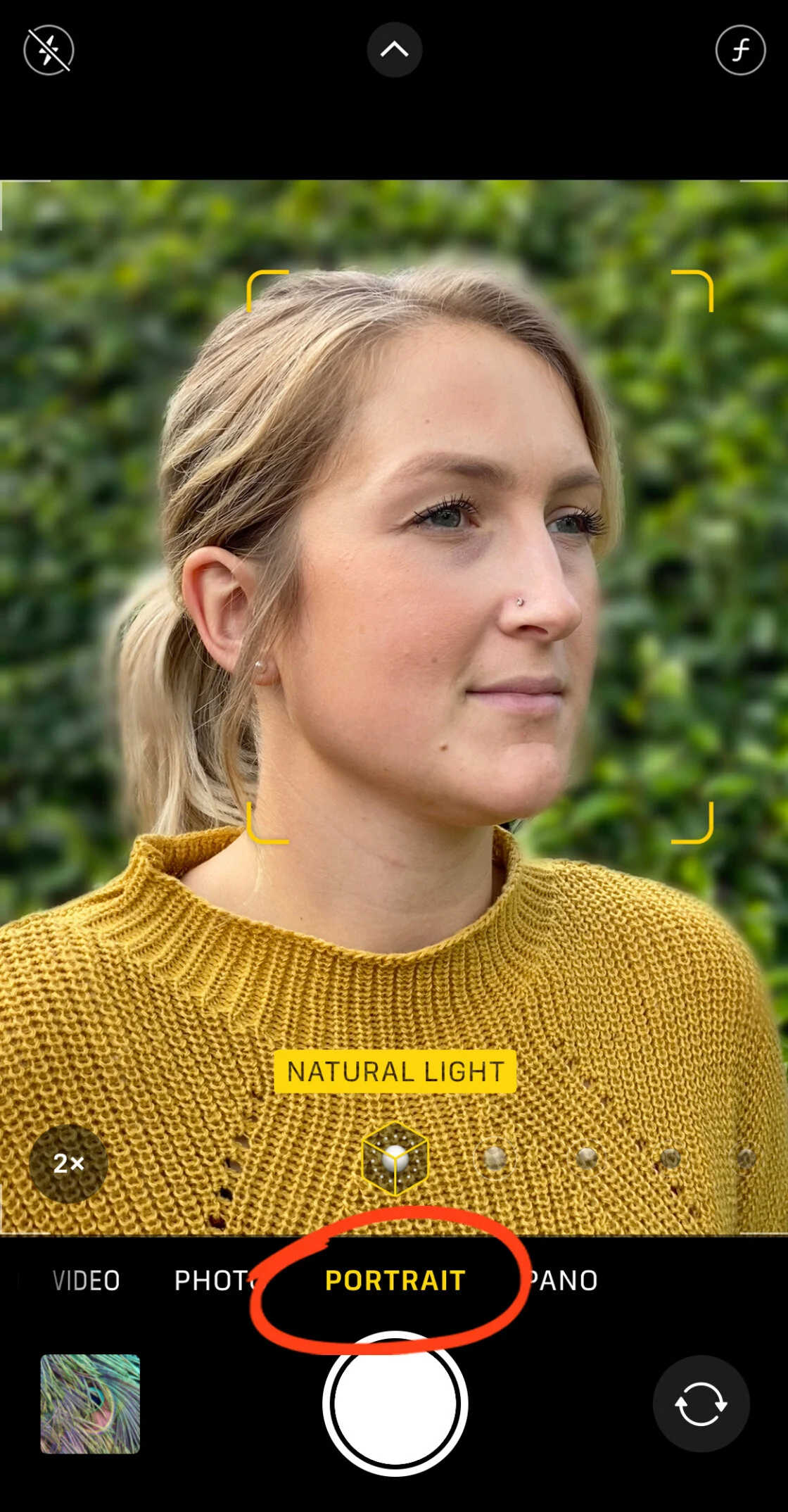
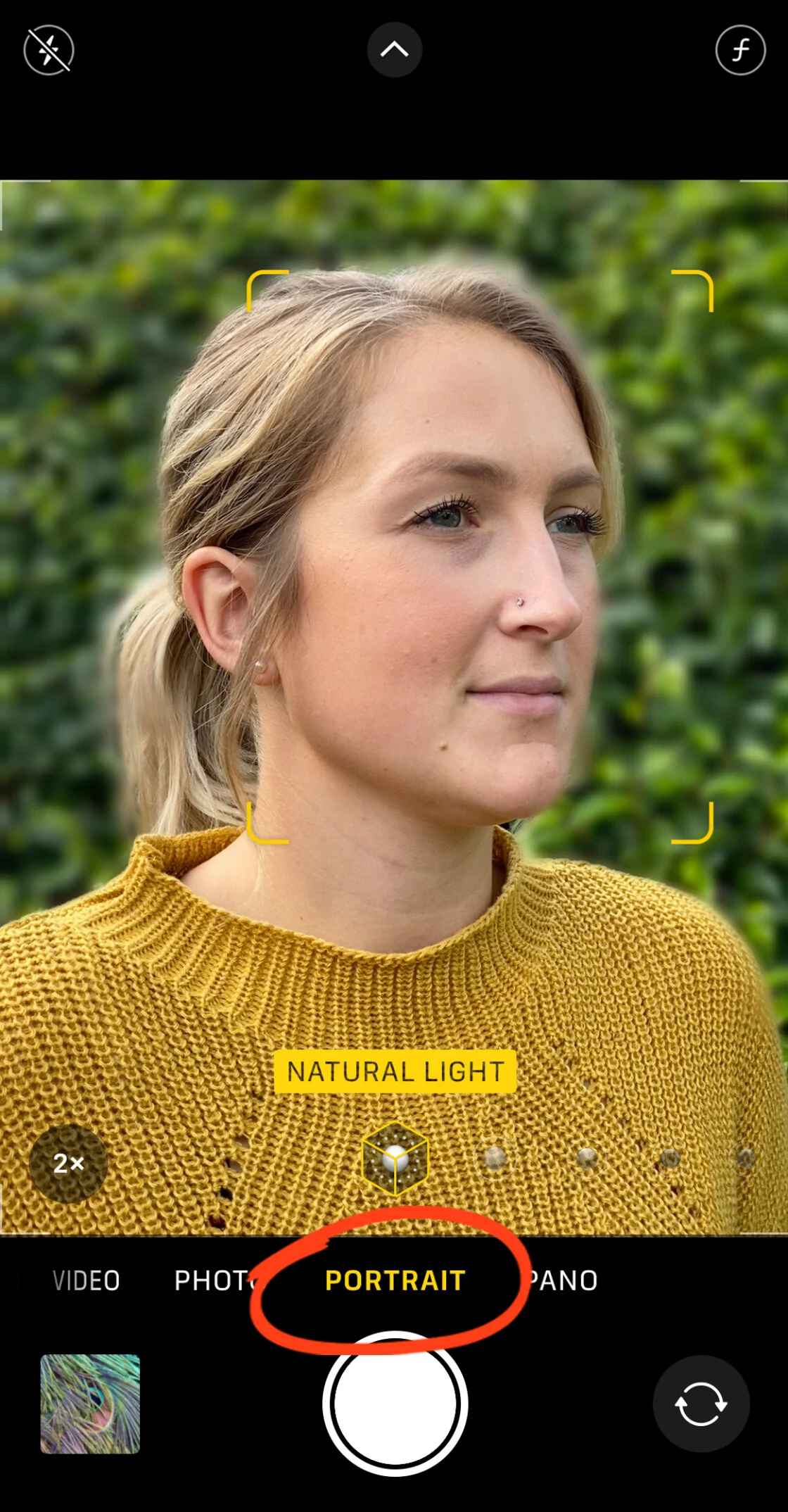
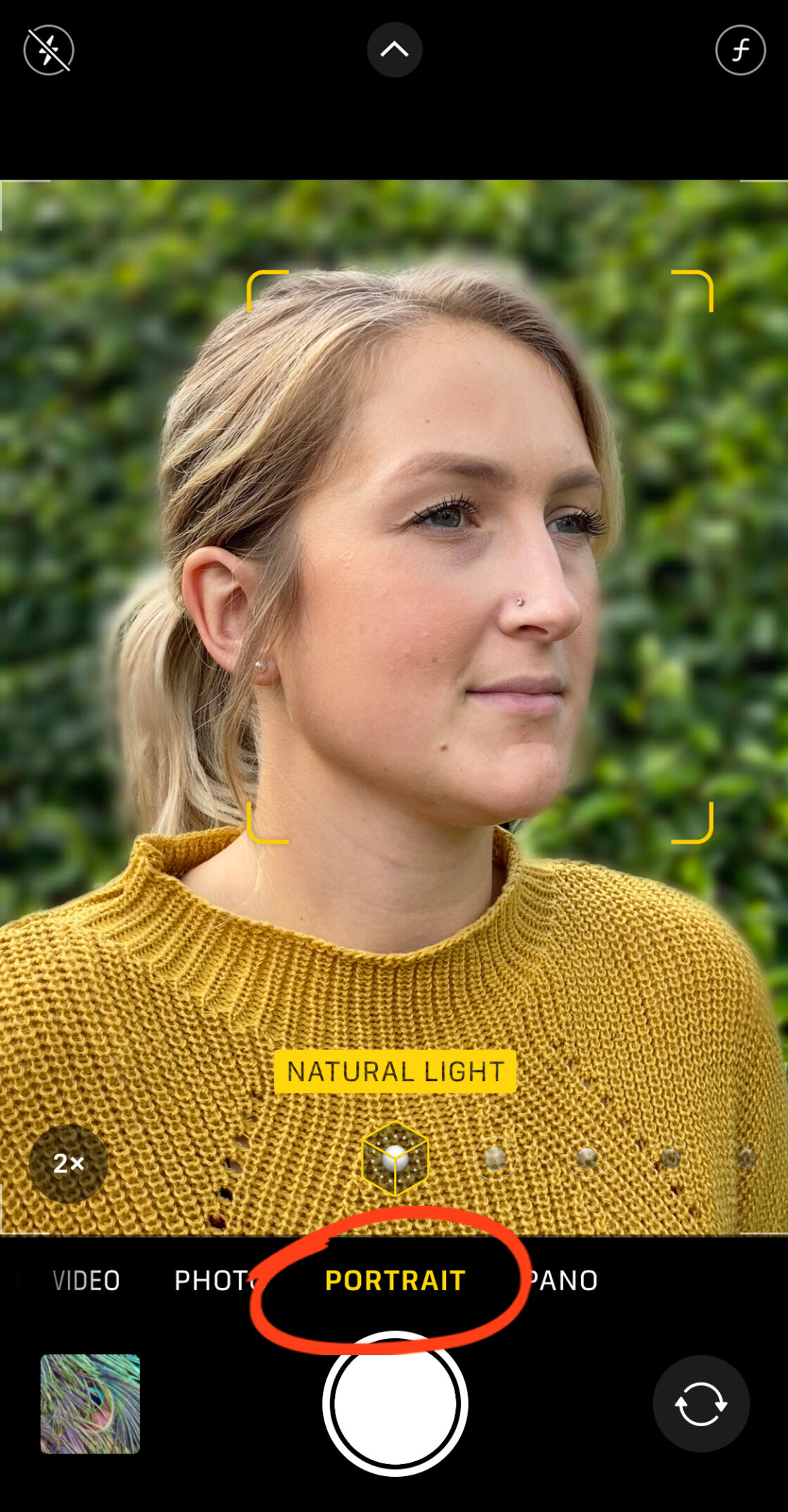
To engage this feature, the user must navigate to the Camera app and swipe to the "Portrait" setting. The software requires specific environmental conditions to function optimally. Specifically, the subject should be positioned between two and eight feet from the lens. If the subject is too close or too far, the interface will provide haptic and visual prompts to adjust the distance.
Once the "Natural Light" or "Depth Effect" indicator turns yellow, the iPhone has successfully locked onto the subject and mapped the background. The resulting image keeps the subject in sharp focus while applying a Gaussian-style blur to everything else, effectively isolating the subject and eliminating distracting background elements.
Post-Capture Adjustments and Portrait Lighting
For devices released after the iPhone XS, Apple provides a non-destructive editing workflow. By selecting a Portrait photo in the Photos app and tapping "Edit," users can access the "f-number" or "Depth" icon. This simulates the aperture of a physical lens. A lower f-number (such as f/1.4) results in a creamy, heavy blur, while a higher f-number (such as f/16) brings more background detail back into focus.
Additionally, Portrait Lighting effects offer studio-grade illumination simulations. These include:
- Studio Light: Brightens facial features for a clean, professional look.
- Contour Light: Adds dramatic shadows to define the face.
- Stage Light/Stage Light Mono: Completely replaces the background with a black void.
- High-Key Light Mono: Creates a stark black-and-white subject against a pure white background.
The Physics of Optical Blur: Using Proximity and Macro Lenses
For users with older iPhones lacking Portrait Mode, or for those seeking a more organic aesthetic, background blur can be achieved through the fundamental laws of optics. This is known as "shallow depth of field."
The depth of field is determined by the distance between the camera and the subject. By moving the iPhone significantly closer to a subject—such as a flower, an insect, or a small detail—the lens is forced to focus at a very short distance. Because the lens cannot maintain focus on both the near subject and the distant background simultaneously, the background naturally falls out of focus.
Macro Photography and Third-Party Hardware
In recent years, the iPhone 13 Pro and subsequent Pro models have introduced a dedicated Macro mode that utilizes the Ultra-Wide lens to focus on subjects as close as two centimeters. For users without these specific models, third-party manufacturers like Moment or Sandmarc produce high-quality add-on macro lenses. These glass elements clip over the existing iPhone lens, allowing for extreme close-ups with an incredibly shallow depth of field, producing a blur that is optical rather than algorithmic.
To ensure success with this method, users should utilize the "AE/AF Lock" feature. By long-pressing on the subject in the Camera viewfinder, the iPhone will lock the focus and exposure, preventing the camera from refocusing on the background during the shot.
Post-Production Blurring via Third-Party Applications
When a photograph has already been captured without a blurred background, or when the native software fails to produce the desired effect, third-party applications provide a secondary layer of control. Two industry standards in this space are AfterFocus and Snapseed.

Precision Editing with AfterFocus
AfterFocus is renowned for its "Smart Selection" tool. The app allows users to draw a rough line over the subject they wish to keep sharp and another line over the background. The app’s internal algorithms then calculate the edges of the subject. For complex images where the software might struggle—such as a person holding a bicycle with many spokes—AfterFocus offers a manual "Pencil" mode. This allows the user to zoom in and paint a precise "red mask" over the subject. Once the mask is finalized, the app applies a "Lens Blur" that can be adjusted for intensity and "Motion Blur" to simulate movement.
Dreamy Vignettes with Snapseed
Google’s Snapseed app offers a different approach through its "Lens Blur" tool. Rather than masking a specific subject, Snapseed uses a radial or linear tilt-shift effect. Users can position a circular "focus zone" over their subject and adjust the "Transition" and "Vignette Strength." This creates a dreamy, soft-focus effect around the edges of the frame, which is particularly effective for centrally composed subjects or atmospheric landscape shots.
Market Analysis and the Impact of Computational Photography
The proliferation of background-blurring technology on the iPhone has had a measurable impact on the consumer electronics market. According to industry data from the Camera & Imaging Products Association (CIPA), shipments of digital still cameras have declined by over 90% since their peak in 2010. The primary driver of this decline is the "good enough" factor of smartphone photography.
For the average consumer, the convenience of an iPhone—combined with the ability to simulate the look of a $2,000 DSLR setup—obviates the need for a dedicated camera. Apple’s "Shot on iPhone" marketing campaign has further solidified this perception, showcasing large-scale billboards and cinematic short films captured entirely on mobile devices.
Industry analysts suggest that the future of this technology lies in "Video Portrait Mode" (marketed by Apple as Cinematic Mode). Introduced with the iPhone 13, this feature applies background blur to moving subjects in real-time, even allowing the focus to shift automatically when a subject looks away from the camera. This represents a significant leap in processing power, requiring the device to render a new depth map for every frame of a 30fps or 60fps video.
Conclusion and Future Outlook
Blurring the background on an iPhone is no longer a niche skill reserved for tech-savvy enthusiasts; it is a fundamental feature of the modern mobile experience. Whether through the sophisticated depth-mapping of Portrait Mode, the physical proximity of macro photography, or the surgical precision of third-party editing apps, users have an unprecedented array of tools at their disposal.
As artificial intelligence and machine learning continue to evolve, the distinction between software-generated "fauxto-graphy" and traditional optical bokeh will continue to blur. Future iterations of the iPhone are expected to integrate even more advanced neural engines, potentially allowing for the simulation of specific legendary vintage lenses, further narrowing the gap between the smartphone in one’s pocket and the professional gear used in high-end studios. For now, the combination of hardware awareness and creative editing remains the gold standard for any iPhone user looking to make their subject truly stand out.