
In the ever-evolving landscape of digital photography, the journey from a captured image to a compelling visual narrative often hinges on the finesse of post-processing. While photographers meticulously focus on correct exposure, sharp focus, and balanced composition in-camera, a recurring challenge arises when technically proficient images still lack that indefinable spark, that final layer of visual impact. These photos, despite their technical correctness, frequently feel incomplete, failing to resonate with the viewer on an emotional level. The critical distinction between a merely decent photograph and a truly stunning one often resides in the application of subtle, yet powerful, finishing touches that refine its aesthetic and emotional appeal. This article explores how Skylum’s Luminar Neo, a prominent player in AI-powered photo editing, addresses this common photographic dilemma through its sophisticated Color Harmony tool, offering photographers an avenue to elevate their work from technically sound to artistically profound.
Luminar Neo, developed by Skylum, has positioned itself as an innovative solution for photographers seeking both advanced capabilities and user-friendly interfaces. Its suite of AI-driven tools aims to streamline complex editing processes, democratizing techniques once reserved for seasoned professionals. Among its many features, the Color Harmony module, discreetly located within the Professional Tools section, often remains overlooked by users unfamiliar with its nuanced power. Yet, for those who uncover its potential, it swiftly becomes an indispensable asset for refining the delicate interplay of tone, contrast, and color balance, breathing vital life into images that initially fall flat.
The Evolution of Color Control in Photography Software
The pursuit of perfect color has been central to photography since its inception. From early chemical processes requiring precise mixing to modern digital sensors capturing vast color information, control over hue, saturation, and luminance has been paramount. The advent of digital editing software in the late 20th century, notably with programs like Adobe Photoshop, revolutionized this control, offering layers, masks, and adjustment tools that allowed for unprecedented manipulation. However, these early tools often required a deep understanding of color theory and intricate manual adjustments, posing a steep learning curve for many photographers.

The 21st century has witnessed a significant shift, with software developers increasingly integrating artificial intelligence to simplify and accelerate complex tasks. Skylum, with Luminar Neo, exemplifies this trend, aiming to provide powerful results with intuitive controls. The Color Harmony tool represents a sophisticated evolution of traditional color grading, moving beyond simple saturation or temperature sliders to offer a more intelligent and interconnected approach to color management. It recognizes that color adjustments are not isolated but rather form an intricate ecosystem within an image, where changes to one aspect can ripple through others.
Unlocking Nuance: A Deep Dive into Color Harmony
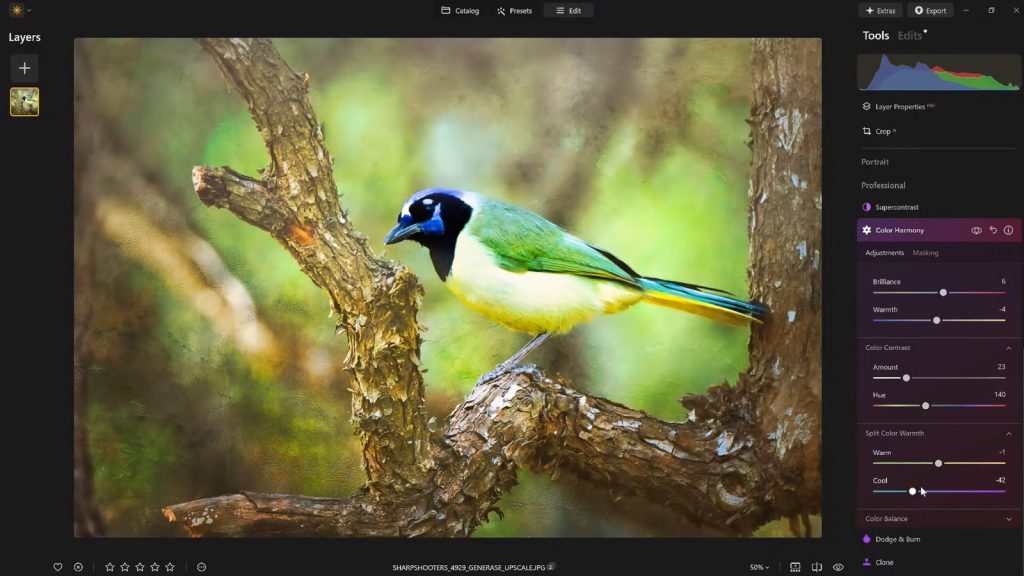
Color Harmony is not designed for drastic, overt transformations that fundamentally alter an image’s integrity. Instead, its strength lies in introducing granular control over how colors interact and relate to one another across the entire visual spectrum of an image. This philosophy aligns with a growing trend among professional photographers who prioritize realism and subtlety over heavily processed, artificial aesthetics. The module offers a comprehensive set of adjustments: Brilliance, Warmth, Color Contrast, Split Warmth, and Color Balance. Each component is engineered to help photographers fine-tune their work with exceptional precision, ensuring that every adjustment contributes meaningfully to the overall visual coherence and emotional impact.
The collective application of these tools guides the viewer’s eye, subtly emphasizes the primary subject, and cultivates a cohesive atmosphere that perfectly aligns with the mood and ambient lighting conditions of the original scene. This holistic approach to color management empowers photographers to transcend mere technical correction and venture into the realm of artistic interpretation, allowing them to imbue their images with specific emotional qualities or narrative intentions.
Brilliance and Warmth: The Art of Subtle Enhancement

The initial controls within Color Harmony, Brilliance and Warmth, epitomize the tool’s philosophy of gentle yet effective refinement. Brilliance, unlike standard saturation adjustments, focuses on increasing or decreasing the vibrancy of colors without introducing the harsh, artificial effects often associated with over-saturating an image. A slight boost in brilliance can impart a richer, more profound tone to colors, enhancing their depth while scrupulously preserving natural detail and texture. The key, as with many advanced editing techniques, lies in moderation; excessive application risks pushing the image into an unnatural or cartoonish aesthetic. Experienced photographers often find that a light, judicious touch yields the most authentic and impactful results, subtly enhancing the image’s inherent luminosity.
Similarly, the Warmth slider offers a refined control over the image’s color temperature. Moving the slider to the right imbues the photograph with a gentle golden glow, evoking feelings of comfort, nostalgia, or the warmth of a sunset. Conversely, shifting it to the left introduces cooler tones, which can convey serenity, starkness, or the crispness of a winter morning. The art here is to meticulously match the warmth or coolness to the emotional tone and narrative context of the photograph. A carefully applied, subtle warmth can significantly add depth and atmosphere, enhancing the scene’s emotional resonance without overpowering or distorting its original character. This precise control over color temperature allows photographers to evoke specific sentiments, transforming a merely descriptive image into an evocative experience.
Mastering Color Contrast and Split Warmth for Dynamic Visuals
Beyond general vibrance and temperature, Color Harmony provides more specialized controls to sculpt the image’s visual dynamics. Color Contrast is a powerful adjustment that increases the visual tension and separation between distinct color ranges, particularly between the highlights and shadows of an image. When applied thoughtfully and with a clear artistic intention, this tool can dramatically enhance depth, making individual elements within the composition stand out with greater clarity and impact, all without resorting to crude over-processing. It allows colors to pop against each other, creating a more dynamic and engaging visual experience. For instance, in a landscape photograph, increasing color contrast can make a vibrant green foreground stand out more sharply against a cool blue sky, drawing the viewer’s eye to these distinct areas.
Split Warmth offers an even more granular level of control, enabling photographers to adjust warm and cool tones independently across the image. This feature proves particularly valuable in complex lighting scenarios, such as mixed lighting conditions where both artificial and natural light sources are present, or in creating sophisticated color separation within layered compositions. For example, a photographer might want to introduce a subtle warmth into the midtones of a portrait while maintaining cooler tones in the shadows to enhance depth and mood. While not every image demands its application, for those that do, Split Warmth becomes an invaluable tool for achieving highly specific and sophisticated color grading effects. Its judicious use can elevate an image by crafting a distinct color narrative, but its necessity is determined by the unique demands of each photograph.

Color Balance: Precision Control Over Tonal Regions
The Color Balance section within Luminar Neo’s Color Harmony tool offers perhaps the most advanced and precise control over an image’s chromatic qualities. This feature provides independent sliders for adjusting the color tones specifically within the shadows, midtones, and highlights. This level of segmentation allows for incredibly targeted adjustments, enabling photographers to meticulously match the color atmosphere of the image to their creative vision.
For instance, a subtle shift in the midtones towards warmer hues can transform a landscape photograph, making it feel more inviting and serene, while a slight shift towards cooler tones in a portrait can achieve a more neutral, understated, or even dramatic appearance. This granular control is crucial for correcting color casts that might be present in specific tonal ranges due to challenging lighting conditions, or for intentionally introducing creative color grades that enhance the image’s storytelling potential.
While Color Balance is a more advanced feature, demanding a deeper understanding of color theory and its application, it quickly becomes indispensable for professional photographers aiming to achieve consistent color grading across an entire photo series or portfolio. The ability to fine-tune shadows, midtones, and highlights independently ensures that the overall color palette remains harmonious and serves the overarching artistic direction, making it a cornerstone for achieving a polished and professional aesthetic.
Guiding the Viewer’s Gaze with Vignettes

Once the intricate color adjustments have been meticulously applied, another classic photographic technique, the vignette, can be employed to subtly yet effectively direct the viewer’s attention towards the primary subject. A vignette works by gradually darkening the edges of the image while often simultaneously introducing a touch of "Inner Light" or brightness in the center. This creates a natural visual spotlight, drawing the eye inward and enhancing focus without requiring heavy masking, complex local adjustments, or overtly artificial effects.
The strategic application of vignetting is a testament to the power of understated post-processing. When executed skillfully, it enhances the narrative flow of the photograph without drawing undue attention to itself. It’s a quiet but profoundly effective method for directing the viewer’s experience, ensuring that their gaze settles on the most important elements of the composition. In an era where visual information is abundant, guiding the viewer’s eye efficiently and aesthetically is a crucial skill, and a well-applied vignette serves this purpose with elegance and impact.
The Strategic Importance of Saving Custom Presets
After investing time and creative energy in dialing in the perfect aesthetic for an image, the ability to save these adjustments as a custom preset becomes an invaluable asset for any photographer. This practice serves multiple critical functions beyond mere convenience. Firstly, it ensures a consistent editing style across a body of work, which is vital for building a recognizable photographic brand or maintaining uniformity within a series. Secondly, it preserves the ability to revisit and refine the precise look later, allowing for iterative improvements or adaptations.
Reapplying a saved preset to the same image, or to other images within the same series, provides an instant baseline for future edits. This significantly streamlines the workflow, especially when dealing with large volumes of photographs taken under similar conditions. Furthermore, this workflow inherently supports a crucial aspect of photographic editing: the need to step back and gain fresh perspective. It is common for photographers, after an intensive editing session, to find that they may have pushed certain adjustments too far. With a saved preset, it’s easy to reapply the effect at a reduced strength (e.g., 70-80%), maintaining the core aesthetic while correcting any instances of over-editing. This iterative process, facilitated by presets, is a hallmark of professional post-production.

Skylum’s Vision: Empowering Photographers
The integration of tools like Color Harmony and the emphasis on workflow efficiency through presets align perfectly with Skylum’s broader mission. The company aims to make professional-grade editing accessible to a wider audience, from hobbyists to seasoned professionals. In a market increasingly saturated with sophisticated imaging software, Luminar Neo differentiates itself by blending powerful AI with intuitive controls, addressing the ongoing demand for solutions that reduce complexity without sacrificing creative control.
Industry reports consistently highlight the importance of post-processing in photography, with a significant percentage of professional images undergoing extensive editing. The global photo editing software market, valued at billions of dollars, continues to grow, driven by advancements in AI and cloud-based solutions. Skylum’s focus on tools that provide subtle, yet impactful, enhancements reflects a mature understanding of what photographers truly need: not just tools to fix errors, but tools to express vision.
A Finishing Touch That Defines Excellence
In conclusion, what truly distinguishes a compelling image from a merely passable one often isn’t a dramatic, transformative alteration, but rather a collection of carefully considered and artfully applied enhancements. Luminar Neo’s Color Harmony tool, when combined with strategic vignetting and a thoughtful, iterative editing approach, provides photographers with the means to inject depth, emotion, and cohesive beauty into their work.
For photographers who seek to add a refined polish to their images without succumbing to the pitfalls of over-processing, these advanced finishing tools in Luminar Neo offer a compelling balance of precise control and creative freedom. They empower users to move beyond the technical specifications of an image and delve into its artistic and emotional potential, ensuring that every photograph tells a richer, more engaging story.
As an additional benefit for those looking to explore these powerful features, a special offer is available: get 10% off Luminar Neo with the code NATURETTL at checkout.
About the Author
Vanelli is an accomplished photographer, educator, and author based in Florida. He serves as the Director of Education at Skylum, bringing a unique perspective from his past as a Triple Crown Karate champion to his current role in teaching visual arts. With a diverse skill set, Vanelli develops comprehensive educational content and courses for photo editing, frequently instructing industry leaders. He is a sought-after speaker at major conferences, where he delivers engaging presentations on photography. Vanelli’s contributions include numerous insightful articles, educational videos, and his role as host of the widely acclaimed Luminar Coffee Break show, making him a prominent voice in the photography education community.