The evolution of mobile photography has fundamentally altered the landscape of digital imaging, transitioning from basic documentation to sophisticated artistic expression. Central to this evolution is the ability to manipulate depth of field, a technique historically reserved for high-end Digital Single-Lens Reflex (DSLR) cameras with large sensors and wide-aperture lenses. Today, the iPhone has democratized this capability through a combination of advanced optics and computational photography. By creating a shallow depth of field—commonly referred to as "bokeh"—photographers can isolate a subject, minimize background distractions, and produce images with a distinct professional aesthetic. This guide provides an exhaustive analysis of the methodologies used to achieve background blur on the iPhone, ranging from native hardware features to advanced post-processing applications.
The Rise of Computational Photography: Understanding Portrait Mode
The most significant milestone in the iPhone’s photographic history was the introduction of Portrait mode, which debuted with the iPhone 7 Plus in 2016. This feature marked the beginning of Apple’s reliance on "computational photography," where software algorithms work in tandem with hardware to simulate optical effects. Unlike a traditional camera that creates blur through the physical properties of the lens, the iPhone uses depth-mapping technology to distinguish between the foreground subject and the background.
Technical Mechanics of Depth Mapping
Portrait mode operates by utilizing multiple camera lenses—typically the Wide and Telephoto lenses—to create a "disparity map." On newer Pro models, this process is augmented by LiDAR (Light Detection and Ranging) scanners, which emit infrared light to measure the exact distance between the phone and various objects in the scene. The Image Signal Processor (ISP) and the Neural Engine then analyze this data to apply a graduated blur to the background while keeping the subject in sharp focus.
Step-by-Step Implementation of Portrait Mode
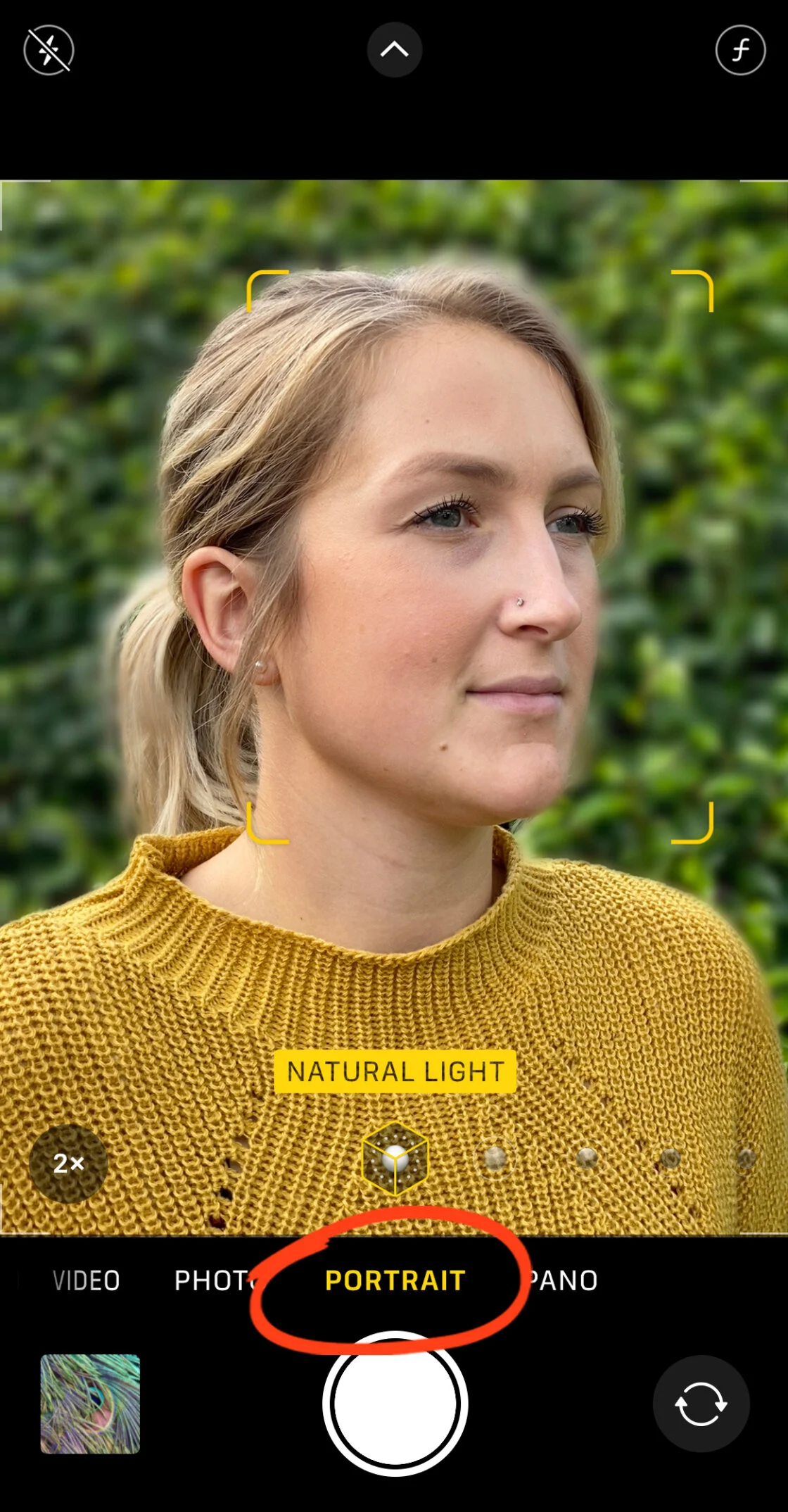
To utilize this feature, users must navigate to the native Camera app and swipe to the "Portrait" setting. The software requires specific conditions to function optimally:
- Distance Requirements: The subject should ideally be positioned between two and eight feet from the lens. If the subject is too close or too far, the interface will prompt the user to adjust their position.
- Lighting Conditions: Computational depth mapping relies heavily on edge detection. In low-light environments, the software may struggle to differentiate between the subject’s hair or clothing and the background, leading to "artifacting" or unrealistic edges.
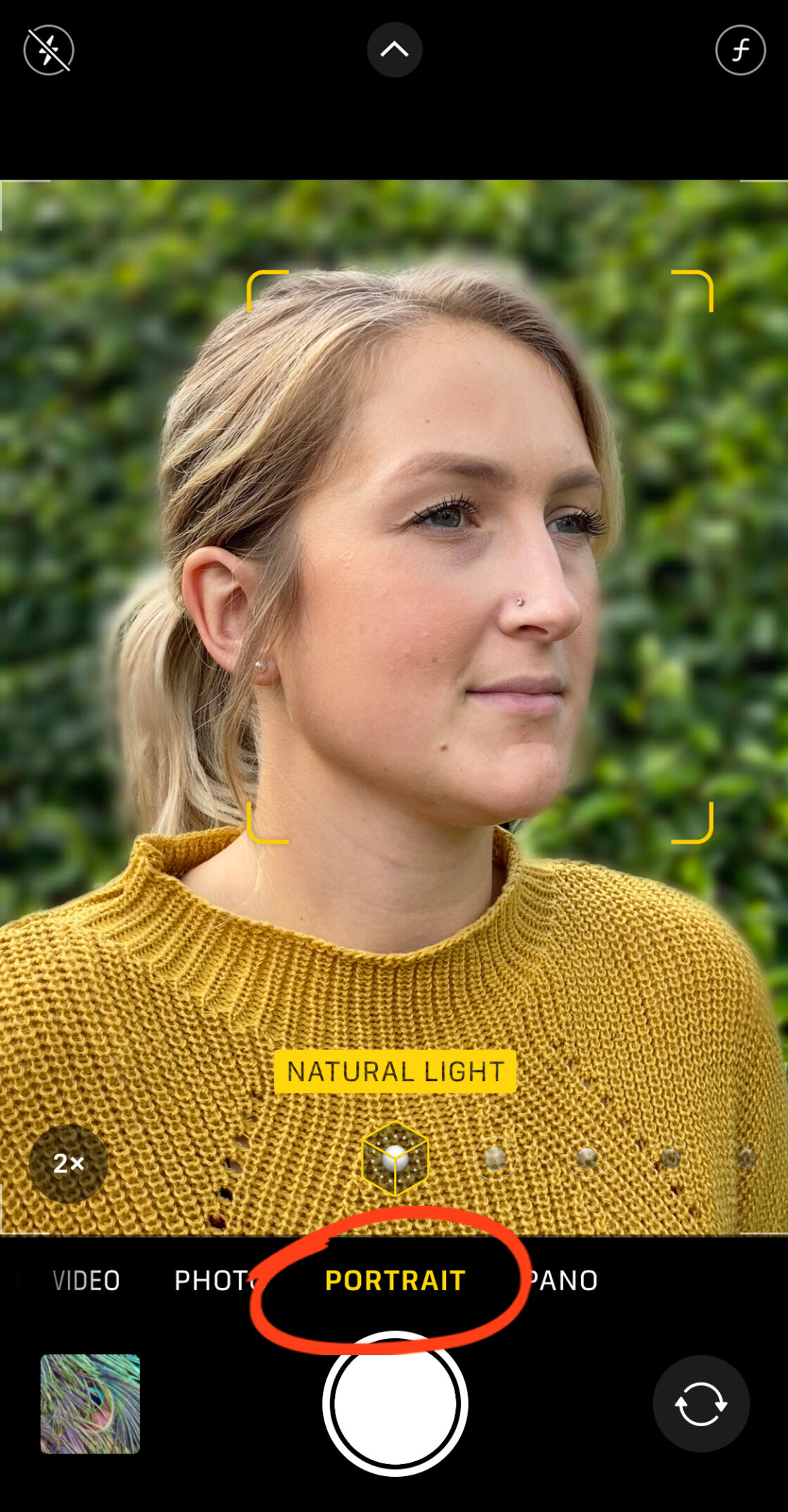
- Focus Confirmation: The iPhone indicates readiness by highlighting the focus box in yellow and displaying the lighting effect (e.g., "Natural Light"). Once these indicators appear, the depth effect is active.
Advanced Adjustments: Depth Control and Portrait Lighting
Apple’s hardware iterations, specifically from the iPhone XS and XR onwards, introduced the ability to manipulate the intensity of the background blur after the image has been captured. This is achieved through a feature known as Depth Control.
Manipulating Virtual Aperture
In the Photos app, selecting a Portrait mode image and tapping "Edit" reveals the Depth Control slider, represented by an "f" icon (f-stop). In traditional photography, a lower f-number (such as f/1.4) indicates a wider aperture and a blurrier background, while a higher f-number (such as f/16) results in a deeper focus. The iPhone simulates this range, allowing users to move the slider to increase or decrease the blur intensity. This provides a level of flexibility that was previously impossible in mobile imaging, as the photographer is no longer locked into the initial settings of the shot.
Studio Effects via Portrait Lighting
Beyond simple blurring, the iPhone offers Portrait Lighting, which uses artificial intelligence to simulate professional studio lighting setups. These include:
- Studio Light: Brightens facial features while maintaining a soft background.
- Contour Light: Adds dramatic shadows to highlight facial structure.
- Stage Light and Stage Light Mono: Entirely removes the background, replacing it with a deep black void to create a high-contrast theatrical effect.
- High-Key Light Mono: Replaces the background with white for a clean, editorial look.
Achieving Natural Optical Blur Through Proximity
While Portrait mode is a powerful software tool, it is not the only way to achieve a blurred background. The laws of physics allow for natural optical blur even on older iPhone models or in standard "Photo" mode. This is achieved through the principle of proximity.
The Physics of Subject Distance
Optical blur occurs when the distance between the camera and the subject is significantly shorter than the distance between the subject and the background. By moving the iPhone lens physically closer to a subject—such as a flower, an insect, or a small product—the camera’s lens is forced to focus at a very short distance, naturally causing the background to fall out of focus.
Macro Photography and Third-Party Optics
For users seeking extreme background blur, macro photography is the most effective route. While the iPhone 13 Pro and newer models feature a built-in Macro mode, users with older devices often turn to external lens systems, such as those produced by Moment or Sandmarc. These high-quality glass attachments allow the iPhone to focus on objects just millimeters away, creating a creamy, organic bokeh that software-based Portrait mode often struggles to replicate.
Post-Capture Solutions: Editing Apps and Manual Selection
For photographs taken in standard mode that require a retrospective depth effect, several third-party applications provide sophisticated blurring tools. These are particularly useful for older iPhone models that lack dual-lens systems or LiDAR.
Precision Editing with AfterFocus
AfterFocus is a prominent application in the mobile photography community due to its "Smart Selection" and "Manual Selection" features. Users can define the "Focus" area, the "Mid-ground," and the "Background" by drawing rough lines. The app’s algorithm then identifies the edges of the subject. For professional-grade results, the manual brush tool allows for pixel-perfect edge refinement, ensuring that complex subjects—like a person with flowing hair—do not have blurred sections where they should be sharp.
Dreamy Aesthetics with Snapseed’s Lens Blur
Snapseed, developed by Google, offers a "Lens Blur" tool that is favored for creating a "vignette blur" or a "tilt-shift" effect. Unlike Portrait mode, which attempts to map the entire scene, Snapseed’s tool allows users to place a linear or elliptical focus point over the subject. The user can then adjust the "Transition" (how quickly the focus fades into blur) and the "Vignette Strength" (the darkening of the edges). This technique is highly effective for central subjects and adds a "dreamy," nostalgic quality to the image.

Data and Market Context: The Decline of the Entry-Level Camera
The ability of the iPhone to replicate professional depth effects has had a measurable impact on the global camera market. According to data from the Camera & Imaging Products Association (CIPA), shipments of digital cameras have declined by over 90% since their peak in 2010. This trend correlates directly with the advancement of smartphone image signal processors.
Market analysis suggests that for the average consumer, the convenience of a smartphone—combined with the "good enough" quality of computational bokeh—has rendered the entry-level point-and-shoot camera obsolete. Professional photographers are also increasingly incorporating iPhones into their workflows for social media and quick-turnaround editorial content, citing the iPhone’s ability to "edit and publish" in a single device as a decisive advantage.
Industry Implications and Future Outlook
The trajectory of background blurring technology on the iPhone points toward an increasingly "AI-first" approach. As Apple continues to refine its Neural Engine, we can expect the distinction between hardware-driven optical bokeh and software-driven computational blur to become virtually indistinguishable to the human eye.
Critical Analysis of Software Limitations
Despite these advancements, professional critics note that computational blur still faces challenges with "edge cases." Transparent objects (like wine glasses), fine textures (like fur), and complex foreground elements can sometimes confuse the depth-mapping software, leading to "halos" or unintended blurring of the subject. However, the integration of LiDAR and machine learning training on millions of images is rapidly closing this gap.
Conclusion
Mastering the art of the blurred background on an iPhone requires a dual understanding of native software features and the physical principles of photography. Whether utilizing the sophisticated depth-mapping of Portrait mode, the natural bokeh of close-up shooting, or the precision of third-party editing suites, iPhone users now possess the tools to create imagery that rivals professional equipment. As mobile technology continues to evolve, the "bokeh" effect will remain a cornerstone of the smartphone’s identity as a serious tool for visual storytelling.