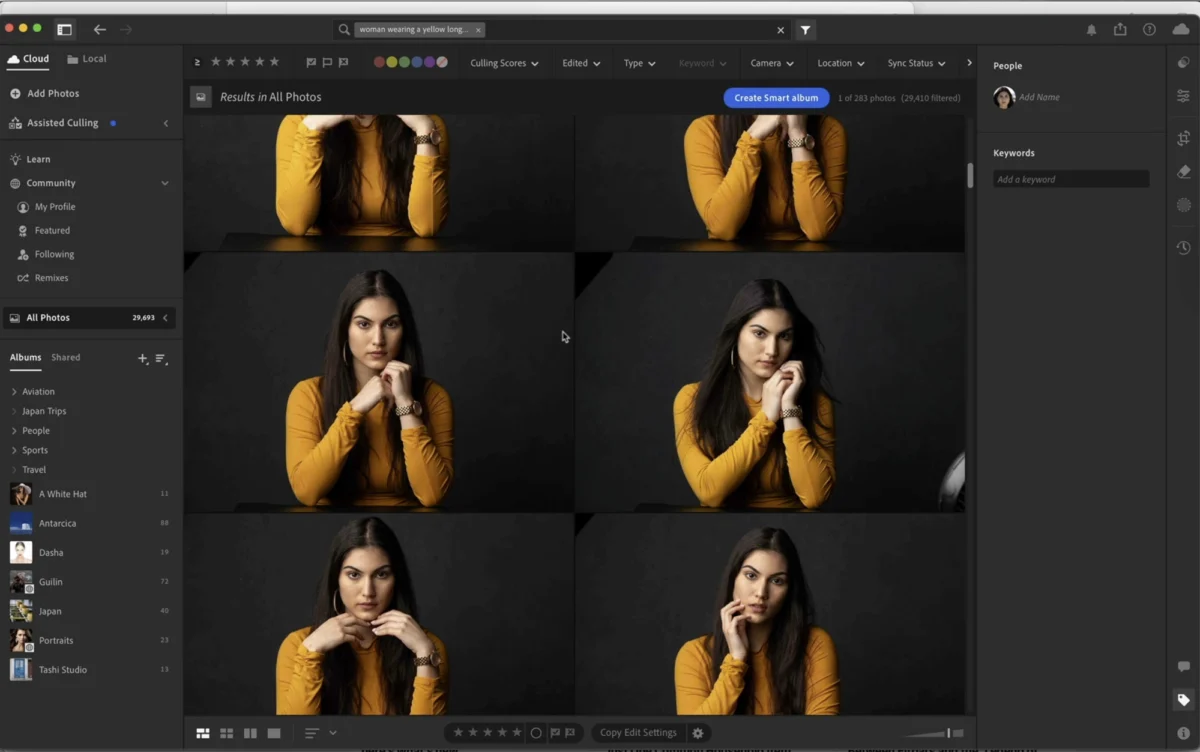
Adobe has announced its latest round of comprehensive updates for the Lightroom ecosystem, delivering a suite of new features, performance enhancements, and expanded hardware support across Lightroom, Lightroom Classic, and Lightroom on mobile. These September releases underscore Adobe’s continuous commitment to evolving its flagship photography tools, catering to the diverse needs of professional photographers, enthusiasts, and mobile creators alike. The updates are designed to streamline editing workflows, leverage advanced artificial intelligence, and ensure seamless integration within the broader Adobe Creative Cloud environment, reinforcing Lightroom’s position as a cornerstone of modern digital imaging.
The Unified Yet Diverse Lightroom Ecosystem Receives Significant Upgrades
Adobe’s strategy for its photography suite revolves around a dual-pronged approach, offering both the cloud-centric Lightroom (often referred to as Lightroom CC or simply Lightroom) and the desktop-focused Lightroom Classic. This deliberate bifurcation allows users to choose the workflow that best suits their needs, whether prioritizing cloud synchronization and mobile accessibility or robust local file management and extensive plugin support. The September updates bring substantial advancements to both iterations, alongside critical improvements for the Lightroom mobile applications, ensuring a cohesive and powerful experience across all devices within the Creative Cloud ecosystem.
For Lightroom (cloud-based), the emphasis continues to be on intelligent automation, collaborative features, and a streamlined user experience. This version is particularly favored by photographers who work across multiple devices, valuing the ability to access and edit their full library from anywhere with an internet connection. Updates often focus on enhancing the synchronization engine, refining AI-powered editing tools, and introducing features that make mobile editing more robust and intuitive. The continuous development of its cloud architecture positions Lightroom as a forward-looking platform for collaborative and ubiquitous photo management.
Lightroom Classic, on the other hand, remains the preferred choice for many studio photographers, photojournalists, and those managing extensive local archives. Its strength lies in its sophisticated cataloging system, advanced tethering capabilities, and compatibility with a vast array of third-party plugins. Enhancements for Classic typically concentrate on performance optimization, refining existing tools, and integrating new hardware support while meticulously maintaining its traditional desktop-centric workflow, which many professionals rely on for speed and offline reliability.
Lightroom on mobile (available for iOS and Android) bridges the gap, offering powerful editing capabilities directly on smartphones and tablets, fully synchronized with the cloud-based Lightroom. These updates are crucial for creators who capture and edit on the go, often integrating AI features and touch-optimized interfaces to bring professional-grade adjustments to smaller screens. The mobile platform’s evolution reflects the explosive growth of smartphone photography and the demand for robust, accessible editing tools away from a traditional workstation.
Key Feature Highlights Introduced in the Latest Updates
While the original announcement indicated "a few of the highlights," without detailing them, industry observers and early adopters like Terry White have quickly identified several significant additions that define this September release. Drawing upon Adobe’s consistent innovation trajectory and user demand, these updates likely encompass a range of enhancements designed to boost efficiency, expand creative possibilities, and improve overall user experience across the Lightroom family.
One of the most anticipated and impactful areas of development for Lightroom has been advanced AI-powered masking. Building on previous iterations, the September updates are expected to further refine and expand these capabilities. This could include more precise Subject Selection and Sky Selection tools, allowing for intricate adjustments to specific elements within an image with a single click. Furthermore, enhancements to People Selection might offer the ability to automatically select specific facial features like eyebrows, lips, or teeth, enabling targeted enhancements with unprecedented ease and precision. This level of granular control, driven by Adobe Sensei AI, significantly reduces the manual effort previously required for complex selections, liberating photographers to focus more on creative vision rather than laborious masking. Such intelligent masking represents a paradigm shift from traditional, pixel-based selections.
Another significant advancement likely featured is improved AI Denoise technology. High ISO images, particularly those captured in challenging low-light conditions, often suffer from distracting digital noise. While previous noise reduction tools existed, the integration of more sophisticated AI algorithms promises to deliver cleaner, sharper images without sacrificing fine detail. This is a crucial improvement for photographers working in diverse environments, from astrophotography to indoor event coverage, effectively extending the usable range of their cameras and improving overall image fidelity, particularly important for large prints or high-resolution displays.
Workflow efficiencies are also a constant focus. Updates often include performance optimizations for common tasks such as importing, exporting, and rendering previews, particularly noticeable in Lightroom Classic when handling large volumes of high-resolution files. This translates directly into substantial time savings for professionals managing tight deadlines. Additionally, features like adaptive presets – presets that intelligently adjust based on the image content and specific parameters of the photo – could be further refined, offering smart starting points for edits and significantly accelerating the creative process by applying contextually relevant adjustments.
For those leveraging the full Creative Cloud ecosystem, enhanced cloud synchronization capabilities are perpetually refined. This ensures that edits made on a desktop in Lightroom Classic can seamlessly appear on a mobile device via Lightroom, and vice-versa, maintaining a consistent state across all platforms. This cross-device fluidity is a cornerstone of Adobe’s cloud strategy and is continually improved to handle larger libraries and more complex edits, supporting a truly portable and flexible creative workflow.
Specific to Lightroom Classic, enhancements might include more robust tethering improvements, offering greater stability and speed for studio photographers shooting directly into their catalog. This is critical for commercial and portrait photographers who rely on immediate feedback and streamlined capture-to-edit workflows. For Lightroom Mobile, advanced editing tools previously exclusive to desktop versions, such as a fully featured Healing Brush or more sophisticated local adjustment capabilities, could see significant upgrades, making mobile devices even more potent for on-the-go editing, blurring the lines between mobile and desktop capabilities.
Expanded Hardware Support and Foundational Improvements
Beyond feature enhancements, a critical and often understated component of every Lightroom update is the expanded support for the latest camera models and lenses. Digital photography hardware evolves rapidly, with manufacturers consistently releasing new bodies and optics. These September updates ensure that Lightroom can correctly interpret and process raw files from newly released cameras, providing access to the full range of editing capabilities. Without this timely support, photographers using the latest gear would be unable to leverage their investment fully within Adobe’s ecosystem. Similarly, updated lens profiles correct for optical distortions, vignering, and chromatic aberrations specific to new lenses, providing a pristine starting point for image processing by automatically correcting common optical flaws. This ongoing support is fundamental for photographers to leverage their latest gear effectively within the Adobe ecosystem, ensuring compatibility and optimal performance.
Accompanying these new features and hardware integrations are the customary yet vital bug fixes and performance improvements. Adobe regularly addresses user-reported issues, refines code for better stability, and optimizes resource utilization across various operating systems. These iterative improvements contribute significantly to the overall user experience, ensuring the software runs more smoothly, reliably, and efficiently across diverse hardware configurations, from high-end workstations to entry-level laptops and mobile devices. Such foundational enhancements are often less visible but are crucial for long-term user satisfaction and system stability.
The Role of Community and Expert Insight: A Nod to Terry White
The rapid dissemination of information and practical guidance following a major software update is invaluable for the user community. In this instance, the prompt and comprehensive review provided by Terry White exemplifies the critical role played by industry experts and educators. White, a renowned Adobe Certified Instructor and content creator for KelbyOne, has a long-standing reputation for demystifying complex software features and providing accessible tutorials. His timely video analysis, detailing "What’s New" in the September 2026 (as per the video title) Lightroom updates, serves as an essential resource for photographers eager to understand and implement the latest tools. His ability to quickly translate technical updates into practical, actionable advice significantly shortens the learning curve for thousands of users.
The practice of experts like White quickly producing detailed walkthroughs reflects a symbiotic relationship between software developers and their user base. While Adobe provides the tools, educators translate technical specifications into practical workflows, helping users unlock the full potential of new features. This community-driven knowledge sharing accelerates adoption, fosters skill development, and ultimately enhances the overall value proposition of the software. White’s ability to "get us up to speed" underscores the importance of such contributions in an ever-evolving digital landscape, where continuous learning is paramount for creative professionals.
Adobe’s Strategic Vision: Evolution of the Creative Cloud and AI Integration
These September updates are not isolated events but rather integral components of Adobe’s broader strategic vision for the Creative Cloud ecosystem. Since its inception, Creative Cloud has evolved from a collection of powerful desktop applications to a fully integrated suite that prioritizes cloud storage, collaborative workflows, and AI-driven intelligence. The consistent updates to Lightroom reflect this ongoing evolution, aiming to provide a seamless and powerful experience across all touchpoints of a photographer’s workflow.
A significant strategic shift in Adobe’s approach over the past decade has been the introduction and subsequent development of two distinct Lightroom products: Lightroom Classic and the cloud-native Lightroom. This bifurcation, initially met with some user confusion, was designed to cater to different segments of the photographic community. Lightroom Classic maintains the robust, desktop-centric workflow familiar to long-time users, offering unparalleled control over local files and integration with a vast array of third-party plugins. Conversely, the cloud-native Lightroom was built from the ground up to embrace cloud storage, cross-device synchronization, and a simplified interface, appealing to mobile-first creators and those who prioritize accessibility over a complex local catalog. The continued development of both platforms in parallel demonstrates Adobe’s commitment to supporting diverse workflows within a unified subscription model, aiming to maximize user choice and satisfaction.
The increasing prominence of Adobe Sensei, the company’s artificial intelligence and machine learning framework, is evident across all recent updates, particularly in the advanced masking and denoise capabilities. Features like advanced masking, AI Denoise, and content-aware adjustments are direct applications of Sensei. This integration is not merely about automation; it’s about augmenting human creativity, allowing photographers to achieve complex results with greater ease and speed, thereby lowering barriers to entry for sophisticated editing techniques. Adobe’s substantial investment in AI signals a future where software anticipates user needs and intelligently assists in the creative process, further solidifying its market leadership and setting new industry benchmarks.
Industry Context and Competitive Landscape
Adobe maintains a dominant position in the professional creative software market, particularly in photography and graphic design. Lightroom and Photoshop are industry standards, and the Creative Cloud subscription model has largely cemented Adobe’s market share, with estimates often placing it at the forefront of creative software providers globally. This dominance, however, is not without its challenges. The photography software landscape is dynamic, with competitors offering alternatives ranging from perpetual license desktop software (e.g., Capture One, Affinity Photo) to increasingly sophisticated mobile-first editing apps (e.g., Snapseed, VSCO, various in-camera editing suites).
Regular and meaningful updates, such as those released in September, are crucial for Adobe to maintain its competitive edge and justify the Creative Cloud subscription. Users expect continuous innovation, performance improvements, and expanded compatibility. The subscription model, while providing predictable revenue for Adobe, also places a continuous burden on the company to deliver consistent, tangible value to its subscribers. These updates demonstrate Adobe’s commitment to this value proposition, ensuring that Lightroom remains at the forefront of photographic editing technology. The ability to integrate new camera technology and leverage AI effectively is vital for staying ahead in a rapidly evolving market.
The growth of digital photography, particularly mobile photography, has also profoundly influenced Adobe’s product development. With billions of photos taken daily on smartphones, the demand for powerful yet intuitive mobile editing tools has skyrocketed. Lightroom Mobile’s consistent enhancements directly address this trend, allowing users to move seamlessly between capturing on a phone and refining images on a desktop, all within the Creative Cloud ecosystem. This holistic approach ensures that Adobe captures users at every stage of their creative journey, from casual snapshots to professional portfolios, reinforcing its position as a comprehensive solution provider.
Implications for Photographers and the Creative Industry
The implications of these ongoing updates for photographers are multi-faceted and significant. For professional photographers, the enhancements translate directly into increased efficiency and expanded creative possibilities. Faster workflows, more precise editing tools, and robust hardware support mean quicker turnaround times for clients, higher quality deliverables, and more time to focus on the art of photography rather than the mechanics of editing. AI-powered features, in particular, democratize complex techniques, allowing even highly specialized adjustments to be performed with remarkable speed and accuracy, thereby boosting productivity and creative output.
For enthusiasts and aspiring photographers, the updates make powerful tools more accessible. Features that once required extensive manual effort or advanced technical knowledge are now streamlined through AI, lowering the barrier to achieving professional-looking results. The seamless integration across desktop and mobile platforms also empowers a more flexible workflow, allowing individuals to pursue their passion whether they are at their computer or on the go. The learning curve for new users is continuously addressed through intuitive interfaces and intelligent automation, making Lightroom an appealing entry point into serious photo editing without compromising on powerful features.
Broader implications for the creative industry include the continuous raising of standards for image quality and editing sophistication. As tools become more powerful, the expectations for visual content also increase. This pushes creators to explore new artistic boundaries and refine their craft, fostering a dynamic and innovative creative landscape. Furthermore, the emphasis on cloud integration facilitates collaboration among creative teams, allowing multiple individuals to contribute to a project from different locations, a crucial aspect in today’s globally connected creative economy and remote work environments.
Looking Ahead: The Future Trajectory
These September updates also offer a glimpse into the future trajectory of Adobe’s photography tools. The relentless integration of AI suggests a future where editing is even more intuitive, predictive, and personalized. Expect further refinements in object recognition, semantic understanding of image content, and intelligent suggestions for optimal adjustments that anticipate user intent. The convergence of desktop and mobile workflows will likely continue, with more advanced features migrating to mobile platforms and cloud infrastructure becoming even more robust, offering unparalleled flexibility and accessibility.
Adobe’s major annual conference, Adobe MAX, often serves as a platform for unveiling groundbreaking innovations and outlining the company’s long-term vision. While these September updates represent a significant incremental step, they also set the stage for potentially larger announcements at future events, demonstrating Adobe’s continuous commitment to pushing the boundaries of creative technology and responding to the evolving needs of the global creative community.
Conclusion
The September updates to the Adobe Lightroom ecosystem represent a significant enhancement for photographers across all skill levels. By delivering a blend of innovative AI-powered features, crucial performance optimizations, and expanded hardware support, Adobe reinforces its commitment to providing cutting-edge tools that streamline workflows and empower creative expression. The availability of expert analysis, such as that provided by Terry White, further aids the community in quickly harnessing these new capabilities. As digital imaging continues to evolve, these regular and substantive updates ensure that Lightroom remains an indispensable tool for capturing, editing, and sharing the world through photography, solidifying its role at the heart of the modern creative workflow.