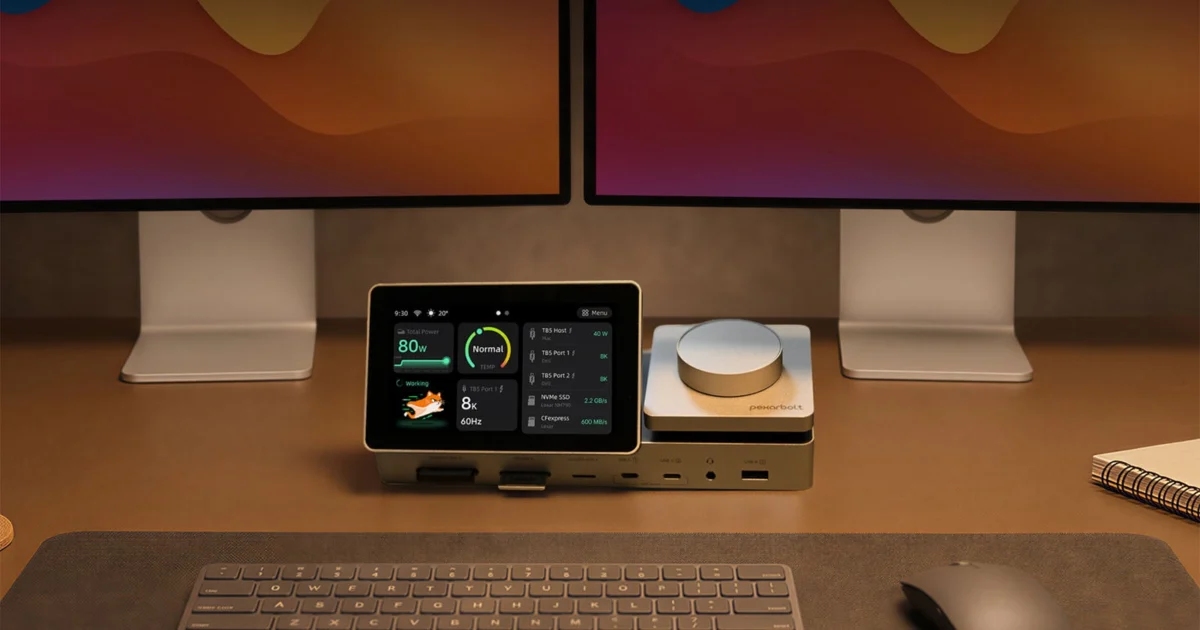
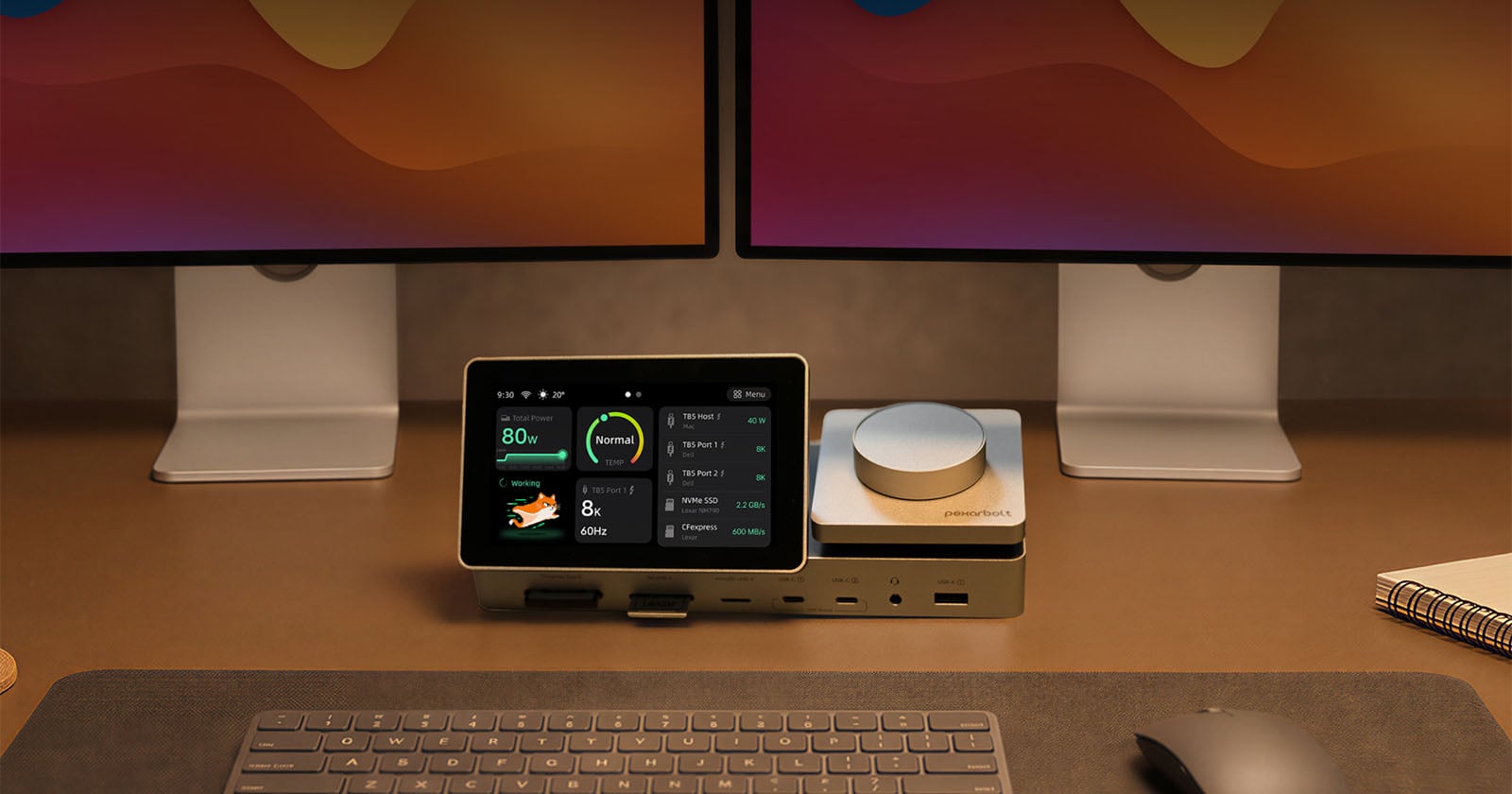
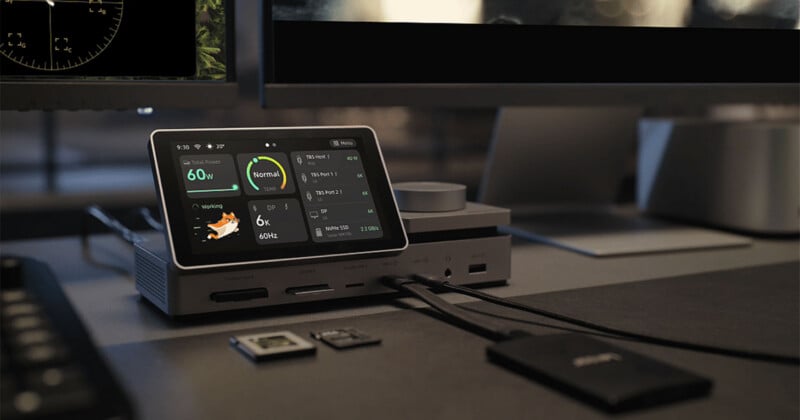
Lexar’s sub-brand, Pexar, originally established in 2024 with a focus on digital picture frames, is making a significant strategic pivot into the high-performance peripheral market with the introduction of the PexarBolt Ultra Thunderbolt 5 dock. This expansion, while seemingly a departure from its initial product line, aligns strategically with parent company Lexar’s deep roots in storage and connectivity solutions, aiming to cater to the evolving demands of creative professionals and power users. The PexarBolt Ultra distinguishes itself in an increasingly competitive dock market by integrating a unique 5-inch touchscreen display and a tactile metal dial for real-time monitoring and control, alongside an impressive array of connectivity options and an integrated NVMe SSD slot.
Pexar’s Strategic Diversification and the Evolution of Thunderbolt Technology
Pexar’s journey began in 2024, carving out a niche in the digital picture frame segment, a market that, while distinct, often overlaps with consumer electronics and media display. Lexar, as its parent company, boasts a storied history dating back decades, renowned for its contributions to memory cards, USB flash drives, and SSDs—essential components for photographers, videographers, and content creators. This heritage provides a solid foundation for Pexar’s foray into advanced connectivity solutions, positioning the PexarBolt Ultra as a natural extension of Lexar’s ecosystem, albeit under a new sub-brand. The "powered by Lexar" branding prominently displayed on the new dock reinforces this connection, leveraging Lexar’s reputation for reliability and performance.
The timing of this launch coincides with the burgeoning adoption of Thunderbolt 5 technology, the latest iteration of Intel’s high-speed data transfer interface. Thunderbolt technology, since its inception, has revolutionized peripheral connectivity by offering a single port solution for data, video, and power delivery. Thunderbolt 1 and 2, utilizing Mini DisplayPort connectors, offered 10Gbps and 20Gbps throughput respectively. Thunderbolt 3, with its adoption of the USB-C connector, dramatically increased speeds to 40Gbps and introduced power delivery capabilities up to 100W, becoming a staple for professional workstations and mobile devices. Thunderbolt 4 maintained the 40Gbps data rate but standardized minimum video and data requirements, improving compatibility and multi-port accessory support.
Thunderbolt 5, however, marks a significant leap forward. It offers bidirectional bandwidth of 80 gigabits per second (Gbps) and introduces a novel "Bandwidth Boost" feature that can allocate up to 120 Gbps for display-centric workloads while maintaining 40 Gbps for data. This asymmetric capability is particularly beneficial for users driving multiple high-resolution monitors or demanding VR setups. Furthermore, Thunderbolt 5 increases power delivery capabilities, supporting up to 240W, although the PexarBolt Ultra’s host port delivers 140W, which is still substantial for charging powerful laptops. This technological advancement provides the necessary backbone for a device like the PexarBolt Ultra to offer unprecedented connectivity and performance, making the shift into docks a timely and strategic move for Pexar.
Unrivaled Connectivity: A Port for Every Professional Need
At its core, the PexarBolt Ultra is engineered to be a comprehensive command center for any modern workstation, meticulously designed to eliminate cable clutter and expand connectivity beyond what most laptops offer. Its extensive port selection caters to a diverse range of peripherals and workflows, from high-speed data transfer to multi-monitor setups and robust network access.
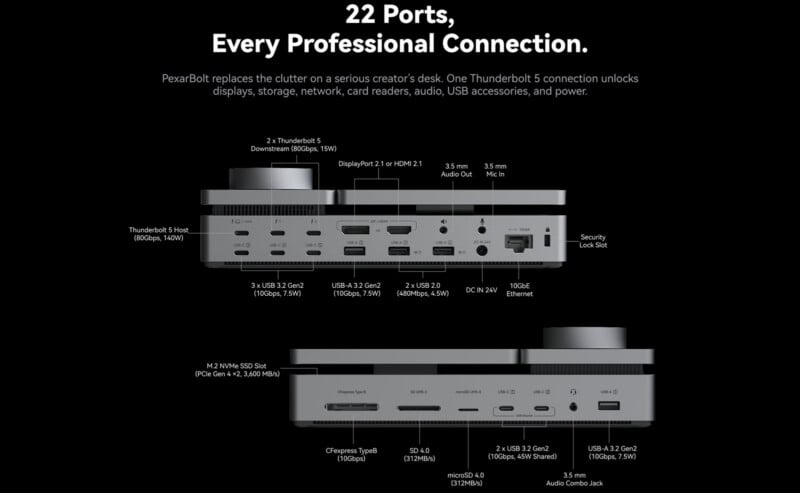
The rear panel of the PexarBolt Ultra is a testament to its comprehensive design, featuring:
- Two Thunderbolt 5 downstream ports (80Gbps, 15W): These allow for daisy-chaining additional Thunderbolt devices, connecting high-speed external storage, or driving multiple displays with cutting-edge bandwidth. The 15W power delivery is suitable for bus-powered devices.
- One Thunderbolt 5 host port (80Gbps, 140W): This is the primary connection to the host computer, providing the full 80Gbps bandwidth and a robust 140W of power delivery, capable of charging most high-performance laptops, including those used by creative professionals.
- Three USB 3.2 Gen2 ports (10Gbps, 7.5W): These versatile ports are ideal for connecting a variety of USB peripherals, from external hard drives to webcams, offering ample speed and power for common accessories.
- DisplayPort 2.1 or HDMI 2.1: The dock offers both display output standards, supporting resolutions up to 8K at 60Hz or 4K at 240Hz, depending on the host system’s capabilities and the display’s specifications. It’s crucial to note that only one of these video outputs can be utilized at a time, allowing users to choose the optimal connection for their monitor setup. This flexibility is key for professionals working with high-resolution visual content.
- One USB-A 3.2 Gen2 port (10Gbps, 7.5W): An additional high-speed USB-A port for legacy devices or those preferring the traditional connector type.
- Two USB 2.0 ports: Perfect for connecting keyboards, mice, or other low-bandwidth peripherals, reserving the faster ports for more demanding tasks.
- 3.5mm audio out and 3.5mm audio in: Dedicated jacks for headphones, speakers, and microphones, ensuring clear audio input and output.
- 10GbE Ethernet port: A standout feature for professionals, particularly those in video editing, graphic design, or data-intensive fields. This 10-Gigabit Ethernet port provides blazing-fast network speeds, crucial for accessing Network Attached Storage (NAS) systems, cloud resources, or rendering farms without bottlenecking, significantly improving workflow efficiency.
On the front, the PexarBolt Ultra offers convenient access to frequently used ports and crucial media card readers:
- CFexpress Type B (10Gbps) card slot: An essential feature for professional photographers and videographers using high-end cameras, enabling rapid offloading of large RAW photo and video files. The 10Gbps speed ensures quick transfers, minimizing downtime.
- UHS-II SD card slot and UHS-II microSD slot: These high-speed slots cater to a wide range of cameras, drones, and mobile devices, allowing for fast and efficient data transfer from common memory card formats.
- Two USB-C 3.2 Gen2 ports (10Gbps, 45W shared PD): These front-facing USB-C ports are perfect for connecting modern accessories, charging smartphones, or quickly connecting portable SSDs. The 45W shared power delivery is ample for most bus-powered USB-C devices.
- 3.5mm audio combo jack: A convenient single jack for headsets with integrated microphones.
- Single USB-A 3.2 Gen2 port (10Gbps, 7.5W): Another easily accessible high-speed USB-A port for quick peripheral connections.
Intuitive Control and Integrated Intelligence
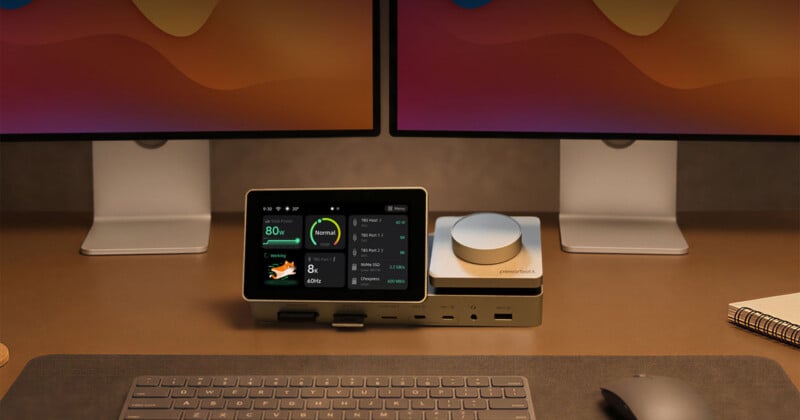
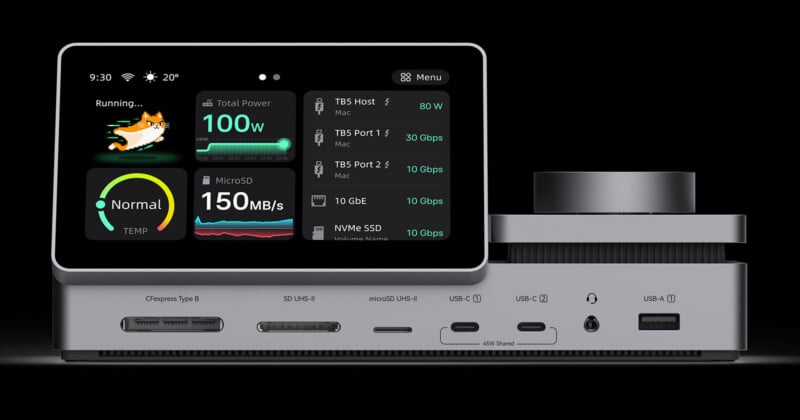
Beyond its comprehensive port selection, the PexarBolt Ultra sets itself apart with its integrated 5-inch touchscreen and a tactile metal control dial. Positioned on the top of the device, the screen is designed to tilt downwards, ensuring optimal visibility for users seated at their desks. This interactive display provides real-time monitoring of critical system and dock parameters, including:
- Connected device status: Users can quickly see which devices are connected and their operational status.
- Power usage: Monitor power delivery to connected devices and the host computer.
- Data transfer rates: Gain insights into the speed of data moving through various ports.
- Thermal performance: Crucially, the screen allows users to keep an eye on the dock’s internal temperatures, ensuring optimal performance during intensive tasks.
- Settings adjustment: The metal dial, paired with the touchscreen, offers an intuitive interface for adjusting dock settings, switching display modes, or navigating through monitoring menus without needing to interact with the host computer’s software. This level of on-device control is a significant differentiator, enhancing user experience and efficiency.
Integrated Storage and Advanced Thermal Management
Further enhancing its utility, the PexarBolt Ultra incorporates an integrated NVMe SSD slot. This allows users to add their own M.2 NVMe SSD, effectively transforming the dock into a high-speed external storage solution. This feature is particularly valuable for creative professionals who frequently work with large files and require fast, accessible storage directly integrated into their workflow hub, eliminating the need for additional external drives and their associated cables.
High-performance docks, especially those with integrated storage and extensive power delivery, generate heat. Pexar has addressed this proactively by incorporating a built-in cooling fan, substantial metal components for efficient heat dissipation, and smart thermal control algorithms. These measures ensure that the PexarBolt Ultra maintains optimal operating temperatures even under intense workloads, preventing thermal throttling and guaranteeing consistent performance. The ability to monitor these thermals directly on the integrated screen provides users with peace of mind and proactive insight into their hardware’s health.
-800x420.jpg)
Market Positioning and Implications
The launch of the PexarBolt Ultra is a bold statement from a sub-brand previously known for more niche consumer electronics. By entering the Thunderbolt 5 dock market, Pexar is directly challenging established players like CalDigit, OWC, and Anker, who have long dominated the high-end peripheral space. Pexar’s strategy appears to be one of differentiation through innovation and integration. While other Thunderbolt 5 docks offer impressive port selections and power delivery, the combination of an integrated touchscreen, tactile control dial, and an NVMe SSD slot in a single unit is unique.
This move by Pexar, "powered by Lexar," suggests a broader strategy by Lexar to solidify its presence across the entire professional digital workflow. By offering not just the memory and storage components but also the central hub that connects them all, Lexar aims to create a more integrated and powerful ecosystem for its target audience—primarily photographers, videographers, and other creative professionals who demand high bandwidth, extensive connectivity, and robust performance. The 10GbE port and CFexpress card slot, in particular, underscore this focus, directly addressing critical bottlenecks in modern media production workflows.
Pricing and Availability
The PexarBolt Ultra is slated for launch on Kickstarter, a common platform for innovative tech products seeking early adopter support and funding. The "super early bird" pricing is set at $479, offering a substantial discount from the anticipated eventual retail price of $649. While crowdfunding campaigns can offer attractive initial prices and a chance to support new technology, potential backers should be aware of the inherent risks, including potential delays in production or delivery. Pexar has not yet announced a specific general availability date beyond the Kickstarter launch, but the strategy of engaging the community early often allows for feedback and refinement before a broader market release. This pricing positions the PexarBolt Ultra as a premium dock, reflecting its advanced features and comprehensive capabilities, aiming to deliver significant value for professionals willing to invest in a streamlined and powerful workstation solution.