
In the intricate world of digital photography, the distinction between a technically sound image and a truly captivating one often hinges on the finesse of post-processing. Photographers frequently encounter scenarios where an image is perfectly exposed, sharply focused, and well-composed, yet it lacks that elusive spark, feeling visually incomplete or uninspired. This critical gap, where technical proficiency meets artistic expression, is increasingly addressed by advanced software features designed for nuanced refinement. One such tool, gaining traction for its powerful yet understated capabilities, is Color Harmony within Luminar Neo, a flagship photo editing application developed by Skylum. This feature, often overlooked by those unfamiliar with its specific utility, provides an advanced suite of controls to meticulously refine tone, contrast, and overall color balance, elevating an image from ordinary to extraordinary through subtle, deliberate adjustments.
The Evolution of Post-Processing and Skylum’s Vision
The journey of photographic post-processing is a testament to technological advancement, evolving from the chemical darkrooms of the 20th century to the sophisticated digital studios of today. Early photographers meticulously manipulated light and chemicals to achieve desired tones and contrasts, a process that was both an art and a science. The advent of digital photography and software like Adobe Photoshop revolutionized this landscape, offering unprecedented control through layers, curves, and selective adjustments. However, these tools often came with a steep learning curve, requiring significant technical expertise. Skylum, as a prominent player in the photo editing software market, emerged with a vision to democratize advanced editing, leveraging artificial intelligence (AI) and intuitive interfaces to make complex tasks accessible to a broader audience, from seasoned professionals to enthusiastic amateurs. Luminar Neo, launched in 2022, exemplifies this philosophy, integrating AI-powered enhancements with traditional editing tools. Its development timeline reflects a continuous effort to blend cutting-edge technology with user-friendly design, aiming to streamline creative workflows and empower photographers to realize their artistic visions more efficiently. The introduction and continuous refinement of tools like Color Harmony underscore Skylum’s commitment to providing comprehensive solutions for the diverse challenges photographers face in achieving a polished final output.

Color Harmony: A Nuanced Approach to Image Refinement
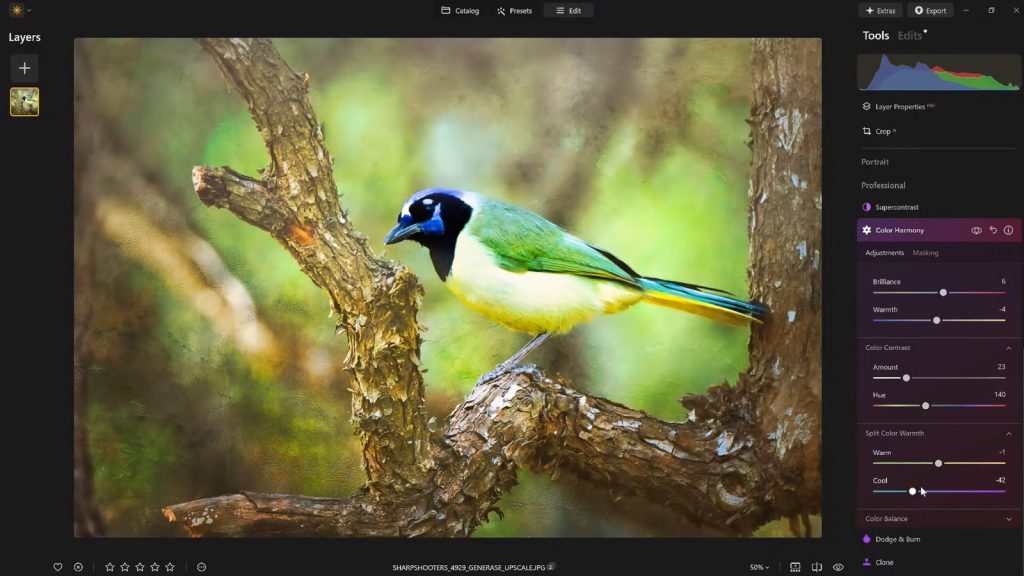
Nestled within Luminar Neo’s Professional Tools section, Color Harmony is not designed for dramatic, sweeping changes but rather for the subtle, impactful adjustments that define a professional finish. It offers a spectrum of controls—Brilliance, Warmth, Color Contrast, Split Warmth, and Color Balance—each meticulously engineered to allow photographers to fine-tune how colors interrelate across an image. Unlike global saturation adjustments that can quickly lead to an artificial or "overcooked" look, Color Harmony provides granular control, ensuring that enhancements serve to guide the viewer’s eye, emphasize key subjects, and cultivate a cohesive aesthetic that resonates with the scene’s inherent mood and lighting conditions. This careful orchestration of color interaction is crucial for conveying depth, emotion, and visual unity, elements that are often the hallmark of a truly compelling photograph.
Brilliance and Warmth: The Foundation of Tonal Expression
The initial controls within Color Harmony, Brilliance and Warmth, offer foundational adjustments that significantly impact an image’s overall character. Brilliance functions as a refined vibrance control, allowing for an increase or decrease in color intensity without the harsh, uniform effects often associated with standard saturation sliders. A slight boost in Brilliance can imbue colors with a richer, more luminous quality, enhancing their natural depth and vibrancy while meticulously preserving intricate detail. The key, as emphasized by professional educators like Vanelli, Director of Education at Skylum, lies in moderation; excessive application can quickly push an image into an unnatural, overly processed realm. Therefore, a light, judicious touch typically yields the most aesthetically pleasing and realistic outcomes, subtly enhancing the visual impact.

Similarly, Warmth provides precise control over the image’s color temperature. Shifting the slider to the right introduces a gentle golden glow, evoking feelings of warmth, comfort, and often a nostalgic quality. Conversely, moving it to the left cools the image, imparting blueish tones that can convey serenity, solemnity, or a crisp, clear atmosphere. The effective application of Warmth is intrinsically linked to the emotional narrative of the photograph. For instance, adding subtle warmth to a sunset landscape can amplify its inherent grandeur, while cooling a portrait might lend it a sophisticated, contemplative air. The goal is to match the warmth to the desired emotional tone, enhancing the scene’s atmosphere without overpowering its original essence. These controls, when used in concert, establish a critical baseline for subsequent, more targeted color adjustments.
Color Contrast and Split Warmth: Sculpting Visual Dynamics
Moving beyond global adjustments, Color Contrast delves into the interplay between different color ranges, particularly those present in highlights and shadows. This tool intensifies the visual tension between these ranges, allowing elements within the image to "pop" without resorting to aggressive clarity or sharpness adjustments. When applied with discernment, Color Contrast enhances the perception of depth, making subjects stand out and textures appear more pronounced, contributing to a three-dimensional quality in the photograph. This is particularly valuable in complex compositions where subtle separation of elements is desired to prevent the image from appearing flat. Industry professionals often utilize such controls to direct the viewer’s gaze and create a more dynamic visual experience.
Split Warmth represents a more advanced, specialized control within the Color Harmony suite, offering distinct manipulation over warm and cool tones across the image. This granular control proves invaluable in challenging lighting scenarios, such as mixed lighting environments where incandescent and daylight sources coexist, or in creating intentional color separation within layered compositions. For example, a photographer might use Split Warmth to introduce a subtle cool tone into the shadows of a forest scene while maintaining the warmth of sunlit leaves, thereby enhancing the sense of depth and atmosphere. While not every image necessitates its application, for those requiring precise tonal separation or a unique color grade, Split Warmth offers an unparalleled level of command. Its strategic use can transform complex lighting situations into artistic opportunities, allowing photographers to craft bespoke color palettes that define their unique style.

Color Balance: Precision Tonal Grading Across Luminosity Ranges
Perhaps one of the most powerful and versatile features within Color Harmony is Color Balance, which grants independent control over the color tones present in the shadows, midtones, and highlights of an image. This level of targeted adjustment allows for incredibly precise manipulation of the image’s atmosphere. For example, a photographer might subtly shift the midtones of a landscape toward warmer hues to create a more inviting feel, or introduce a hint of cyan into the highlights of a snowy scene to enhance its crispness. In portraiture, Color Balance can be used to ensure skin tones appear natural and flattering, irrespective of the ambient lighting conditions.
The ability to manipulate specific tonal ranges independently is a cornerstone of professional color grading, enabling photographers to achieve a consistent color aesthetic across an entire series of images. This is particularly vital for editorial work, commercial projects, or personal portfolios where visual consistency reinforces brand identity or artistic vision. While initially appearing complex, mastering Color Balance unlocks a sophisticated dimension of image control, allowing for the subtle infusion of specific colors into different luminosity zones to achieve a harmonious and emotionally resonant final product. This targeted approach prevents unintended color shifts in other parts of the image, which can be a common pitfall with more generalized color adjustment tools.
The Strategic Application of Vignettes: Guiding the Viewer’s Journey

Once the intricate process of color adjustment is complete, the strategic application of a vignette serves as a potent finishing touch, subtly yet effectively directing the viewer’s attention. A vignette, traditionally achieved by darkening the edges of an image, works by creating a visual "spotlight" on the central subject. Luminar Neo’s vignette tool often includes an "Inner Light" feature, which subtly brightens the center while darkening the periphery, amplifying this effect without heavy-handed masking or laborious local adjustments.
Historically, vignetting was an optical aberration in lenses, but it quickly became an artistic choice in photography, used to frame subjects and draw focus. In the digital realm, its deliberate application helps to contain the viewer’s gaze within the frame, preventing distractions from the edges and reinforcing the photograph’s narrative. When implemented judiciously, a vignette enhances storytelling by concentrating the visual weight on the intended focal point, adding depth and a sense of enclosure. The art lies in its subtlety; a well-executed vignette should be almost imperceptible, its presence felt more as an enhancement to the composition than a conspicuous effect. This quiet yet powerful technique underscores the principle that the most impactful post-processing often involves enhancements that serve the image without overtly drawing attention to themselves.
Workflow Efficiency and Creative Consistency: The Power of Presets
Beyond individual adjustments, Luminar Neo facilitates a highly efficient and creatively consistent workflow through its robust preset functionality. After meticulously dialing in the desired aesthetic using Color Harmony and other tools, saving the entire set of adjustments as a custom preset offers significant advantages. This practice ensures that a consistent editing style can be readily applied across an entire photo series, which is invaluable for professional photographers maintaining a distinct visual brand or for hobbyists aiming for a cohesive portfolio.

Furthermore, presets serve as an indispensable baseline for future edits. Reapplying a saved preset to the same image or others in a batch provides an instant starting point, dramatically reducing repetitive work. This efficiency is critical in high-volume photographic endeavors, such as event coverage or commercial shoots. An often-overlooked benefit of presets is their role in facilitating iterative refinement. After a period away from an image, it is common for photographers to gain fresh perspective, noticing areas where an edit might have been pushed too far. With a saved preset, the original effect can be reapplied at a reduced strength (e.g., 70-80%), allowing for fine-tuning that maintains the core aesthetic while correcting any over-editing. This iterative process, enabled by flexible preset management, is a hallmark of professional post-production workflows.
Implications for the Photography Community and Industry Trends
The integration of sophisticated yet accessible tools like Color Harmony within platforms like Luminar Neo signifies a broader trend in the photo editing software market. There is a growing demand for tools that combine advanced capabilities with intuitive user interfaces, democratizing techniques once reserved for highly specialized professionals. This shift benefits the entire photography community, empowering a wider range of creators to produce high-quality, emotionally resonant imagery.
From a market perspective, Skylum’s continued innovation in areas like AI-powered editing and nuanced color control positions Luminar Neo as a formidable competitor to established giants. Industry analysts predict continued growth in demand for tools that streamline workflows and offer creative freedom without sacrificing precision. The ability to achieve subtle, impactful enhancements efficiently is paramount in a saturated visual landscape where differentiation is key. Photographers, from landscape artists seeking to convey the grandeur of nature to portrait specialists aiming for emotive depth, increasingly rely on such features to imbue their work with a unique signature. The ongoing evolution of these tools reflects a collective push towards enabling photographers to focus more on their artistic vision and less on the technical complexities of execution.
Conclusion: The Art of the Finishing Touch
Ultimately, what distinguishes a truly compelling photograph is rarely a dramatic, singular edit, but rather a carefully orchestrated ensemble of considered enhancements. Luminar Neo’s Color Harmony, when combined with the strategic application of vignettes and a thoughtful, iterative editing approach, provides photographers with the tools to infuse their images with depth, emotion, and visual cohesion. For those seeking to add a polished, professional finish to their work without succumbing to the pitfalls of overprocessing, these advanced finishing tools offer a precise balance of creative control and technical efficacy. They empower photographers to transcend mere technical correctness, enabling them to tell richer stories and evoke deeper emotions, solidifying the image’s impact and ensuring its lasting impression on the viewer.