

Every photographer, from amateur enthusiast to seasoned professional, eventually encounters the challenge of an image that is technically sound yet lacks a compelling visual impact. The exposure might be perfect, the subject impeccably sharp, and the composition thoughtfully arranged, but the final photograph still feels incomplete, missing that elusive spark that transforms a good shot into an extraordinary one. Often, this critical distinction lies in the application of subtle, yet powerful, finishing touches that refine the overall aesthetic and emotional resonance of an image. In the competitive landscape of digital photography, where visual content reigns supreme, the ability to imbue photographs with this nuanced quality is paramount.
Addressing this pervasive need, Luminar Neo, a cutting-edge photo editing software developed by Skylum, has introduced and refined a powerful yet frequently overlooked feature: Color Harmony. Positioned within the software’s suite of Professional Tools, its discrete placement belies its profound capabilities. Once photographers become adept at harnessing its potential, Color Harmony quickly becomes an indispensable component of their workflow, offering unparalleled precision in refining tone, contrast, and overall color balance. This tool exemplifies Skylum’s commitment to democratizing advanced editing techniques, providing users with sophisticated controls often found only in high-end, complex software, but presented within an intuitive, AI-accelerated interface.
The Evolution of Digital Color Correction and Skylum’s Vision
The journey of color manipulation in photography dates back to the early days of film, where darkroom techniques, chemical processes, and specific film stocks dictated the final color rendition. The advent of digital photography ushered in a new era, offering unprecedented control over every pixel. Early digital editing tools, while revolutionary, often required extensive technical knowledge and manual adjustments, making professional-grade color correction a time-consuming and specialized skill. Over the past two decades, software developers have continually strived to simplify these complex processes, driven by advancements in computing power and, more recently, artificial intelligence.

Skylum, a Ukrainian-American software company, has been at the forefront of this innovation, particularly with its Luminar series. Launched as an alternative to traditional image editors, Luminar Neo distinguishes itself through its AI-powered features designed to streamline complex tasks and inspire creative expression. The software aims to cater to a broad spectrum of photographers, from those seeking quick, intelligent enhancements to professionals demanding granular control. Color Harmony is a prime example of this philosophy, embedding nuanced control over chromatic interactions directly into the user experience, moving beyond simplistic saturation and vibrance sliders to offer a more sophisticated approach to color grading.
Color Harmony: A Powerful Tool for Nuanced Refinement
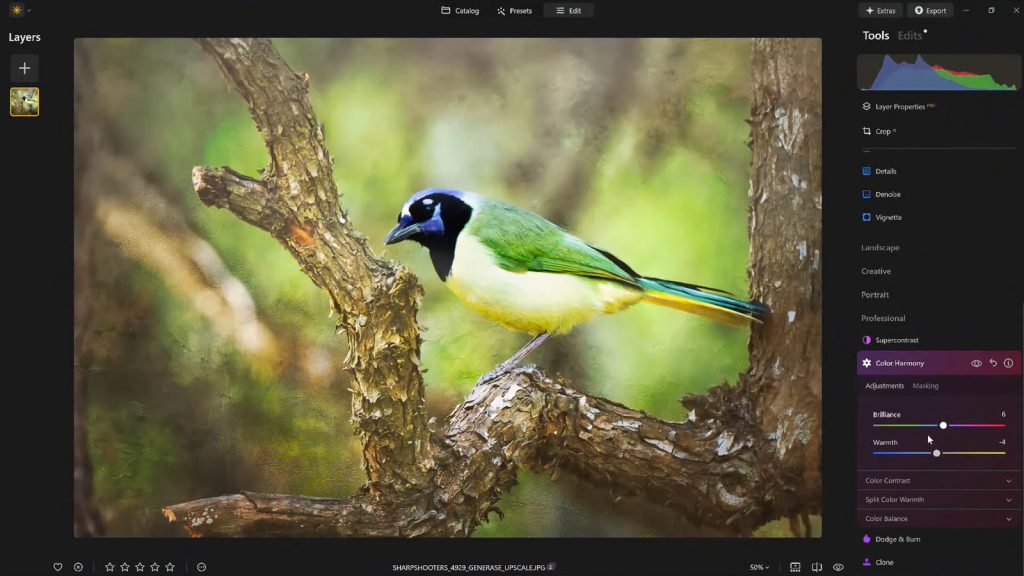
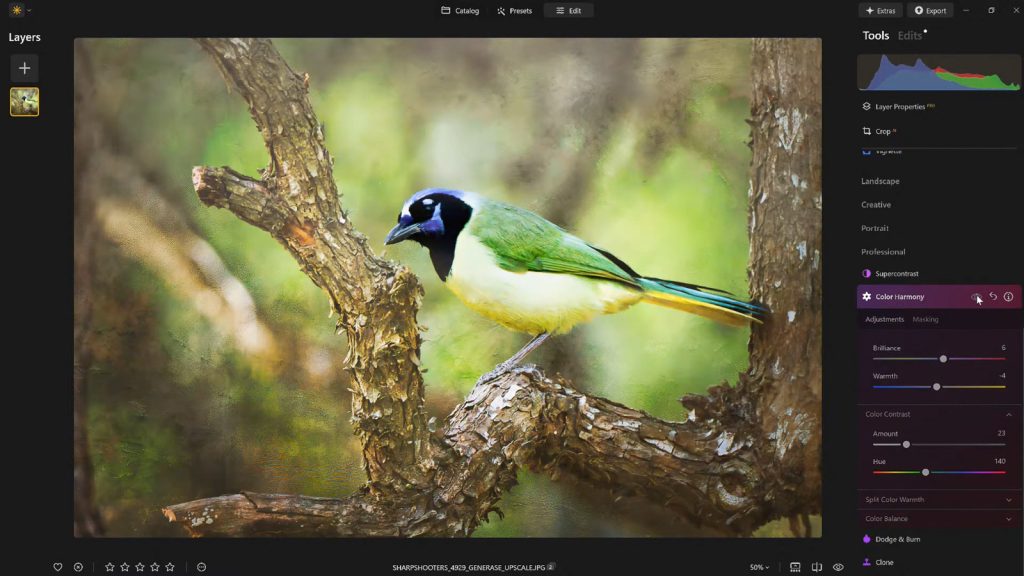
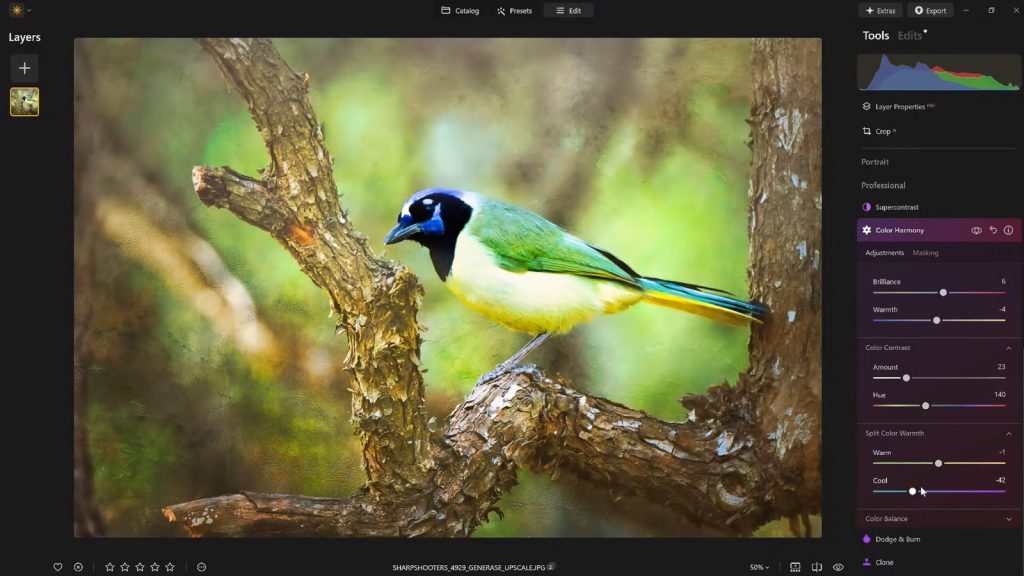
Color Harmony is not engineered for drastic, overt transformations. Instead, its strength lies in introducing subtle, nuanced control over how colors interrelate and influence each other across an entire image. It comprises a suite of interconnected adjustments—Brilliance, Warmth, Color Contrast, Split Warmth, and Color Balance—each designed to empower photographers to fine-tune their work with exceptional precision. The cohesive operation of these sections allows users to subtly guide the viewer’s eye, emphasize the primary subject, and cultivate a unified aesthetic that perfectly aligns with the mood, lighting, and narrative of the photographic scene. This systematic approach ensures that enhancements contribute to the overall artistic intent rather than detracting from it.
Brilliance and Warmth: The Gentle Sculptors of Light and Mood
The initial controls within Color Harmony, Brilliance and Warmth, embody a philosophy of gentle yet impactful adjustment. Brilliance offers a refined alternative to standard saturation controls. While saturation globally intensifies all colors, Brilliance works more intelligently, subtly increasing or decreasing the vibrancy of colors without introducing the harsh, artificial effects often associated with over-saturated images. A slight boost in Brilliance can impart a richer, more luminous tone to colors, enhancing their natural depth and detail. The key to effective use lies in moderation; pushing the slider too far can quickly push an image into an unnatural, garish territory. Experienced photographers often find that a delicate touch yields the most authentic and appealing results, preserving the integrity of the original capture while elevating its visual presence.

Similarly, Warmth operates with a focus on emotional and atmospheric impact. Shifting the Warmth slider to the right infuses an image with a golden, inviting glow, reminiscent of late afternoon sunlight or a cozy indoor setting. Conversely, moving it to the left introduces cooler tones, evoking sensations of crisp morning air, wintry landscapes, or a more subdued, melancholic mood. The artistic imperative here is to align the warmth adjustment with the desired emotional tone of the photograph. A judicious application of warmth can significantly enhance depth and atmosphere, drawing the viewer deeper into the scene without overwhelming the visual narrative. For instance, a landscape shot at sunset benefits immensely from a subtle increase in warmth, accentuating the natural golden hour hues, while a portrait might require a cooler touch to achieve a neutral, balanced skin tone.
Making Use of Color Contrast and Split Warmth: Defining Visual Relationships
Moving deeper into the Color Harmony tool, Color Contrast provides a sophisticated mechanism for enhancing the visual tension and separation between distinct color ranges, particularly those present in highlights and shadows. Unlike global contrast adjustments that affect luminosity, Color Contrast focuses on the interplay of hues, making certain elements within the image stand out more prominently. When applied judiciously, this tool can significantly enhance the perception of depth and dimensionality, making a two-dimensional photograph feel more three-dimensional and immersive. It allows colors to pop against each other without resorting to aggressive sharpening or over-processing, which can lead to unnatural artifacts. For example, in a forest scene, increasing color contrast might make the greens of the foliage distinct from the browns of tree trunks, adding definition.
Split Warmth represents a more granular level of control over the temperature of an image. This feature grants photographers the ability to independently adjust the warm and cool tones within different parts of the image spectrum. This is particularly valuable when dealing with complex lighting scenarios, such as mixed lighting conditions (e.g., warm indoor lights combined with cool daylight streaming through a window), or when the goal is to create distinct color separation in layered compositions. For instance, a photographer might wish to introduce a subtle cool tone into the shadows of a landscape while simultaneously enhancing the warmth of the highlights, creating a dynamic interplay of color temperatures that adds visual interest. However, Split Warmth is not a universal solution. Its application depends heavily on the specific requirements of each image. Some photographs inherently possess a harmonious color balance that does not necessitate such specialized intervention, while others can be dramatically improved by its precise adjustments.
Color Balance: The Architect of Consistent Grading

Perhaps the most advanced and versatile component within Color Harmony is Color Balance. This feature provides independent control over the color tones residing in the shadows, midtones, and highlights of an image. This tripartite division allows for highly targeted adjustments, enabling photographers to meticulously match the overall atmosphere or specific color grading requirements of their vision. For example, shifting the midtones slightly toward warmer hues can instantly make a serene landscape appear more inviting and idyllic, while a subtle shift towards cooler tones in a portrait can achieve a more neutral or even artistic, desaturated look.
The power of Color Balance lies in its ability to influence the mood and narrative without resorting to broad, indiscriminate changes. It is a cornerstone tool for achieving professional-grade color grading, especially when aiming for consistency across an entire series of photographs. A wedding photographer, for instance, can use Color Balance to ensure that all images from a particular event share a unified and cohesive color palette, regardless of variations in lighting conditions throughout the day. While initially requiring a deeper understanding of color theory and its application, Color Balance, once mastered, becomes an indispensable tool for establishing a signature style and maintaining visual continuity across a body of work.
Using Vignettes to Guide the Viewer’s Eye: The Art of Subtle Emphasis
Once the intricate process of color adjustment is complete, another classic finishing touch, the vignette, can be employed to subtly but effectively direct the viewer’s attention. A vignette works by gradually darkening the edges of an image while often introducing a complementary "Inner Light" effect in the center. This creates a natural visual spotlight, drawing the eye inwards towards the primary subject without the need for complex masking or localized adjustments. The psychological effect of a well-applied vignette is profound: it frames the subject, isolates it from distracting periphery, and enhances focus, thereby amplifying the intended narrative of the photograph.
The art of vignetting lies in its subtlety. An overly aggressive vignette can appear artificial and detract from the image, but when applied thoughtfully, it enhances storytelling without explicitly drawing attention to itself. It acts as a quiet, yet powerful, directorial cue, shaping the viewer’s experience and ensuring that their gaze lands precisely where the photographer intends. Historically, vignetting was an optical phenomenon of lenses, but in digital editing, it has been repurposed as a creative tool, allowing photographers to harness its evocative power with complete control.
Save Your Look as a Preset: The Cornerstone of Efficient Workflow and Consistency
A crucial aspect of any professional editing workflow is the ability to maintain consistency and efficiency. After investing time and artistic judgment into dialing in the "perfect look" for an image using Color Harmony and other tools, saving the resulting adjustments as a custom preset becomes invaluable. This practice serves multiple critical functions: it ensures a consistent editing style across an entire body of work, significantly accelerates the editing process for similar images, and preserves the ability to revisit and refine the aesthetic later.
Reapplying a saved preset to other images within the same series provides an immediate baseline for future edits, drastically reducing the time spent on initial adjustments. Furthermore, this workflow facilitates a critical self-assessment process. After stepping away from an edit for a period, it is common for photographers to gain fresh perspective and identify areas where adjustments may have been pushed too far. With a saved preset, the effect can be easily reapplied at a reduced strength (e.g., 70-80%), maintaining the core aesthetic while softening any instances of over-editing. This iterative refinement process is a hallmark of professional post-production and is greatly aided by the intelligent use of presets. It’s a testament to Skylum’s understanding of a photographer’s need for both creative freedom and practical efficiency.
Industry Impact and Expert Commentary
The introduction and refinement of tools like Color Harmony within Luminar Neo reflect broader trends in the photography and visual content industries. There is an ever-increasing demand for high-quality, emotionally resonant imagery across all platforms, from social media to commercial advertising. Skylum, by providing sophisticated yet accessible tools, is empowering a wider demographic of creators to achieve professional-grade results.
Industry analysts note that AI-driven editing software is democratizing techniques that once required years of specialized training. "The beauty of tools like Color Harmony," explains leading photography educator and Skylum’s Director of Education, Vanelli, "is that they distil complex color science into intuitive sliders, allowing artists to focus on their vision rather than getting bogged down in technical minutiae. It’s about empowering creative expression." This sentiment is echoed by many professional photographers who appreciate the speed and precision offered by such advancements, enabling them to deliver compelling visual narratives more efficiently. The ongoing development of AI in photo editing suggests a future where even more sophisticated and context-aware adjustments will become commonplace, further blurring the lines between technical expertise and artistic intuition.
A Finishing Touch That Matters: Elevating Visual Storytelling
Ultimately, what distinguishes a truly compelling image from a merely passable one is rarely a dramatic, single change. Instead, it is the cumulative effect of a handful of carefully considered, subtle enhancements that collectively elevate the photograph. Color Harmony, when wielded with thoughtful intention and combined with strategic vignetting and a disciplined editing approach, imbues images with depth, emotion, and cohesion that might otherwise remain latent.
For photographers seeking to add a layer of polish and professionalism to their work without succumbing to the pitfalls of overprocessing, these finishing tools within Luminar Neo offer an ideal balance of granular control and creative flexibility. They represent Skylum’s ongoing commitment to providing innovative solutions that support and enhance the artistic endeavors of photographers worldwide.
For those ready to explore these capabilities and transform their images, Luminar Neo is available with a special offer. Get 10% off Luminar Neo with the code NATURETTL at checkout.
About the Author
Vanelli is an accomplished photographer, educator, and author based in Florida. He serves as the Director of Education at Skylum, bringing a unique background that includes a past as a Triple Crown Karate champion. Vanelli has seamlessly transitioned his discipline and focus into the visual arts, where he excels in developing educational content and courses for photo editing, often teaching industry leaders. He is a highly sought-after speaker at major conferences, where he delivers engaging presentations on various aspects of photography. Vanelli’s extensive contributions to the field include his insightful articles, comprehensive educational videos, and his role as host of the widely acclaimed Luminar Coffee Break show.