The burgeoning volume of digital media, particularly high-resolution photographs and videos, presents an increasingly complex challenge for creators seeking to maintain organization, ensure data integrity, and safeguard their valuable assets across a multitude of storage devices. A new Mac application, Tusk, has officially launched following an intensive two-month beta period, aiming to streamline these critical processes by offering a specialized solution for cataloging project files, verifying transfers, and managing backups. Developed specifically for photographers and video professionals, Tusk addresses a common pain point: knowing where backed-up files reside, even when their source drives are disconnected.
The proliferation of digital content creation has led to an exponential increase in file sizes and quantities. Modern cameras capture stunning detail, but this comes at the cost of massive data footprints. Professional photographers and videographers routinely juggle gigabytes, often terabytes, of footage across various external hard drives, high-speed memory cards, network-attached storage (NAS) devices, and cloud services. The inherent difficulty in tracking the location and backup status of these scattered files often leads to "offload anxiety"—the pervasive fear that crucial data might be lost or inadvertently deleted before being securely replicated. Tusk enters this challenging landscape with a targeted approach, distinguishing itself from general-purpose backup software by focusing intently on project-based media management.
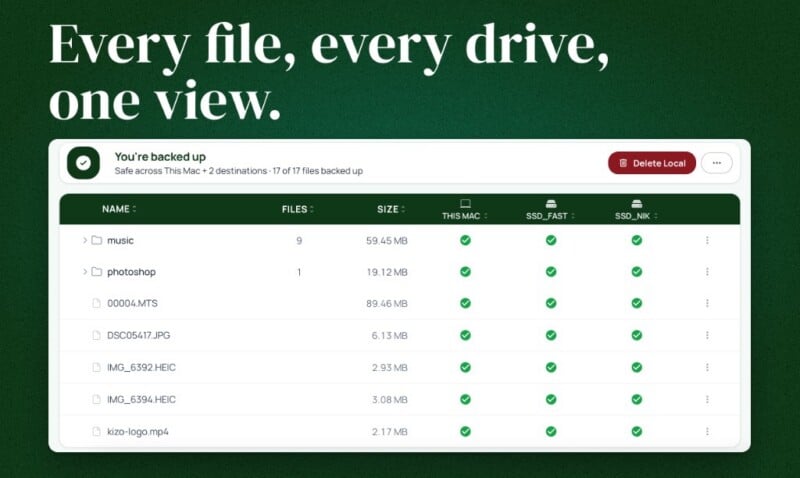
At its core, Tusk provides a persistent, local catalog of project files and their multiple locations. This innovative feature allows users to view comprehensive information about files stored on external drives, even when those drives are not physically connected to the computer. This "disconnected drive" visibility is a significant departure from traditional file management systems, which typically require a drive to be mounted to display its contents. By maintaining a robust local index, Tusk empowers creators with an always-on overview of their entire media library, irrespective of the immediate availability of every storage medium. This centralized intelligence is crucial for complex workflows where media assets might move from an initial capture device (like an SD card) to a working drive for editing, and then to various archive drives or cloud storage solutions.
A cornerstone of Tusk’s data integrity strategy is its integration of BLAKE3 checksums for both cataloging and transferring files. Checksums are cryptographic hash functions that produce a unique, fixed-size string of characters for a given set of data. If even a single bit of data changes, the checksum will be entirely different, thus providing an extremely reliable method for verifying data integrity. While older checksum algorithms like MD5 or SHA-1 are still in use, BLAKE3 offers superior speed and security, making it ideal for verifying large media files quickly and efficiently. The developer emphasizes that Tusk’s reliance on BLAKE3 ensures that files are copied successfully and without corruption, moving beyond the less reliable methods of merely checking file names or folder structures. This rigorous verification process instills confidence that every transfer is bit-perfect, a critical requirement for professional media workflows where data loss can be catastrophic.
The application also offers a streamlined process for incorporating existing storage. Users can select specific folders on an already populated drive and instruct Tusk to index their contents without the need to first copy the files to another location. Once indexed, the drive can be disconnected, yet its contents and their cataloged status remain fully visible and searchable within the Tusk application. This capability is invaluable for professionals with extensive archives already spread across numerous drives, providing an immediate organizational layer without requiring a tedious re-ingestion process.

The genesis of Tusk is deeply rooted in the personal experiences of its creator, Niklas Fischer. A seasoned software engineer and programming educator, Fischer encountered the very challenges Tusk aims to solve while managing his own vast collection of footage from programming courses and YouTube projects. His professional background includes founding engineer roles at cleverklagen, data scientist positions at DAZN and FC Barcelona, and extensive experience teaching programming through various online platforms and bootcamps. This blend of technical expertise and direct experience as a content creator provided a unique perspective, allowing him to design a solution that directly addresses the practical needs of media professionals.
"I spent a few years recording programming courses and tutorials, and I’d just drag and drop the footage and screen recordings to my external drives. At some point I had no idea anymore which files were already backed up and where," explains Fischer. This sentiment resonates with countless creators who find themselves overwhelmed by scattered data, highlighting the universal need for a more intelligent and reliable system for media asset management. Tusk, therefore, is not merely a technical exercise but a practical tool born from a real-world problem statement.
One of Tusk’s standout features is its purpose-built design around the concept of "projects." Unlike general-purpose disk cataloging applications that might index every file on every drive, Tusk organizes files within designated project folders. This project-centric approach aligns perfectly with the workflow of photographers and videographers, who typically manage discrete bodies of work, each with its own set of raw media, edited versions, and associated assets. By tracking files within these defined project boundaries, Tusk can effectively map the journey of media from an SD card to a working drive, and eventually to multiple archive destinations, all while providing a clear overview of each file’s status and location without requiring constant drive connection.
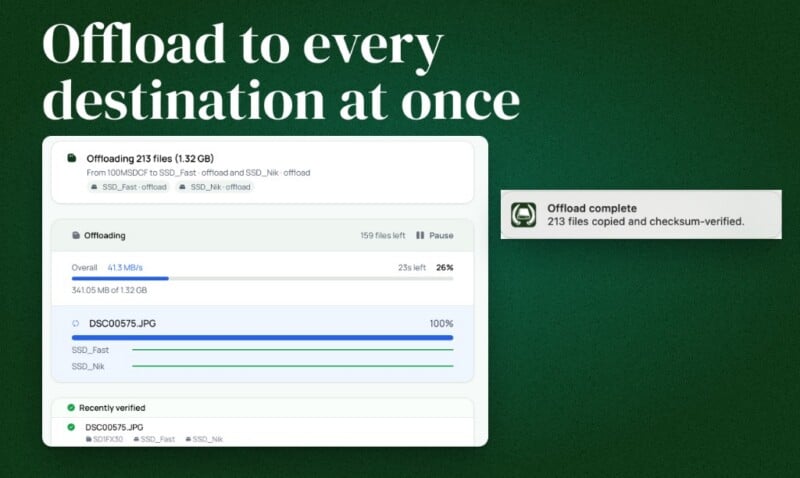
For on-location workflows, Tusk introduces a highly efficient SD card offload feature. This capability allows users to copy the contents of a memory card to multiple designated destinations simultaneously. Crucially, the card only needs to be read once, and the files do not need to be temporarily staged on the Mac’s internal storage before being distributed to the selected backup locations. This significantly accelerates the offload process, which is often a time-sensitive bottleneck during shoots. For photographers and filmmakers working in the field, the ability to create redundant copies of their media quickly and reliably before formatting a card is paramount for data security. Furthermore, for large video projects, avoiding an intermediate copy to the Mac’s internal drive can save significant storage space and transfer time, particularly when dealing with terabytes of raw footage. This directly supports the widely recommended "3-2-1 backup rule," which advocates for at least three copies of data, stored on two different types of media, with one copy off-site. Tusk’s multi-destination offload facilitates creating multiple local copies efficiently.
Another critical component of Tusk’s workflow addresses the "offload anxiety" directly: its intelligent pre-deletion check. After media files have been backed up to their intended destinations, creators often need to free up space on their working drives or memory cards. Before allowing a local copy of a file to be removed, Tusk meticulously checks all connected backup destinations to confirm that the relevant backup exists and has been successfully verified via BLAKE3 checksums. This feature was specifically designed to eliminate the uncertainty that often accompanies the process of clearing storage after a shoot.
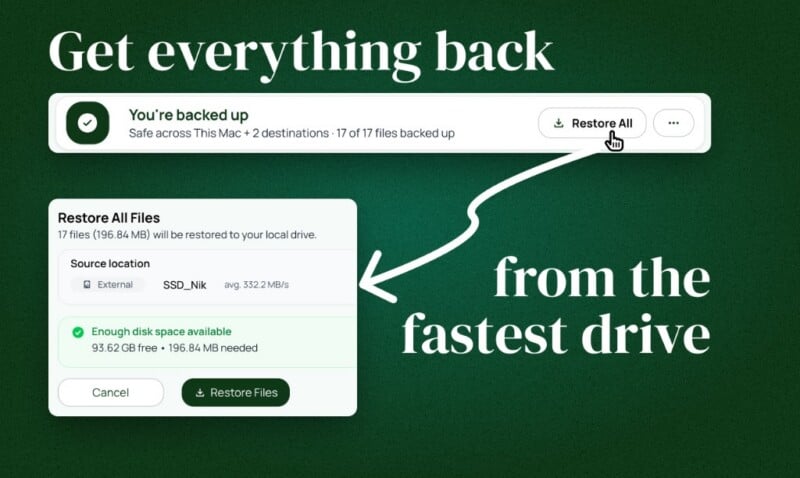
Fischer elaborates on this point: "The fear was never really about losing a drive, it was the offload anxiety: have I already backed this up, does it exist in at least two places before I delete it locally? I wanted to open one app and know exactly where a project actually lived, instead of plugging in drives one by one to check." This functionality provides an invaluable layer of safety, ensuring that no file is ever deleted locally until its secure replication is unequivocally confirmed. Should the need arise, files can be effortlessly restored from any available and verified backup source directly through the Tusk application interface, completing the full lifecycle of media management.
From a technical and privacy standpoint, Tusk employs a local SQLite catalog to store its index data, meaning that users are not required to create a Tusk account, and crucially, no file contents or sensitive metadata are transmitted to the company’s servers. This commitment to user privacy and local data control is a significant advantage in an era of increasing concerns over cloud-based data handling and potential security breaches. The application’s design prioritizes user autonomy and data sovereignty.
It is important to clarify Tusk’s intended role within the broader ecosystem of data management tools. The developer explicitly states that Tusk is not designed to replace every type of backup application. It does not create bootable disk clones (like Carbon Copy Cloner or SuperDuper), provide continuous, whole-system cloud backup (like Backblaze), or maintain historical snapshots and version history (like Apple’s Time Machine). Instead, Tusk is positioned as a specialized tool that complements these existing solutions. It fills a specific niche by combining intelligent file location tracking with robust project-based backups and efficient media offloading, thereby enhancing a comprehensive backup strategy without duplicating the functionality of other specialized utilities.
Furthermore, Tusk differentiates itself from more general-purpose disk cataloging applications such as NeoFinder or DiskCatalogMaker. While those tools are excellent for indexing vast, disparate collections of files and disks across various file types, Tusk’s focus is narrower and more specialized: it centers on project-based media assets, particularly photos and videos, and integrates backup verification and offloading functionalities directly into its core workflow. This focused approach ensures that the application is highly optimized for the specific needs of its target audience.
Tusk is now available for download following its successful beta phase. The pricing structure for early adopters offers an incentive, with the first 100 licenses priced at $49. Following this initial offering, the price will adjust to $79. The application currently supports Apple Silicon Macs natively, leveraging the performance benefits of Apple’s custom processors, with an Intel version reportedly in its final stages of testing, ensuring broader compatibility across the Mac user base. A 14-day free trial is available, allowing potential users to experience Tusk’s capabilities firsthand before committing to a purchase.
In conclusion, Tusk represents a significant advancement in digital asset management for photographers and video creators. By addressing the critical need for reliable file tracking across disconnected drives, integrating state-of-the-art BLAKE3 checksum verification, and streamlining the complex process of multi-destination media offloading and verified deletion, Tusk offers a powerful solution to combat "offload anxiety." Its project-centric design and commitment to local data processing make it an invaluable addition to the toolkit of any professional navigating the ever-growing demands of digital media production, providing peace of mind and enhanced efficiency in an increasingly data-intensive world.