
Every photographer, regardless of skill level, inevitably encounters images that, while technically sound with correct exposure, sharp focus, and solid composition, lack a certain spark, appearing visually flat or unfinished. This pervasive challenge highlights a fundamental truth in visual arts: the distinction between a merely decent photograph and a truly stunning one often resides in the application of subtle, yet impactful, finishing touches that elevate the visual narrative. In the rapidly evolving landscape of digital image processing, tools that empower photographers to achieve this nuanced refinement are becoming increasingly crucial. Among these, Luminar Neo, a prominent AI-driven photo editor, offers a powerful, yet frequently overlooked, feature called Color Harmony, a sophisticated module designed to breathe essential life into otherwise uninspired photographs. Positioned within the Professional Tools section of the software, its discrete placement might lead some users to miss its profound capabilities, but for those who master its application, Color Harmony quickly becomes an indispensable component for meticulously refining tone, contrast, and overall color balance, thereby unlocking an image’s full expressive potential.
The Foundation of Visual Impact: Understanding Color in Photography
To appreciate the significance of Luminar Neo’s Color Harmony, it is essential to understand the fundamental role of color in photography. Color is not merely a descriptive element; it is a powerful psychological tool that evokes emotion, guides the viewer’s eye, and establishes the overall mood and atmosphere of an image. From the cool blues of a serene winter landscape to the fiery reds and oranges of a dramatic sunset, colors communicate silently yet profoundly. Traditional photo editing often relies on global adjustments to saturation and vibrance, which, while effective for basic corrections, can frequently lead to artificial-looking results or a loss of natural detail. The challenge lies in achieving a harmonious interplay of colors that feels organic and purposeful, enhancing the scene’s inherent beauty rather than overwhelming it.
For decades, photographers have sought advanced methods to control color, from chemical darkroom techniques like color filtration and dodging/burning to the advent of digital tools offering selective color adjustments and complex color grading curves. The emergence of AI-powered editors like Luminar Neo represents a significant leap forward, simplifying these intricate processes while offering a level of precision previously reserved for seasoned professionals. Skylum, the developer behind Luminar Neo, has positioned its software as a bridge between powerful editing capabilities and user-friendly interfaces, leveraging artificial intelligence to automate complex tasks and streamline workflows. Color Harmony is a prime example of this philosophy, providing granular control over color relationships without demanding extensive technical knowledge of color science.

A Deeper Dive: Luminar Neo’s Color Harmony Module
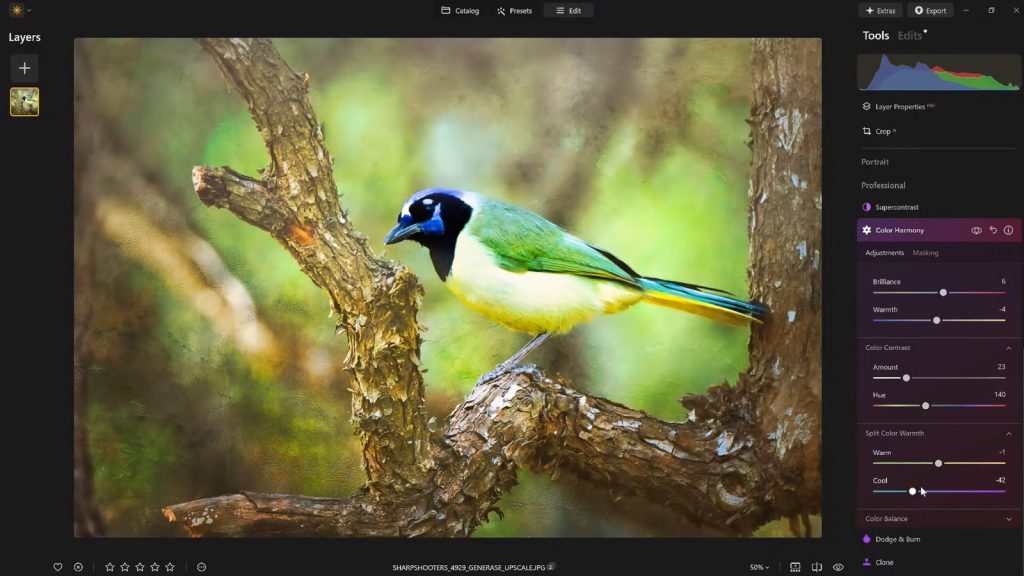
Unlike blunt instruments that apply sweeping color changes, Color Harmony is engineered for nuanced control, enabling photographers to manipulate how various colors interact across an image with precision. The module is comprised of several distinct adjustments—Brilliance, Warmth, Color Contrast, Split Warmth, and Color Balance—each designed to contribute to a cohesive and emotionally resonant final image. The strategic implementation of these controls allows for the meticulous tuning of color relationships, ensuring that every adjustment serves to guide the viewer’s attention, emphasize the primary subject, and cultivate a consistent aesthetic that aligns with the scene’s mood and lighting conditions.
The development of such a feature by Skylum aligns with a broader industry trend toward intelligent editing solutions. As photographers increasingly demand tools that enhance creativity without adding unnecessary complexity, software developers are investing heavily in AI and machine learning. Luminar Neo, first launched in 2022, was designed from the ground up to incorporate a layered, module-based architecture, allowing for flexible and powerful editing capabilities. Color Harmony, added as part of an ongoing commitment to expand professional-grade tools, exemplifies Skylum’s dedication to providing accessible yet advanced controls.
Brilliance and Warmth: The Art of Subtle Enhancement
Beginning with Brilliance, this slider offers a refined alternative to standard saturation controls. Rather than indiscriminately intensifying all colors, Brilliance subtly increases or decreases the vibrance of an image, imparting a richer, more luminous quality to hues while meticulously preserving natural detail and avoiding the harsh, oversaturated look that can plague less sophisticated tools. A slight boost in brilliance can awaken dull tones, making them appear more vibrant and alive, akin to polishing a gem to reveal its inner glow. However, as with any powerful tool, moderation is key; pushing the slider too far risks pushing the image into an artificial, almost cartoonish, territory. Experienced editors advocate for a light, judicious touch, often yielding the most authentic and impactful results.

Warmth operates on a similar principle, allowing for precise adjustments to the emotional temperature of a photograph. Shifting the slider to the right infuses the image with a golden, inviting glow, reminiscent of late afternoon sunlight or the comforting ambiance of a hearth. Conversely, moving it to the left cools the image, introducing blue tones that evoke feelings of calm, introspection, or even starkness, depending on the context. The true artistry lies in harmonizing the warmth adjustment with the emotional narrative of the photograph. A subtle increase in warmth can imbue a portrait with a sense of intimacy or make a landscape feel more welcoming, while a cooler tone might emphasize the grandeur of a mountain range or the stark beauty of an urban scene. The aim is to enhance the inherent atmosphere without overwhelming the viewer with an unnatural color cast.
Color Contrast and Split Warmth: Precision in Tonal Separation
Color Contrast introduces a sophisticated mechanism for increasing the visual tension and separation between distinct color ranges, particularly between the lighter areas (highlights) and darker areas (shadows) of an image. When applied with thoughtful consideration, this adjustment significantly enhances depth, allowing various elements within the frame to stand out with greater clarity and definition, all without resorting to the heavy-handed processing that can flatten an image. It’s about making colors ‘pop’ against each other, creating a dynamic interplay that guides the eye and adds a sense of three-dimensionality. For instance, in a forest scene, increasing color contrast can make the greens of the foliage distinct from the browns of tree trunks, adding visual interest and texture.
Split Warmth takes color control a step further by offering specific, independent manipulation over warm and cool tones across the image’s tonal spectrum. This granular control proves invaluable in navigating complex lighting scenarios or for deliberately creating distinct color separation within layered compositions. Imagine a scene with both warm sunlight hitting a subject and cool shadows falling in the background; Split Warmth allows the photographer to subtly warm up the sunlit areas while simultaneously cooling down the shadows, enhancing depth and creating a more sophisticated color palette. However, this is not a universally applicable adjustment. While certain images benefit immensely from its capacity to fine-tune color relationships and create nuanced emotional shifts, others, particularly those with simpler lighting or color schemes, may not require its intervention at all. Its utility is highly dependent on the specific creative intent and the inherent characteristics of the photograph.
Color Balance: The Architect of Atmosphere

The Color Balance tool stands as one of the most advanced and indispensable components within the Color Harmony module, providing independent control over the color tones present in the shadows, midtones, and highlights of an image. This segmentation allows for exceptionally targeted adjustments, enabling photographers to meticulously craft and match the precise atmosphere or mood they envision for their image. For instance, shifting the midtones subtly towards warmer hues can transform a neutral landscape into an inviting vista, while a gentle push towards cooler tones might lend a portrait a more serene or contemplative quality. The power of Color Balance lies in its ability to influence the entire emotional register of a photograph through precise, localized color shifts.
Mastering Color Balance is a journey that, once completed, renders the tool indispensable for achieving consistent color grading across an entire series of photographs. This consistency is crucial for photographers working on projects, client galleries, or cohesive portfolios, ensuring a unified visual language throughout their body of work. For example, a wedding photographer can use Color Balance to ensure all images from a particular event share a consistent warm, inviting glow, regardless of variations in ambient light. This not only streamlines the editing process but also reinforces the artistic vision, making the collection feel professional and thoughtfully curated.
Guiding the Gaze: The Strategic Use of Vignettes
Once the intricate color adjustments have been meticulously completed, a powerful final touch often involves the subtle application of a vignette. This technique, far from being a mere aesthetic flourish, serves a critical compositional purpose: to gently yet firmly draw the viewer’s attention towards the primary subject of the photograph. By strategically darkening the edges of the frame and, in Luminar Neo’s implementation, often introducing a complementary touch of "Inner Light" in the center, the composition creates a natural visual funnel. This process effectively creates a spotlight effect, enhancing focus and emphasis without the need for complex masking, intricate local adjustments, or any technique that overtly announces its presence.
The use of vignettes has a rich history, dating back to early photographic processes where optical imperfections in lenses often produced natural light fall-off towards the edges of the frame. Over time, what was once a technical limitation evolved into a deliberate artistic choice. In the digital age, tools like Luminar Neo’s vignette module offer unparalleled control over its application, allowing photographers to adjust its amount, roundness, feathering, and the exact position of its center. This precision ensures that the vignette feels organic and supportive of the image’s narrative, rather than an artificial imposition.

When deployed with skill and sensitivity, vignetting profoundly enhances the storytelling aspect of an image without ever overtly calling attention to itself. It acts as a quiet yet potent director, subtly guiding the viewer’s experiential journey through the photograph. This measured approach ensures that the focus remains squarely on the subject and the narrative, making the vignette a sophisticated tool for enriching visual communication.
Streamlining Creativity: The Power of Presets
After investing the time and creative energy into dialing in the perfect aesthetic for an image using Color Harmony and other tools, the ability to save that meticulously crafted look as a custom preset becomes invaluable. This seemingly simple act carries profound implications for a photographer’s workflow and artistic consistency. Saving a preset ensures that a consistent editing style can be applied across a series of images, fostering a cohesive visual brand. More importantly, it preserves the intricate combination of adjustments, allowing the photographer to revisit, refine, and reapply that specific aesthetic at any future point.
The utility of presets extends beyond mere speed. Reapplying a custom preset to the same image, or to other images within the same series, provides an immediate baseline for subsequent edits. This dramatically accelerates the workflow, particularly when processing large batches of photographs from a single shoot, ensuring uniformity in lighting, mood, and color grading. Furthermore, this workflow facilitates a crucial aspect of artistic development: the ability to step back and gain fresh perspective. It is common for photographers, after an intensive editing session, to experience "editing fatigue," which can lead to over-processing. With a saved preset, one can take a break, return with fresh eyes, and then reapply the effect at a reduced strength (e.g., 70-80%). This allows for a quick recalibration, maintaining the core aesthetic while easing any unintended excesses.
The strategic use of presets in Luminar Neo not only optimizes the post-processing pipeline but also serves as a powerful learning tool. By dissecting their own presets, photographers can better understand the interplay of various adjustments and refine their artistic vision over time. This iterative process of creation, saving, and refinement is fundamental to developing a distinctive and recognizable photographic style.

Luminar Neo in the Evolving Landscape of AI Photo Editing
Luminar Neo’s Color Harmony and its integrated workflow features exemplify Skylum’s commitment to democratizing advanced photo editing. In an industry increasingly dominated by artificial intelligence, tools that simplify complex tasks without sacrificing creative control are highly valued. Skylum, with its history rooted in innovative photo editing software, has continuously pushed the boundaries of what AI can do for photographers. From Sky AI to Structure AI, and now with refined color controls, Luminar Neo aims to empower photographers of all levels to achieve professional-grade results with greater efficiency.
The impact of such tools extends beyond individual photographers. They contribute to a broader shift in the photography industry, where the emphasis is moving from purely technical mastery to a blend of technical proficiency and artistic vision, aided by intelligent software. This allows more individuals to express their creativity visually, fostering a more diverse and vibrant photographic community. Vanelli, Director of Education at Skylum and a seasoned educator, often highlights this aspect in his workshops and online content. His transition from a Triple Crown Karate champion to a visual arts instructor underscores a dedication to disciplined, effective technique, a philosophy mirrored in Luminar Neo’s design. His role involves developing educational content that demystifies powerful features like Color Harmony, making them accessible to a wide audience and helping photographers develop their unique styles.
A Finishing Touch That Defines Excellence
Ultimately, what truly distinguishes a compelling image from a forgettable one is rarely a dramatic, single alteration. Instead, it is the cumulative effect of a handful of carefully considered and artfully executed enhancements. Luminar Neo’s Color Harmony, when intelligently combined with the strategic application of subtle vignetting and a thoughtful, iterative editing approach, contributes profoundly to this goal. These tools imbue photographs with greater depth, inject emotional resonance, and establish visual cohesion, transforming raw captures into refined artistic statements.
For photographers who seek to add a professional polish to their work without falling into the trap of over-processing, the finishing tools embedded within Luminar Neo offer an optimal balance of precise control and expansive creative freedom. They represent a modern approach to post-processing, where artificial intelligence assists in achieving natural, impactful results.
For those eager to explore these capabilities and elevate their photographic work, an exclusive offer is available: get 10% off Luminar Neo with the code NATURETTL at checkout. This provides an excellent opportunity to experience firsthand how subtle enhancements can dramatically transform your images.
About the Author
Vanelli, an accomplished photographer, dedicated educator, and insightful author, is based in Florida and serves as the esteemed Director of Education at Skylum. His unique journey from a Triple Crown Karate champion to a revered instructor in visual arts highlights a career built on discipline and a profound understanding of technique. With a comprehensive skill set, Vanelli is responsible for developing cutting-edge educational content and courses focused on photo editing, sharing his expertise with industry leaders and aspiring photographers alike. He is a highly sought-after speaker at major conferences, where his engaging presentations on photography consistently captivate audiences. Vanelli’s significant contributions to the field include his insightful articles, comprehensive educational videos, and his role as host of the widely acclaimed Luminar Coffee Break show, all of which underscore his commitment to fostering excellence in digital photography.