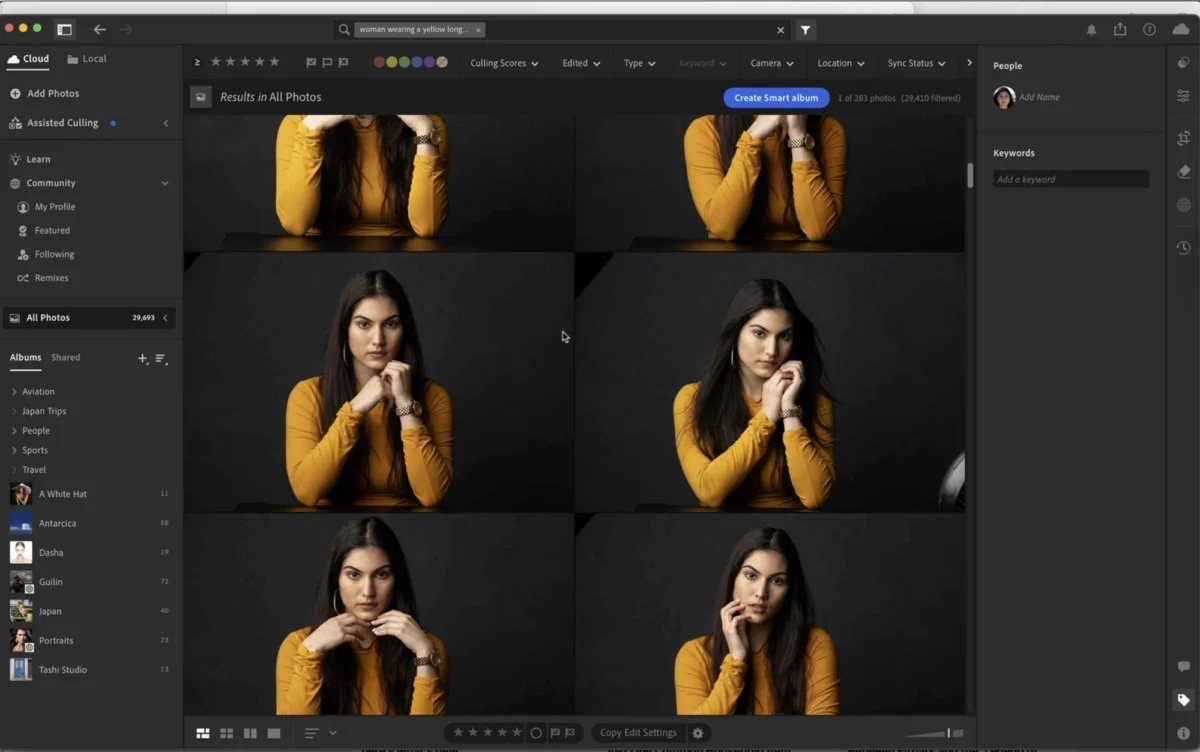
Adobe has recently rolled out a suite of significant updates across its entire Lightroom ecosystem, encompassing Lightroom Classic, Lightroom Cloud, and Lightroom Mobile. These enhancements, designed to streamline workflows, boost performance, and integrate advanced artificial intelligence, mark a pivotal moment for photographers and content creators. To guide users through these crucial new features, KelbyOne, a leading platform for creative education, has launched an exclusive, hands-on course led by photography luminary Scott Kelby, featuring Adobe’s Principal Worldwide Evangelist, Terry White. This collaboration aims to provide practical, real-world insights into the utility and impact of the latest Lightroom innovations, moving beyond mere menu navigation to demonstrate their tangible benefits on actual images.
The updates address several long-standing challenges faced by digital photographers, from managing vast libraries to refining images with greater speed and precision. Key among the new functionalities are an intelligent duplicate finder, an innovative Assisted Culling system, dramatically faster noise reduction capabilities, and the introduction of AI-powered video clip enhancements. These features collectively underscore Adobe’s continued commitment to leveraging cutting-edge technology, particularly artificial intelligence, to empower its user base and solidify Lightroom’s position as an industry-standard tool for image organization, editing, and sharing.
Deep Dive into New Features: Enhancing Efficiency and Quality
The recent wave of updates to Adobe Lightroom represents a strategic push to optimize every stage of the photographic workflow, from initial import and selection to final output. These features are not merely incremental improvements but rather fundamental shifts designed to save users significant time and elevate the quality of their creative output.
Accelerated Workflow and Culling Innovations
One of the most time-consuming aspects of digital photography, particularly for professionals handling high volumes of images, is managing and culling a vast library. Adobe’s new features directly tackle these pain points.
-
The Duplicate Finder: This intelligent tool is a welcome addition for anyone grappling with an ever-expanding photo library. In an era where storage is increasingly abundant but often disorganized, duplicate files – whether from multiple imports, backups, or different versions of the same image – can consume valuable disk space and clutter catalogs. The new duplicate finder employs sophisticated algorithms to identify identical or near-identical images, offering users the ability to review and consolidate them efficiently. This not only frees up storage but also ensures a cleaner, more manageable catalog, reducing the cognitive load on photographers during selection and editing. For a typical professional photographer, who might capture thousands of images per shoot and manage terabytes of data, the ability to quickly and accurately identify and remove duplicates can translate into hours saved and a more robust asset management system. Industry data suggests that a significant percentage of digital media libraries contain redundant files, making this feature a critical workflow enhancement.
-
Assisted Culling: Building on the principles of intelligent library management, Assisted Culling introduces a new paradigm for selecting the best images from a large set. While the specifics of its operation were demonstrated in the KelbyOne course, it is inferred to leverage Adobe Sensei, Adobe’s artificial intelligence and machine learning framework, to provide smart suggestions or criteria-based filtering. Traditionally, culling involves a laborious manual process of reviewing each image, rating it, and making subjective decisions. Assisted Culling likely automates portions of this process by identifying technically superior shots (e.g., in focus, correctly exposed, no closed eyes) or grouping similar shots to allow for quicker comparative analysis. This integration of AI into the selection process empowers photographers to make more informed decisions faster, drastically cutting down the time spent on initial image review. For event photographers, sports photographers, or anyone dealing with bursts of rapid-fire shots, this feature promises a revolutionary improvement in post-production efficiency, allowing more time for creative editing rather than administrative tasks.
Enhanced Image Processing and AI Integration
Beyond library management, the updates also deliver substantial improvements to the core image processing capabilities of Lightroom, with a strong emphasis on performance and AI-driven enhancements.
-
Dramatically Faster Noise Reduction: Noise reduction has long been a computational bottleneck in image processing. High ISO images, common in low-light photography, often suffer from digital noise, which can degrade image quality. While previous iterations of Lightroom offered noise reduction tools, the "dramatically faster" designation suggests a significant overhaul, likely involving GPU acceleration and potentially new, more efficient algorithms powered by AI. Modern graphics processing units (GPUs) are highly efficient at parallel processing, making them ideal for tasks like noise reduction. By offloading these intensive calculations to the GPU, Lightroom users can now expect near-instantaneous previews and significantly reduced export times when applying noise reduction. This enhancement is particularly beneficial for astrophotographers, concert photographers, and photojournalists working in challenging lighting conditions, where high ISO settings are unavoidable. The ability to quickly and effectively clean up noisy images without compromising detail represents a major leap forward in image quality control and workflow speed. This follows Adobe’s recent push with AI-powered Denoise features, suggesting further refinement and integration.
-
AI-Powered Video Clips: The inclusion of AI-powered video clip capabilities within Lightroom signals Adobe’s recognition of the increasing convergence between still photography and videography. Many photographers now capture short video clips alongside stills, but often lack integrated tools for quick, effective editing within their primary photo workflow. While specific details would be revealed in the course, "AI-powered video clips" likely implies features such as automatic color grading suggestions, intelligent stabilization, smart cropping, content-aware enhancements, or even basic scene detection and organization. This allows photographers to perform quick edits on video clips without needing to export them to a separate, more complex video editing suite. For social media content creators, travel photographers, and small business owners who produce hybrid photo-video content, this feature simplifies their workflow and ensures a consistent visual aesthetic across all their media assets, all within the familiar Lightroom environment. This strategic move aligns with the broader industry trend of consolidating creative tools and making advanced features accessible to a wider user base.
-
"And a Lot More": The original announcement teases "a lot more" beyond the explicitly named features. Historically, Adobe updates often include a host of smaller but impactful improvements. These could range from refined masking tools, enhanced healing capabilities, general performance optimizations for library loading and module switching, user interface tweaks for better usability, or even new preset options and camera/lens profile support. Each of these seemingly minor updates contributes to an overall smoother, more robust, and enjoyable user experience, reinforcing the value proposition of the Lightroom ecosystem.
The KelbyOne Initiative: Expert-Led Training and Practical Application
The launch of these significant updates is complemented by an invaluable educational resource: a hands-on course from KelbyOne, featuring the unparalleled expertise of Scott Kelby and Adobe’s Terry White. This collaboration highlights the importance of not just releasing new features, but also ensuring users can effectively integrate them into their existing workflows.
Context of the Collaboration: Scott Kelby, widely recognized for his clear, practical teaching style and his role in KelbyOne and Lightroom Killer Tips, has been a leading voice in photography education for decades. His ability to break down complex concepts into easily digestible lessons makes him an ideal guide for navigating software updates. Terry White, as Adobe’s Principal Worldwide Evangelist, possesses an intimate knowledge of Adobe products, their development, and their intended use cases. His perspective offers authoritative insights into the technical underpinnings and strategic vision behind the updates. The pairing of these two industry titans ensures a comprehensive and practical learning experience.
Course Methodology: The course emphasizes a "hands-on look at everything that’s new," explicitly stating that it moves "rather than just clicking through menus." This pedagogical approach is crucial for real-world application. By demonstrating features on "real images," the course provides context and allows viewers to see the immediate impact and practical benefits of each new tool. This methodology addresses a common frustration among software users: understanding how a feature works in theory versus how it performs under actual working conditions. For photographers, seeing is believing, and a demonstration on diverse images helps them visualize how these updates can enhance their own projects.
Value Proposition: The primary goal of the KelbyOne course is to help photographers discern "which updates are actually worth your time." In a landscape of continuous software development, users often feel overwhelmed by the sheer volume of new features. This course acts as a curated guide, highlighting the most impactful additions and offering strategies for integrating them into various workflows. It aims to empower users to leverage the full potential of Lightroom’s latest capabilities, thereby optimizing their creative process and improving their final output.
Background and Context of Adobe Lightroom’s Evolution
Adobe Lightroom has undergone a remarkable transformation since its inception, evolving from a standalone RAW processor into a comprehensive ecosystem catering to diverse photographic needs.
Brief History of Lightroom: Launched in 2007, Lightroom quickly established itself as a powerful, non-destructive image editor and organizer. Its strength lay in its ability to manage large photo libraries, process RAW files, and provide a streamlined workflow for photographers. The introduction of the Creative Cloud subscription model in 2013 marked a significant shift, tying Lightroom (Classic) into Adobe’s broader suite of creative applications. The subsequent launch of "Lightroom CC" (now known as Lightroom Cloud) alongside Lightroom Classic introduced a cloud-centric, simplified interface designed for cross-device synchronization and mobile editing, expanding Lightroom’s reach to a new generation of photographers. This dual-platform approach ensures that both traditional desktop-centric professionals and modern mobile-first creators are served.
Adobe’s Strategy: Adobe’s continuous innovation model is characterized by frequent updates, subscription-based services, and a relentless focus on integrating artificial intelligence through its Adobe Sensei framework. This strategy ensures that Creative Cloud subscribers always have access to the latest tools and technologies. The current updates for Lightroom exemplify this approach, bringing AI to the forefront for tasks like culling, noise reduction, and video editing. This continuous development cycle allows Adobe to respond to user feedback, adapt to technological advancements, and maintain its market leadership in a highly competitive software landscape.
Competitive Landscape: While numerous photo editing software options exist, from Capture One and Affinity Photo to various open-source alternatives, Adobe Lightroom continues to dominate a significant portion of the professional and enthusiast market. Its comprehensive feature set, robust ecosystem integration with Photoshop, and strong community support contribute to its enduring popularity. The latest updates, particularly those focusing on AI and performance, are strategic moves to reinforce its competitive edge, offering solutions that enhance efficiency and creative possibilities.
User Base Impact: The impact of these updates spans the entire spectrum of Lightroom users. Professional photographers will benefit from faster culling and noise reduction, allowing them to deliver projects more quickly. Enthusiasts will find it easier to manage their growing personal photo collections and achieve higher quality results from challenging shots. Mobile users will appreciate the expanded capabilities for video editing and seamless synchronization across devices, making their smartphones even more powerful creative tools.
Timeline of Recent Adobe Updates
Adobe operates on a dynamic development cycle, typically releasing significant updates to its Creative Cloud applications multiple times a year. This ensures that features are rolled out regularly, rather than waiting for major annual versions. In recent years, Lightroom has seen a consistent stream of innovations:
- Early 2020s: Introduction of advanced masking tools (e.g., Select Subject, Select Sky), allowing for precise, AI-driven selections.
- Mid-2020s: Major enhancements to local adjustments and adaptive presets.
- Late 2020s (leading up to this release): Integration of powerful AI-driven Denoise features, significantly improving high ISO image quality. Further performance optimizations and cloud synchronization improvements.
These continuous updates reflect a proactive approach by Adobe to integrate emerging technologies and respond to evolving user needs, positioning the current set of features as the latest evolution in a long line of strategic enhancements.
Industry Reactions and User Adoption
While formal statements from all industry stakeholders are not yet available, the general sentiment within the photography community regarding features that address common pain points is overwhelmingly positive.
Inferred Reactions: Professional photographers, who often operate under tight deadlines, are likely to welcome any feature that enhances efficiency and reduces manual labor. The "dramatically faster noise reduction" and "Assisted Culling" features, in particular, are expected to be met with enthusiasm, as they directly impact the speed and quality of their output. The integration of AI-powered video editing within Lightroom also signifies a significant step towards a more unified creative workflow, a concept that resonates with the growing number of photographers who also produce video content. The importance of stability and reliability alongside new features is always a key consideration for professionals, and Adobe typically prioritizes rigorous testing to ensure these new tools integrate seamlessly without introducing new complications.
Impact on Workflow: These features have the potential to fundamentally alter the daily workflow for many photographers. High-volume shooters could see a substantial reduction in the time spent on initial image review and selection. Those working in challenging low-light environments can now achieve cleaner images with less effort. The ability to manage and edit video clips within the same application as their stills provides a more holistic approach to content creation. This evolution towards more intelligent and integrated tools allows photographers to spend less time on repetitive tasks and more time on the creative aspects of their craft.
Economic Implications and Access
The economic model surrounding Adobe Lightroom and related educational content like the KelbyOne course is rooted in accessibility and continuous value.
Subscription Model Discussion: Adobe Creative Cloud’s subscription model, at $9.99/month for the Photography Plan (which includes Lightroom, Lightroom Classic, and Photoshop), offers ongoing access to software updates and cloud services. This model ensures that users benefit from the latest features like those recently released, without needing to purchase new versions outright. This approach has democratized access to professional-grade tools, making them affordable for a broader audience.
KelbyOne Course Pricing: The KelbyOne course, priced at $39 for individual purchase or accessible via a $19.99/month subscription (with a 100% money-back guarantee and cancellation anytime), positions itself as an affordable and flexible professional development tool. For a one-time fee or a monthly subscription, photographers gain access to expert guidance that can significantly enhance their productivity and skill set. This investment in continuous learning is crucial in a rapidly evolving software landscape, ensuring that users can keep pace with technological advancements.
Accessibility: Platforms like KelbyOne play a vital role in democratizing access to high-quality, expert-led training. By offering comprehensive courses on new features, they bridge the gap between software developers and end-users, ensuring that the full potential of these powerful tools is realized. This accessibility is particularly important for photographers who may not have access to in-person workshops or specialized training programs.
Future Outlook for Lightroom
Looking ahead, the trajectory of Adobe Lightroom appears firmly rooted in continued integration of artificial intelligence, expansion of its video capabilities, and further enhancement of its cloud ecosystem. One can professionally infer several potential future directions:
- Deeper AI Integration: Expect more sophisticated AI-driven editing tools, potentially extending to content-aware fills, advanced subject manipulation, and even AI-assisted compositional adjustments. The "generative AI" capabilities seen in Photoshop could find their way into Lightroom for even more transformative edits.
- Enhanced Video Capabilities: The current "AI-powered video clips" are likely just the beginning. Future iterations could include more advanced video editing timelines, integrated audio tools, and more sophisticated AI-driven storytelling features, further blurring the lines between photo and video editing.
- Collaborative Features: As cloud computing becomes more prevalent, Lightroom could see enhanced collaborative editing features, allowing multiple users to work on projects simultaneously or share feedback more seamlessly.
- Personalized Workflows: AI could be used to adapt the Lightroom interface and suggest tools based on a user’s specific editing habits and preferences, leading to a more personalized and efficient experience.
In conclusion, the latest updates to Adobe Lightroom represent a significant leap forward in empowering photographers with more efficient, intelligent, and comprehensive tools. From optimizing library management with a duplicate finder and Assisted Culling, to dramatically improving image quality with faster noise reduction, and embracing the convergence of media with AI-powered video editing, these features cater to the evolving needs of the modern creative. The accompanying KelbyOne course, led by Scott Kelby and Terry White, serves as an indispensable resource for users seeking to master these innovations and integrate them effectively into their workflows. Photographers are encouraged to explore these transformative updates and leverage the expert guidance available to unlock new levels of productivity and creativity. The course, available for $39 or through a KelbyOne subscription, can be accessed directly via the provided link, offering practical insights that are invaluable for any Lightroom user.