The evolution of mobile imaging has fundamentally altered the landscape of modern photography, transitioning from simple point-and-shoot capabilities to sophisticated computational photography. For years, the hallmark of professional-grade portraiture was the "bokeh" effect—a soft, aesthetic blurring of the background that isolates the subject. Previously, this required expensive Digital Single-Lens Reflex (DSLR) cameras equipped with wide-aperture lenses. Today, Apple’s iPhone ecosystem utilizes a combination of advanced hardware and neural processing to democratize these high-end visual effects, allowing users to achieve professional results through native software, optical physics, and third-party post-processing tools.
The Technological Foundation of Mobile Depth-of-Field
The ability to blur a background on an iPhone is primarily driven by "computational photography," a process where software algorithms enhance or create visual effects that the physical lens hardware cannot achieve alone. In traditional photography, background blur is a byproduct of a shallow depth of field, determined by the lens’s focal length, aperture size, and the distance between the camera and the subject. Because smartphone sensors and lenses are physically small, they naturally produce a deep depth of field, meaning most objects in the frame remain in focus.
To circumvent these physical limitations, Apple introduced Portrait Mode. This feature uses "disparity mapping" to calculate the distance between the camera and various objects in a scene. By using multiple lenses (such as the Wide and Telephoto lenses) or specialized sensors like LiDAR (Light Detection and Ranging), the iPhone creates a multi-layered depth map. The software then identifies the subject and applies a progressive blur to the background layers, simulating the optical behavior of a high-end prime lens.
Chronology of iPhone Portrait Innovation
The journey toward sophisticated background blur began in 2016 and has seen annual iterations that have refined the accuracy of edge detection and the quality of the "bokeh" rendering.
- September 2016 (iPhone 7 Plus): Apple introduced the first dual-camera system, launching Portrait Mode as a beta feature. It required the Telephoto lens to calculate depth, limiting its use to well-lit environments.
- September 2017 (iPhone 8 Plus and iPhone X): Introduction of Portrait Lighting, allowing users to simulate studio-quality lighting effects using the depth map.
- September 2018 (iPhone XS and XR): Introduction of "Depth Control," enabling users to adjust the intensity of the background blur after the photo is taken. The iPhone XR was notable for achieving Portrait Mode on a single-lens system through purely algorithmic machine learning.
- October 2020 (iPhone 12 Pro series): The integration of LiDAR sensors significantly improved Portrait Mode performance in low-light conditions and enhanced the precision of depth mapping for complex subjects like hair or transparent glass.
Utilizing Native Portrait Mode for Real-Time Results
For users with modern hardware—specifically the iPhone 7 Plus through the latest iPhone 15 and 16 iterations—the native Camera app provides the most seamless method for background blur.
Operational Requirements
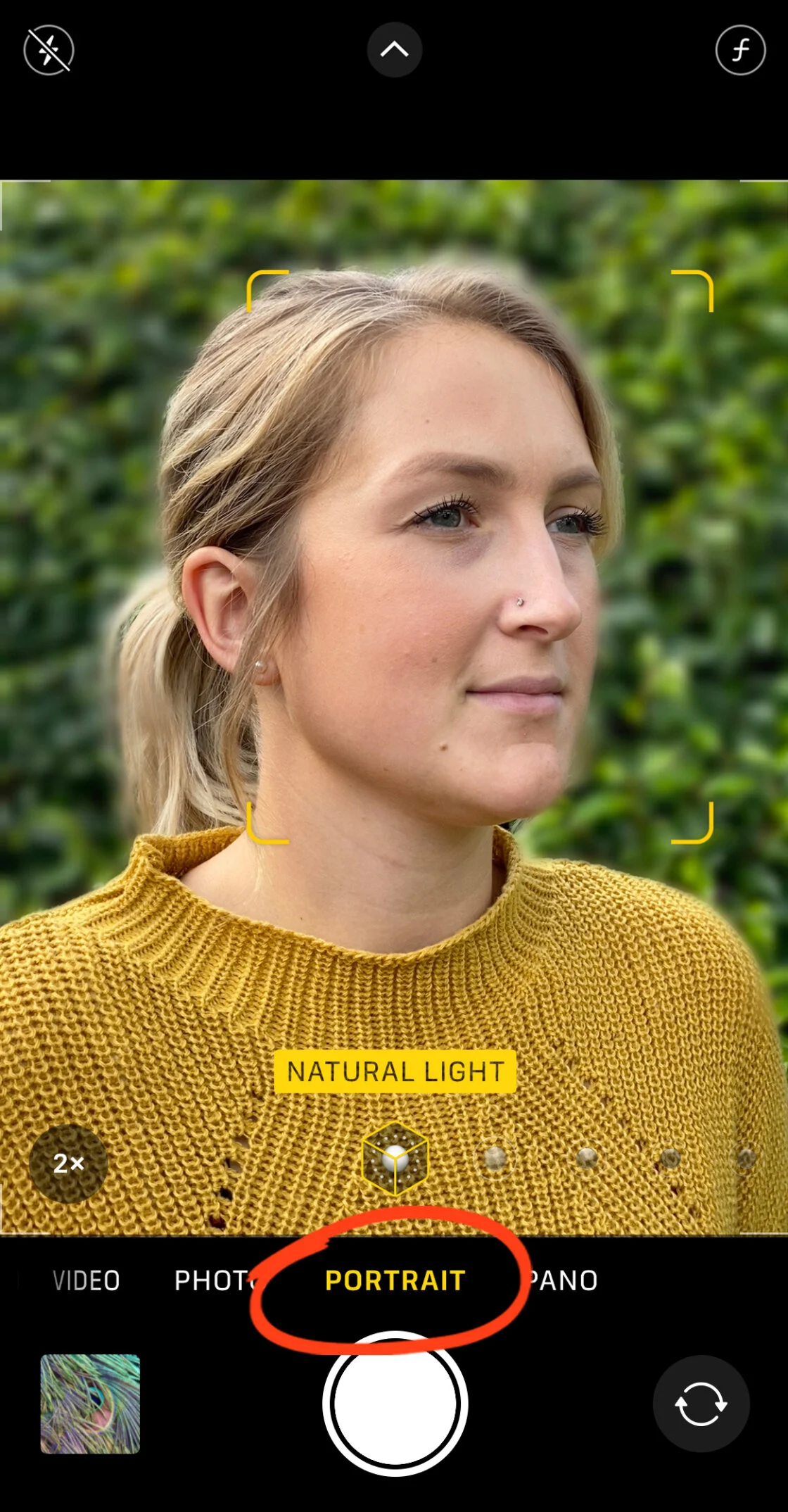
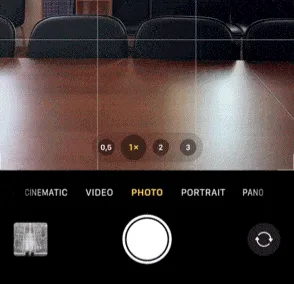
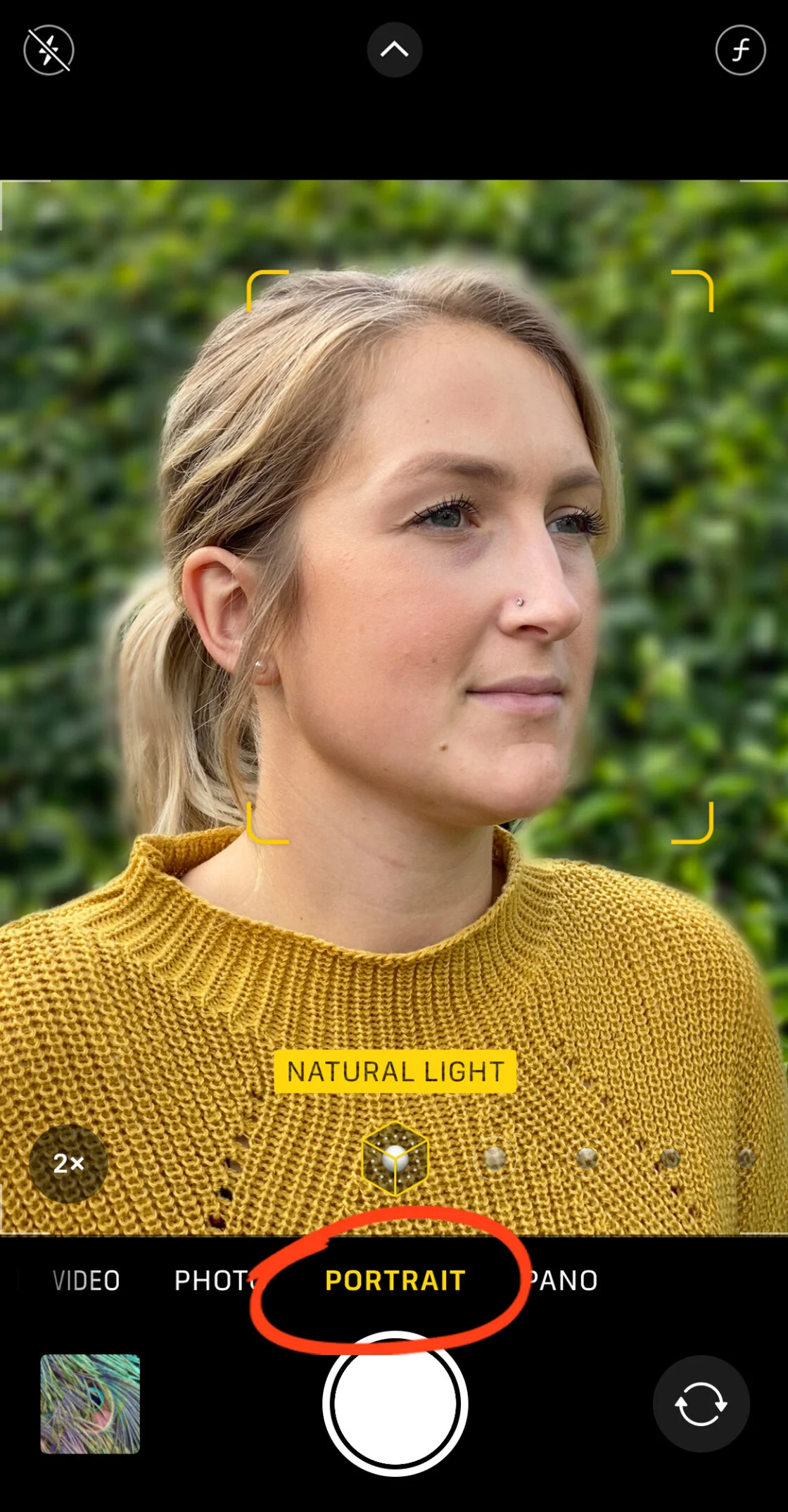
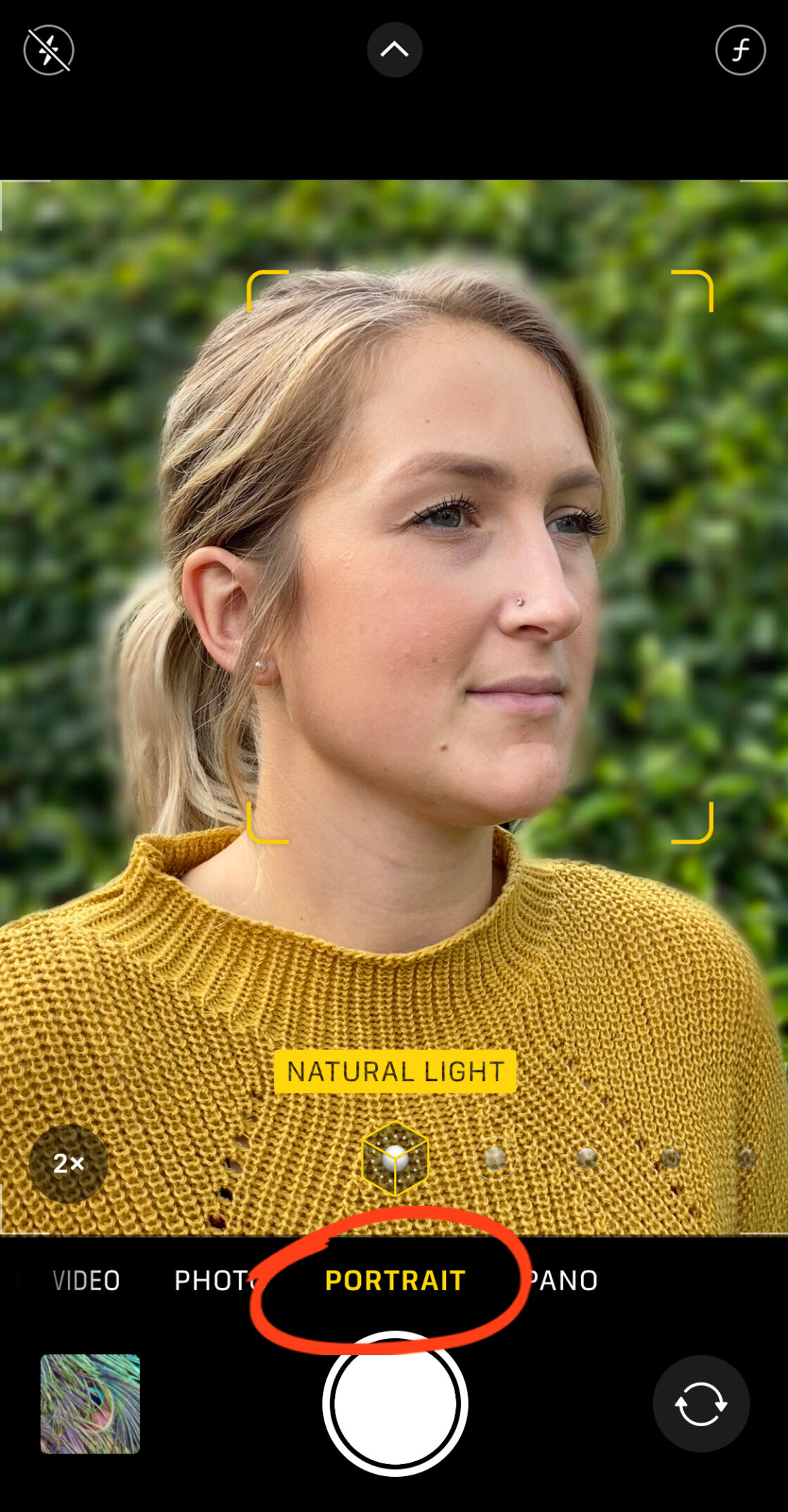
To activate the depth-effect software, the user must select "Portrait" from the camera’s mode slider. The system requires specific conditions to function: the subject must be positioned between two and eight feet from the lens. If the subject is too close or too far, the interface provides haptic and visual feedback, such as "Move farther away" or "Place subject within 8 feet."
When the algorithm successfully identifies the subject, a yellow box appears around the face or object, and the background blurs in real-time. The interface displays "Natural Light" (or "Depth Effect" on legacy models) in yellow, signifying that the depth map is active.
Post-Capture Depth Manipulation
One of the most powerful aspects of Apple’s computational approach is the ability to alter the physics of the photo after it has been saved. On the iPhone XS and newer models, users can navigate to the Photos app, select a portrait, and tap "Edit."
A "f-number" (aperture) icon appears at the top left of the screen. By tapping this, users access a slider that simulates the adjustment of a physical lens aperture. A lower f-number (such as f/1.4) results in a creamier, more intense blur, while a higher f-number (such as f/16) brings more background detail into focus. This non-destructive editing allows for precise creative control that was once impossible without committing to settings at the moment of capture.
Advanced Lighting and Studio Simulations
Portrait Mode is augmented by Portrait Lighting, which uses the depth map to isolate the subject and apply artificial lighting masks.
- Studio Light: Brightens facial features to mimic professional studio reflectors.
- Contour Light: Adds dramatic shadows to the edges of the face for a more sculpted appearance.
- Stage Light / Stage Light Mono: Uses the depth map to completely remove the background, replacing it with a deep black void, effectively isolating the subject in a spotlight.
- High-Key Light Mono: Creates a stylized black-and-white portrait against a stark white background.
Optical Principles: Achieving Blur Without Software
For users with older iPhone models or those who prefer a more organic aesthetic, background blur can be achieved through the fundamental laws of optics. This method does not rely on algorithms but on the physical relationship between the lens and the subject.
The Power of Proximity
The most effective way to create a shallow depth of field manually is to decrease the distance between the camera and the subject. As the lens focuses on a very close object, the "focal plane" narrows. Objects located behind that plane naturally lose focus.
Macro Photography Techniques
For extreme close-ups, such as capturing the intricate details of a flower or an insect, the native lens has a "minimum focus distance." If a user moves too close, the image will become entirely blurred. To overcome this, many photographers utilize third-party macro lenses, such as those produced by Moment or Sandmarc. These lenses shift the focal point, allowing the iPhone to focus on objects just millimeters away, resulting in a dramatic, naturally occurring background blur that software often struggles to replicate.
Professional Post-Production: Third-Party Applications
When a photo is taken in "Photo" mode rather than "Portrait" mode, it lacks the metadata required for the native depth slider. However, the App Store offers robust solutions for retroactively applying blur using sophisticated masking tools.
AfterFocus: Precision and Motion
AfterFocus is a prominent tool for users seeking granular control. It utilizes a "Smart Selection" system where the user draws a rough line over the subject (Focus) and another over the background. The app’s AI then predicts the edges.

For complex images where AI fails, AfterFocus provides a "Manual Selection" mode. Using a brush tool, the photographer can paint a "red mask" over the subject. The precision of this mask determines the realism of the final image. Furthermore, AfterFocus offers "Motion Blur," which applies a directional streak to the background. This is a vital tool for sports or action photography, as it creates a sense of velocity that static blurring cannot provide.
Snapseed: The Dreamy Vignette
Google’s Snapseed app offers a "Lens Blur" tool that operates on a different principle. Instead of masking the subject, it uses a radial or linear tilt-shift gradient.
- Inner Circle: Defines the area of absolute focus.
- Outer Circle: Defines where the blur reaches its maximum intensity.
- Transition Zone: The space between the circles where the focus gradually fades.
This technique is often used to create a "dreamy" or "miniature" effect. By adjusting the "Vignette Strength" alongside the blur, photographers can darken the edges of the frame, further drawing the viewer’s eye toward the central subject.
Market Impact and Professional Implications
The integration of these features has had a profound impact on the creative economy. According to market data from the "Shot on iPhone" campaign and various social media analytics, the prevalence of high-quality, blurred-background imagery has led to a rise in "prosumer" photography. Small business owners, influencers, and journalists now produce content that meets professional standards without the overhead of traditional gear.
Photography experts suggest that while computational blur
is not yet a perfect replacement for high-end glass—noting occasional "artifacts" or errors in edge detection around fine details like hair—the gap is closing rapidly. The introduction of LiDAR and the increasing power of Apple’s "A-series" chips ensure that the rendering of background blur is becoming more mathematically accurate, mimicking the "cat’s eye" or "swirly" bokeh characteristics of vintage lenses.
Conclusion: The Future of the Mobile Lens
As we look toward the future of mobile photography, the trend is moving toward even greater integration of Artificial Intelligence. Future iterations of the iPhone are expected to utilize "semantic segmentation," where the software doesn’t just see a "subject" and a "background," but understands the difference between skin, fabric, sky, and foliage, applying different levels of blur and texture to each.
For the modern iPhone user, blurring the background is no longer a technical hurdle but a creative choice. Whether through the immediate gratification of Portrait Mode, the physical approach of macro proximity, or the meticulous control of post-processing apps like AfterFocus and Snapseed, the power to create stunning, professional-grade imagery is now a standard feature of the device in their pocket.