
Every photographer, from amateur enthusiasts to seasoned professionals, frequently encounters the paradox of a technically flawless image that nonetheless lacks evocative power. The exposure is pristine, the subject is impeccably sharp, and the compositional elements are thoughtfully arranged, yet the final photograph fails to resonate, often feeling incomplete or visually flat. This critical distinction between a merely decent capture and a truly compelling, stunning visual often hinges upon the application of subtle, yet meticulously executed, finishing touches during the post-processing phase. In an era where digital imaging tools proliferate, identifying and mastering features that deliver this nuanced refinement is paramount. Skylum’s Luminar Neo, a prominent player in the AI-powered photo editing landscape, introduces a powerful yet frequently overlooked capability designed specifically to imbue images with this missing vitality: the Color Harmony tool. Positioned within the software’s comprehensive Professional Tools section, its understated placement can lead to it being missed by many users. However, for those who uncover its potential and learn its application, Color Harmony swiftly transitions from a hidden gem to an indispensable component for precision-tuning tone, contrast, and overall color balance, fundamentally transforming the visual narrative of an image.
The Evolution of Digital Color Correction and Luminar Neo’s Position
The journey of color correction in photography has mirrored the evolution of the medium itself. From the meticulous chemical adjustments in traditional darkrooms to the complex layer-based manipulations of early digital software, photographers have continuously sought greater control over their image’s palette. The advent of sophisticated digital tools brought unprecedented flexibility, but often at the cost of steep learning curves and time-intensive workflows. In recent years, the integration of Artificial Intelligence (AI) has marked a significant paradigm shift, democratizing advanced editing techniques and streamlining processes. Software like Luminar Neo represents the vanguard of this movement, offering AI-driven enhancements that simplify complex tasks while retaining a high degree of creative control for the user. According to industry reports, the global market for photo editing software is projected to grow significantly, driven by the increasing demand for intuitive, powerful tools that cater to both professional photographers and the burgeoning segment of content creators. Luminar Neo, with its focus on intelligent automation and accessible professional features, positions itself as a crucial bridge between ease of use and sophisticated output. Its "Color Harmony" tool is a testament to this philosophy, offering a granular level of control traditionally reserved for expert-level color graders, now packaged in an approachable interface.

Color Harmony: A Nuanced Approach to Visual Impact
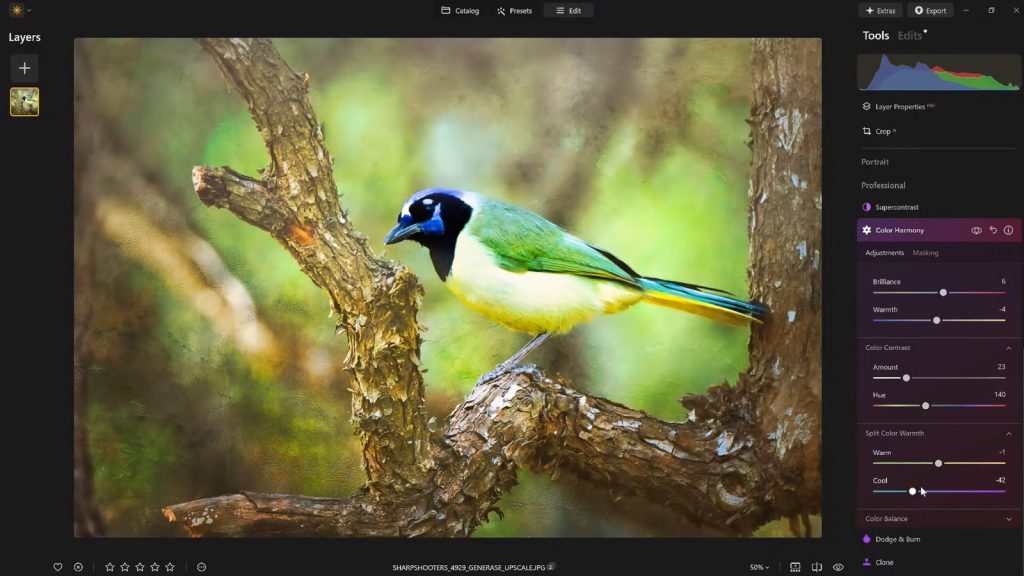
Unlike tools designed for drastic transformations, Color Harmony operates on the principle of nuanced refinement. Its objective is not to overhaul an image but to enhance the intricate interplay of colors, fostering a sense of visual coherence and depth that elevates the subject matter. The tool encompasses a suite of five core adjustments: Brilliance, Warmth, Color Contrast, Split Warmth, and Color Balance. Each of these controls is engineered to provide photographers with the precision necessary to fine-tune their work, guiding the viewer’s eye, emphasizing key elements, and establishing a cohesive aesthetic that aligns with the intended mood and natural lighting conditions of the original scene. This holistic approach ensures that adjustments are not made in isolation but contribute to an overarching visual harmony, a critical element in producing images that genuinely resonate with an audience.
Brilliance and Warmth: Sculpting Light and Emotion
The initial adjustments within Color Harmony, Brilliance and Warmth, offer foundational control over an image’s luminosity and chromatic temperature. Brilliance, often misunderstood as a simple saturation slider, provides a more sophisticated means of increasing or decreasing the vibrancy of colors. Crucially, it achieves this without introducing the harsh, artificial effects commonly associated with excessive saturation. A subtle boost in Brilliance can impart a richer, more luminous tone to colors, enhancing their natural detail and presence. Conversely, overapplication can quickly push an image into an unnatural, oversaturated territory, highlighting the tool’s emphasis on restraint. Industry best practices in color grading consistently advocate for a light touch, where minimal adjustments yield the most authentic and impactful results.

Similarly, the Warmth slider offers precise control over the image’s overall color temperature. Shifting the slider to the right introduces a golden, inviting glow, reminiscent of natural golden hour light or a cozy indoor setting. Moving it to the left imbues the image with cooler tones, evoking moods such as serenity, starkness, or a crisp, clear atmosphere. The judicious application of Warmth is key to aligning the image’s emotional tone with its visual presentation. A carefully chosen degree of warmth can significantly add depth and atmosphere, enhancing the scene’s inherent qualities without overpowering the primary subject or creating an artificial visual temperature. This careful calibration ensures that the emotional resonance of the photograph is amplified, not distorted.
Mastering Color Contrast and Split Warmth for Depth and Separation
Beyond global adjustments, Color Harmony offers tools for more targeted chromatic manipulation. Color Contrast serves to heighten the visual tension and separation between distinct color ranges, particularly those found in the highlights and shadows of an image. When applied thoughtfully, this feature can significantly enhance perceived depth, making elements within the image appear more three-dimensional and distinct, thereby preventing a flat or monochromatic appearance. It allows for subjects to "pop" without resorting to aggressive clarity or sharpness adjustments, which can often lead to an over-processed look. This technique is particularly beneficial in landscapes or complex scenes where differentiating between foreground and background elements is crucial for visual impact.
Split Warmth provides an even more refined layer of control, enabling photographers to independently adjust the warm and cool tones across an image. This capability proves invaluable in complex lighting scenarios, such as mixed lighting environments (e.g., natural daylight combined with artificial indoor lighting) or during transitional periods like sunrise or sunset, where a nuanced balance of temperatures is present. It also facilitates the creation of deliberate color separation in layered compositions, allowing artists to emphasize certain elements by selectively manipulating their underlying warmth or coolness. While not universally necessary for every image, Split Warmth becomes an indispensable tool for advanced color grading, allowing for highly specific adjustments that can dramatically alter the mood and visual flow of a photograph. Its strategic application is a hallmark of sophisticated post-processing, enabling photographers to overcome challenging lighting conditions and achieve a precise aesthetic vision.

Color Balance: The Pinnacle of Targeted Tonal Control
The Color Balance feature within Luminar Neo’s Color Harmony tool represents a sophisticated level of control, empowering photographers to independently manipulate the color tones within the shadows, midtones, and highlights of an image. This granular approach allows for highly targeted adjustments that can subtly but profoundly alter the atmosphere and emotional impact of a photograph. For instance, a slight shift of the midtones towards warmer hues can transform a neutral landscape into an inviting vista, while a subtle cooling of the highlights in a portrait can impart a more serene or classical feel.
This independent control across different tonal ranges is a hallmark of professional-grade color grading. It moves beyond broad adjustments to enable precise calibration, ensuring that changes are applied exactly where they are needed without inadvertently affecting other parts of the tonal spectrum. For photographers aiming to establish a consistent color grading across an entire series of images—a crucial aspect of professional branding and storytelling—mastering Color Balance becomes an indispensable skill. It provides the flexibility to match specific moods, lighting conditions, or artistic visions with unparalleled precision, making it a cornerstone for achieving a cohesive and polished body of work.
The Strategic Application of Vignettes for Visual Guidance

Once the intricate color adjustments have been meticulously completed, a seemingly simple yet profoundly effective finishing touch often involves the strategic application of a vignette. This technique, which subtly darkens the edges of an image while potentially introducing a touch of "Inner Light" in the center, serves a critical compositional purpose: it gently but firmly guides the viewer’s attention directly towards the primary subject. By creating a soft, darkened frame, the viewer’s eye is naturally drawn inward, creating a visual spotlight that enhances focus and emphasizes the central narrative of the photograph.
The beauty of a well-executed vignette lies in its ability to achieve this directional guidance without resorting to heavy masking or complex local adjustments. It’s a quiet but powerful storytelling device, enhancing the composition and deepening the narrative without overtly drawing attention to itself as an effect. Historically, vignetting was an optical aberration in lenses, but photographers quickly recognized its artistic potential. In digital post-processing, it has become a deliberate choice to sculpt light and shadow, influencing the viewer’s journey through the image. When applied thoughtfully, a vignette can add a sense of depth, drama, or intimacy, enriching the overall aesthetic and reinforcing the photographer’s intended message.
Workflow Efficiency: The Power of Presets
In the dynamic world of digital photography, consistency and efficiency are paramount, particularly for professionals managing extensive projects. After meticulously dialing in the perfect aesthetic using Color Harmony and other tools, saving the resulting look as a custom preset is not merely a convenience; it’s a strategic workflow enhancement. This practice ensures a consistent editing style across an entire body of work, a crucial element for establishing a photographer’s unique visual signature or maintaining brand cohesion for clients. Moreover, presets offer the invaluable ability to revisit and refine an image or series at a later stage, providing a reproducible baseline for future edits.

The utility of presets extends beyond initial application. Reapplying a saved preset to the same image—or to other images within the same series—offers a rapid starting point for subsequent editing sessions. This efficiency significantly reduces the time spent on repetitive adjustments. Furthermore, presets provide a crucial mechanism for self-correction in the editing process. It is a common experience for photographers, after spending extended periods on an edit, to step away and later perceive areas where adjustments might have been pushed too far. With a saved preset, the effect can be re-applied at a reduced strength (e.g., 70-80%), allowing the photographer to maintain the core aesthetic while subtly easing any over-editing, thus achieving a more refined and natural result. This iterative process, facilitated by intelligent preset management, underscores the commitment of modern editing software like Luminar Neo to support both creative expression and practical workflow demands.
The Broader Implications for Photography and Content Creation
The introduction and popularization of tools like Color Harmony within Luminar Neo signify a broader trend in the photo editing industry: the continued democratization of advanced photographic techniques. Historically, achieving such nuanced control over color balance, contrast, and tone required extensive technical knowledge and considerable time investment in complex software interfaces. AI-powered platforms are lowering this barrier to entry, enabling a wider range of photographers—from passionate hobbyists to emerging professionals—to achieve results that were once the exclusive domain of highly specialized retouchers.
This shift has several significant implications. Firstly, it empowers more individuals to produce high-quality visual content, fueling the growth of visual storytelling across various platforms. Secondly, it allows seasoned professionals to streamline their workflows, freeing up valuable time that can be reinvested in creative pursuits, client acquisition, or further skill development. Thirdly, it underscores the ongoing evolution of photographic artistry, where the emphasis is increasingly placed on the photographer’s vision and creative direction, with the software acting as an intelligent assistant rather than a manual labor tool. The ability to add subtle, yet impactful, finishing touches without overprocessing is becoming a hallmark of contemporary digital imagery, and tools like Color Harmony are at the forefront of this movement. They offer a balanced approach, providing deep control while promoting an aesthetic of natural enhancement, ensuring that images remain authentic while achieving their full visual potential.
Skylum, the developer of Luminar Neo, through features like Color Harmony, reinforces its commitment to providing intuitive yet powerful tools. Vanelli, Director of Education at Skylum and a respected figure in photographic education, consistently advocates for mastering these subtle enhancements. His extensive background, from martial arts champion to prolific author and educator in visual arts, reflects a dedication to precision and impactful communication, qualities directly mirrored in the design philosophy of Luminar Neo. His contributions to educational content and the popular "Luminar Coffee Break" show exemplify Skylum’s strategy to empower users, ensuring they can harness the full potential of their software. For photographers seeking to imbue their images with depth, emotion, and cohesion, Luminar Neo’s Color Harmony tool, combined with a thoughtful editing approach and strategic vignetting, offers an ideal balance of control and creative freedom, marking a significant step forward in accessible professional-grade photo editing.