
Every photographer invariably encounters images that, while technically sound with correct exposure, sharp subjects, and solid composition, nonetheless lack a certain visual resonance, appearing unfinished or flat. The critical distinction between a merely decent photograph and a truly stunning one frequently hinges on the application of subtle, yet impactful, finishing touches that bring an image to life. In the highly competitive landscape of digital image manipulation, software solutions continually evolve to address these nuanced creative demands.
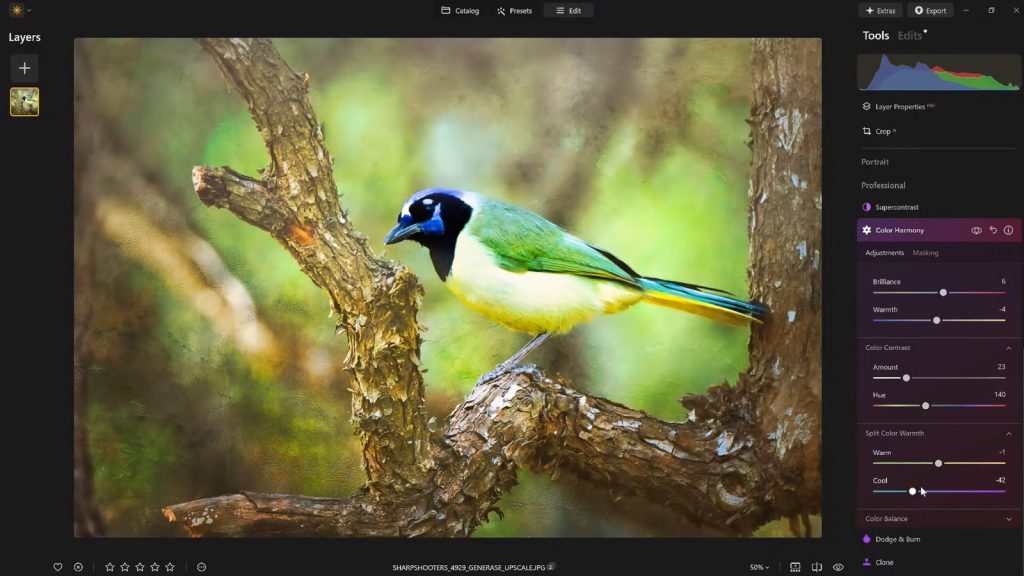
Skylum’s Luminar Neo, a prominent player in AI-powered photo editing, introduces a robust yet often overlooked capability designed precisely for this purpose: Color Harmony. This feature, strategically located within the Professional Tools section, can be easily missed by users focused on more overt adjustments. However, once understood and utilized, Color Harmony swiftly establishes itself as an indispensable module for meticulously refining an image’s overall tone, contrast, and color balance, providing photographers with a precision previously requiring more complex workflows.

The digital photography market has witnessed a significant shift towards intuitive, AI-driven editing tools that democratize advanced techniques. According to recent industry analyses, the global photo editing software market size was valued at approximately USD 950 million in 2022 and is projected to grow at a compound annual growth rate (CAGR) of over 8% from 2023 to 2030, driven by the proliferation of digital content and the increasing demand for professional-grade results from both amateur and professional photographers. Skylum, with its focus on AI integration and user experience, has carved out a significant niche in this expanding market. Luminar Neo, first launched in February 2022, represents a continued evolution in Skylum’s product line, building upon the foundations of previous Luminar iterations by incorporating a modular engine and advanced AI capabilities designed to streamline and enhance the editing process. The Color Harmony tool, while perhaps less flashy than some of Neo’s AI sky replacements or portrait enhancements, speaks to a deeper understanding of photographic artistry—the power of subtle color interaction.
The Unseen Power of Color Harmony in Digital Post-Processing
Color Harmony is not engineered for dramatic, overarching transformations; rather, its strength lies in introducing granular control over how colors interact and relate across an entire image. This suite of controls—Brilliance, Warmth, Color Contrast, Split Warmth, and Color Balance—empowers photographers to fine-tune their work with an unprecedented degree of precision. Each component of the Color Harmony tool is designed to work synergistically, guiding the viewer’s eye, emphasizing the primary subject, and ultimately forging a cohesive visual narrative that aligns perfectly with the intended mood and inherent lighting of the scene. This approach contrasts sharply with broader saturation or vibrance adjustments, which can often lead to unnatural or overprocessed results. The philosophy behind Color Harmony aligns with a growing trend in post-processing education, which advocates for subtle, localized enhancements over global, heavy-handed edits.
Brilliance and Warmth: Sculpting Mood with Nuance
The journey into Color Harmony often begins with Brilliance. Unlike standard saturation sliders that indiscriminately boost all colors, Brilliance allows for a more refined increase or decrease in color vibrancy. A slight positive adjustment can infuse colors with a richer, more profound tone, enhancing natural detail without pushing the image into an artificial or garish aesthetic. The key, as emphasized by many photography educators, is restraint; over-application can quickly detract from the image’s authenticity. This tool is particularly effective for landscapes, where the goal is often to enhance the natural richness of foliage or skies without making them appear hyper-real. For instance, in a forest scene, increasing brilliance can make greens appear lusher and browns more earthy, drawing the viewer deeper into the environment.

Warmth operates on a similar principle of gentle refinement, influencing the overall color temperature of the image. Shifting the slider to the right introduces a subtle golden glow, evoking feelings of warmth, comfort, or a late afternoon sun. Conversely, moving it to the left cools the image, imparting a bluish cast that can convey serenity, chill, or a sense of early morning light. The judicious application of warmth is crucial for aligning the image’s emotional tone with its visual content. A sunset portrait, for example, benefits from a touch of added warmth to enhance the golden hour glow, while a winter landscape might gain atmospheric depth from cooler tones. The subtle nature of this adjustment ensures that the change in temperature enhances the scene’s mood rather than overwhelming it with an artificial color cast. These controls underscore Skylum’s commitment, as inferred from their product development, to providing tools that support artistic expression without requiring extensive technical expertise in color theory.
Mastering Color Contrast and Split Warmth for Enhanced Depth
Color Contrast serves a distinct purpose within the Color Harmony suite by increasing the visual tension and separation between different color ranges, particularly in the interplay between highlights and shadows. When applied judiciously, this tool can significantly enhance the perception of depth within an image, making elements stand out more prominently without resorting to harsh, localized contrast adjustments. This is invaluable in complex scenes where subjects might blend into their backgrounds. For example, in a nature photograph featuring a subject with specific colors against a similarly toned backdrop, Color Contrast can subtly differentiate these elements, allowing the main subject to command more attention. It works by subtly pushing complementary colors apart or accentuating existing color differences, leading to a more dynamic and engaging visual experience. Professional photographers often employ similar techniques manually through careful color grading, but Luminar Neo streamlines this process into an intuitive slider.
Split Warmth represents a more advanced, yet equally powerful, control for manipulating warm and cool tones independently across an image. This feature is particularly beneficial in intricate lighting scenarios or for creating intentional color separation in compositions that feature multiple layers or depth. Imagine a scene with warm foreground elements and cooler background tones; Split Warmth allows the photographer to fine-tune these distinctions, enhancing the sense of atmospheric perspective or creating a specific color palette that reinforces the image’s narrative. While not every photograph necessitates its application, for those complex compositions where precise tonal separation is desired, Split Warmth proves indispensable. It offers a level of control that mirrors traditional split toning techniques but within an accessible interface, reflecting the ongoing trend in photo editing software to make sophisticated adjustments available to a broader user base. The ability to isolate and adjust these tonal ranges separately provides immense creative flexibility, moving beyond simple global adjustments to highly targeted color manipulation.

Color Balance: Granular Control for Consistent Grading
The Color Balance tool within Luminar Neo’s Color Harmony module offers perhaps the most granular control over color tones, providing independent adjustments for shadows, midtones, and highlights. This segmented control is crucial for achieving specific atmospheric effects and ensuring consistent color grading across an entire series of photographs. By shifting the midtones subtly towards warmer or cooler hues, a photographer can transform a landscape from stark to inviting, or adjust a portrait to achieve a more neutral and flattering skin tone. This level of control is paramount for professional workflows, where maintaining a cohesive visual identity across multiple images—whether for a client project or a personal portfolio—is essential.
For example, a wedding photographer might use Color Balance to subtly infuse cooler tones into the shadows of an indoor reception shot while keeping highlights neutral, creating a sophisticated and consistent look across their entire gallery. Conversely, a travel photographer might warm up the midtones of a series of street scenes to evoke a sense of vibrancy and cultural richness. The ability to target specific tonal ranges for color adjustment is a hallmark of professional-grade editing and significantly contributes to the overall polish and emotional impact of an image. Once mastered, Color Balance becomes an indispensable tool for establishing and maintaining a signature aesthetic, serving as a powerful bridge between technical correction and artistic expression. The chronological development of such tools, from basic global sliders to segmented controls, highlights the continuous refinement in photo editing software to meet increasingly sophisticated creative demands.
Guiding the Viewer’s Eye with Strategic Vignetting
Once the intricate color adjustments have been meticulously applied, another subtle but profoundly effective technique comes into play: vignetting. A vignette, when employed thoughtfully, serves to subtly draw the viewer’s attention directly towards the primary subject. By strategically darkening the edges of the frame and, critically, introducing a touch of "Inner Light" in the center, the composition naturally funnels the viewer’s gaze inward. This creates a visual spotlight, enhancing focus and emphasis without the need for heavy masking or complex local adjustments.

Historically, vignetting was often an optical aberration of lenses, but it quickly became an artistic tool. In digital editing, it allows photographers to manipulate visual hierarchy. Luminar Neo’s implementation offers refined control, allowing users to adjust the amount, size, roundness, and feathering of the vignette, as well as the intensity of the Inner Light. This precision ensures that the effect enhances storytelling without ever overtly calling attention to itself. A well-executed vignette is a quiet yet powerful method for directing the viewer’s experience, adding depth and a sense of professionalism to the final image. This feature, when combined with Color Harmony, ensures that not only are the colors emotionally resonant, but the composition also effectively communicates its intended message.
Workflow Efficiency: The Indispensable Role of Presets
After investing the time and creative energy to meticulously dial in the perfect look for an image using Color Harmony and other tools, the ability to save this precise configuration as a custom preset becomes an invaluable asset. This practice serves multiple critical functions beyond mere convenience: it ensures a consistent editing style across an entire body of work, significantly streamlines workflow for future projects, and preserves the ability to revisit and refine the image or apply the same aesthetic to others in a series with ease.
Reapplying a saved preset to other images, particularly those captured under similar conditions or as part of the same photographic series, provides an immediate baseline for future edits. This not only saves considerable time but also fosters a cohesive visual narrative across a portfolio or client delivery. Furthermore, the creation of presets supports an iterative and reflective editing process. It is a common experience for photographers, after stepping away from an intensely edited image for a period, to return with fresh eyes and identify areas where the edit might have been pushed too far. With a saved preset, the original effect can be reapplied at a reduced strength—for instance, 70-80% of its original intensity—allowing for subtle adjustments that maintain the core aesthetic while softening any over-editing. This iterative refinement capability is crucial for achieving truly polished and timeless results, highlighting the importance of a flexible and non-destructive workflow.

A Finishing Touch That Defines Excellence
Ultimately, what truly distinguishes a compelling image from a merely good one is rarely a single dramatic alteration. Instead, it is the cumulative effect of a handful of carefully considered and subtly applied enhancements. Luminar Neo’s Color Harmony feature, in conjunction with judicious vignetting and a thoughtful, iterative editing approach, provides the essential toolkit for achieving this level of refinement. These tools collaboratively add depth, inject emotion, and forge a strong visual cohesion that elevates the photograph beyond its initial technical merits.
For photographers who aspire to add a professional polish to their work without falling into the trap of overprocessing, these finishing tools within Luminar Neo offer an optimal balance of precise control and creative freedom. They empower users to move beyond generic edits, allowing for a personalized touch that reflects their unique artistic vision. The accessibility of such advanced color grading and compositional guidance tools within Luminar Neo underscores Skylum’s continued commitment to innovating within the photo editing software space, making professional-grade results attainable for a broader audience. This strategic development positions Luminar Neo not just as a competitor, but as a leader in democratizing sophisticated post-processing techniques.
As an added incentive for those looking to explore these advanced capabilities, Skylum is currently offering a special promotion: users can receive 10% off Luminar Neo with the code NATURETTL at checkout.
About the Author
Vanelli, the Director of Education at Skylum, is a highly respected photographer, educator, and author based in Florida. His diverse background includes a notable transition from a Triple Crown Karate champion to a leading voice in visual arts education. Vanelli is instrumental in developing comprehensive educational content and courses focused on photo editing, sharing his expertise with industry leaders and aspiring photographers alike. He is a sought-after speaker at major photography conferences, where he delivers engaging presentations on various aspects of photography and post-processing. His contributions to the field are extensive, encompassing numerous articles, insightful educational videos, and his role as host of the widely acclaimed Luminar Coffee Break show, all of which reflect his deep understanding and passion for the craft.