The modern photography landscape is characterized by a persistent tension between the high-speed demands of digital delivery and the aesthetic nuances of traditional craftsmanship. For professional photographers, the post-processing phase often becomes a battleground of repetitive tasks, where the creative vision is frequently sidelined by the technical limitations of industry-standard software. In response to these systemic inefficiencies, Stuttgart-based photographer and developer Michael has introduced a suite of macOS applications—BorderTool Pro and BatchMark Pro—designed to bridge the gap between technical automation and artistic intent. Michael, an official Fujifilm X-Photographer who has operated a commercial studio since 2007, represents a growing demographic of "creator-developers" who leverage their intimate knowledge of professional workflows to build bespoke software solutions.
The Professional Context: From Commercial Studio to Software Development
The genesis of these tools lies in the practical realities of a high-volume commercial photography business. Michael’s career in Stuttgart has spanned nearly two decades, encompassing event coverage, corporate portraiture, and high-end advertising work. Beyond his commercial practice, he serves as a mentor through local photography workshops and hosts the "Coffee and Cameras" podcast, a German-language program focused on the intersection of gear and technique. This multifaceted engagement with the photographic community provided the necessary insights to identify critical gaps in the existing software ecosystem.
The transition from photographer to developer was driven by a fundamental dissatisfaction with the "Photoshop route" for finishing images. In a professional environment, tasks such as adding specific border styles or complex watermarks are often handled through actions or scripts. However, these methods frequently lack flexibility and can be prone to failure when faced with varying aspect ratios or high-resolution files. Michael’s approach was to view these workflow hurdles as engineering puzzles, eventually leading to the development of standalone applications optimized for the macOS environment.
BorderTool Pro: Reclaiming the Aesthetic of the Physical Print
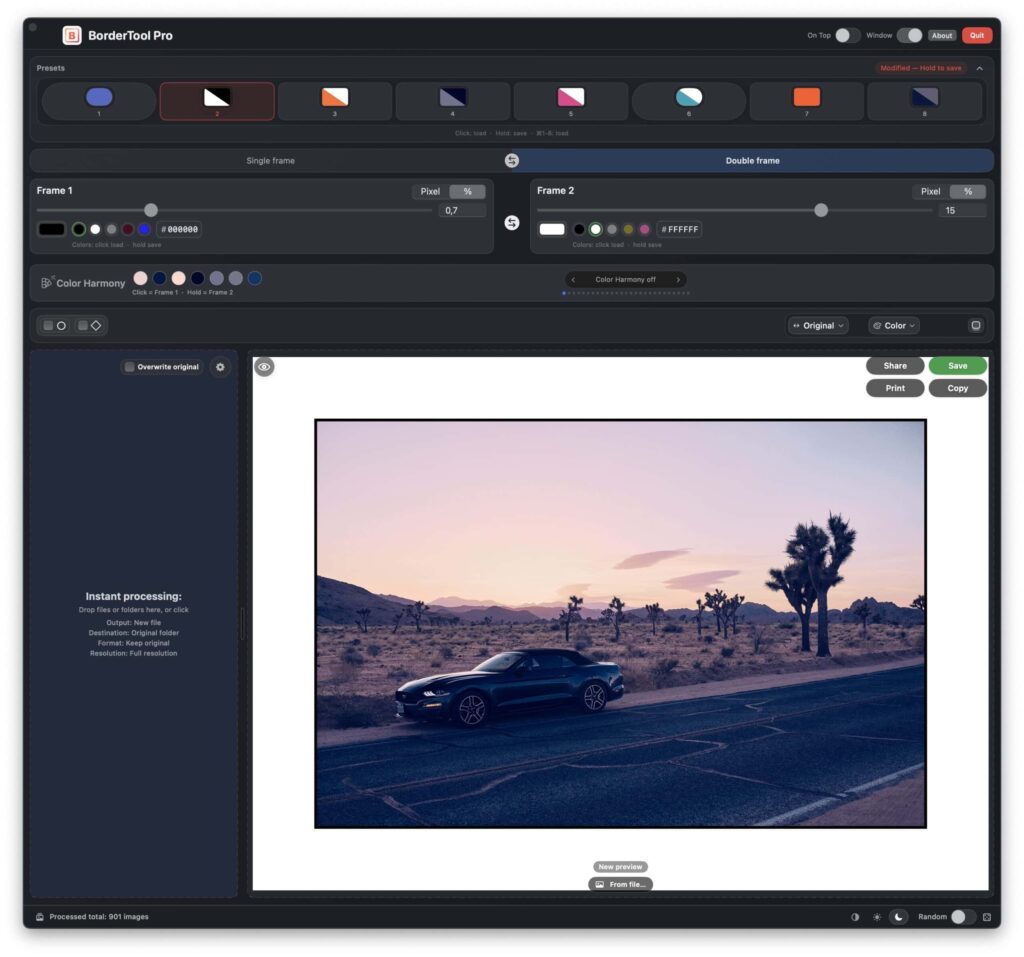
One of the most significant challenges in digital photography is replicating the "objecthood" of a physical print. For many practitioners, particularly those with a background in analog film, the frame is not merely a decorative addition but a structural component of the image. BorderTool Pro was developed to automate the application of sophisticated framing options that typically require labor-intensive manual work in Adobe Photoshop or Capture One.
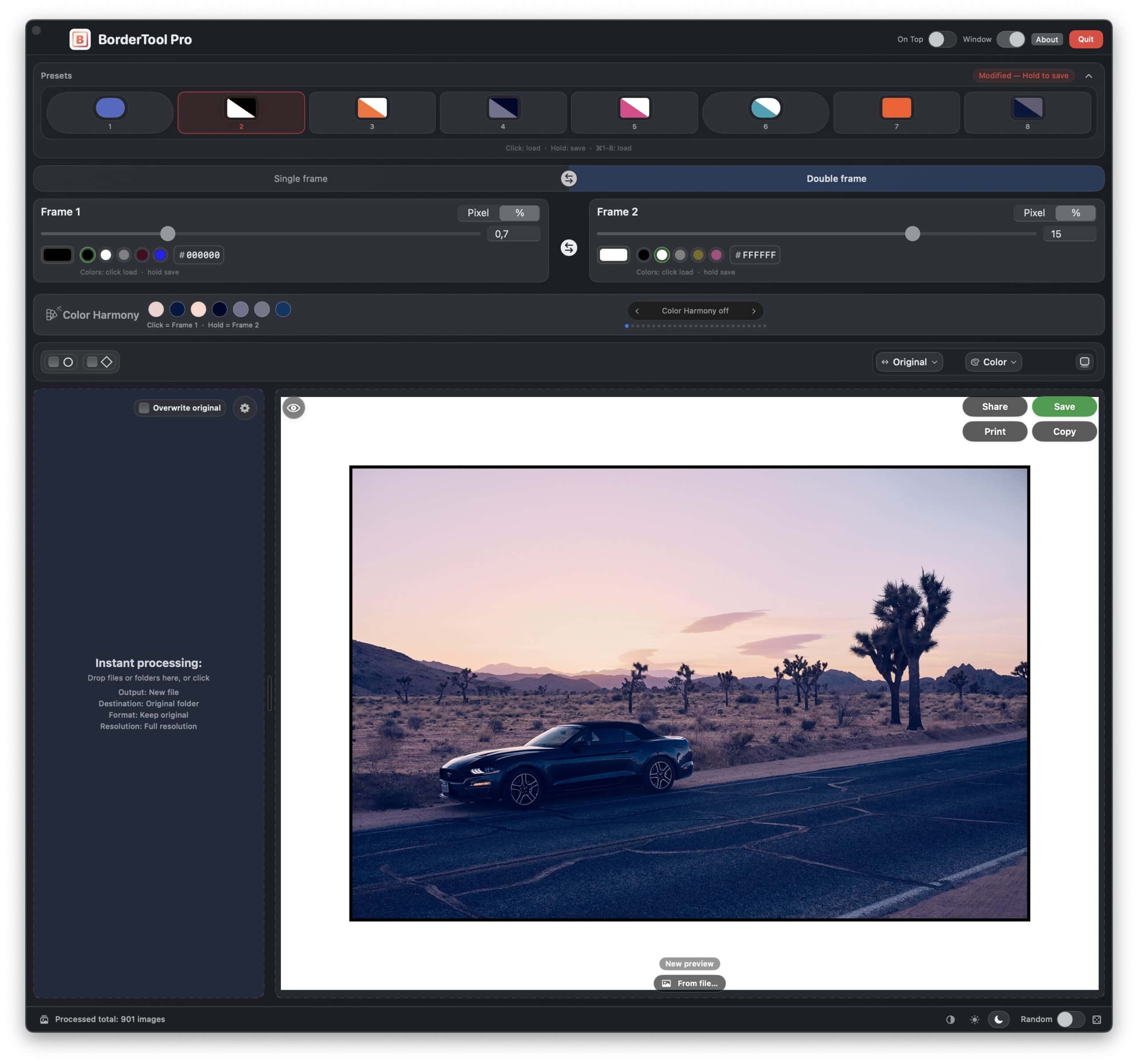
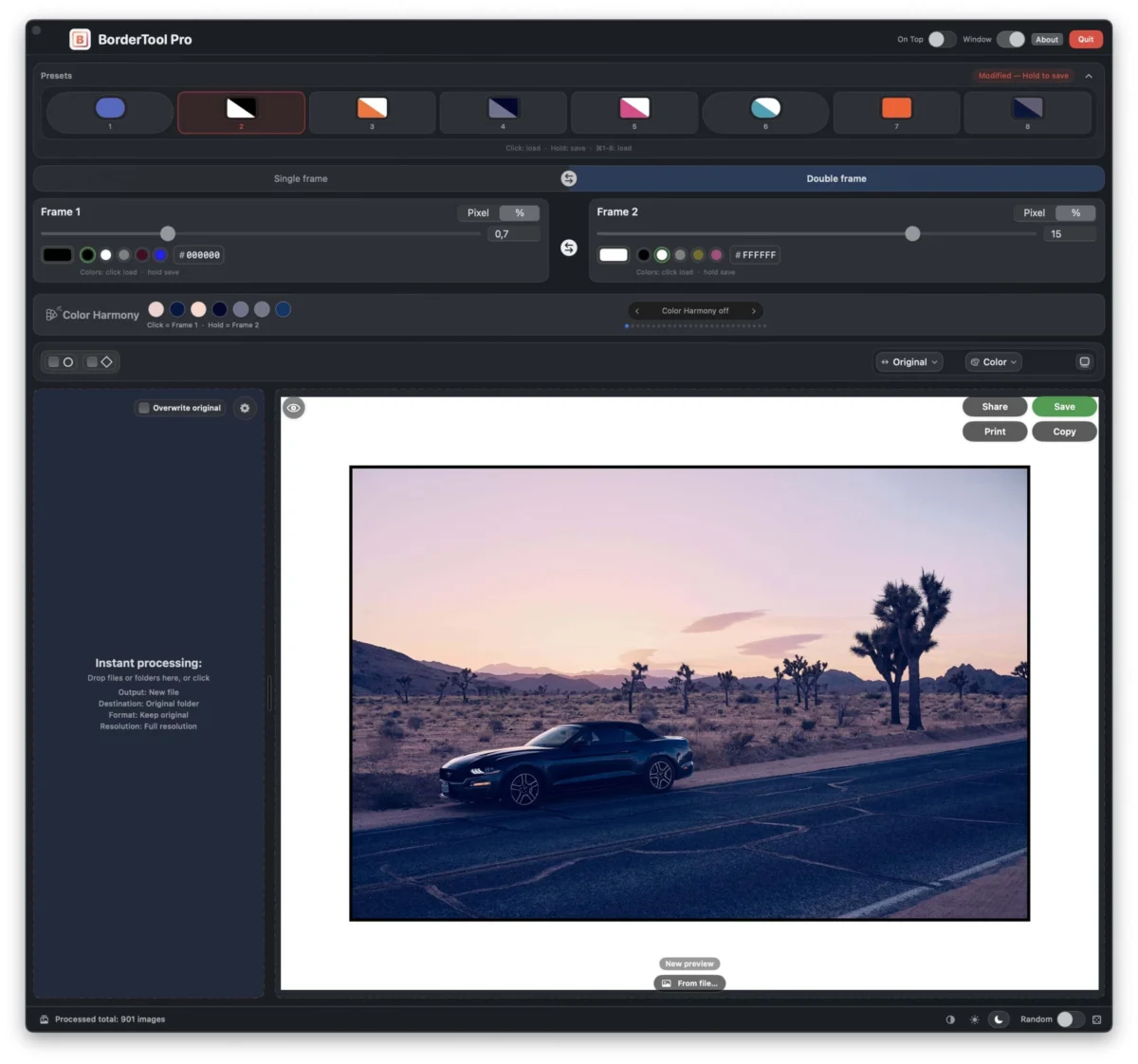
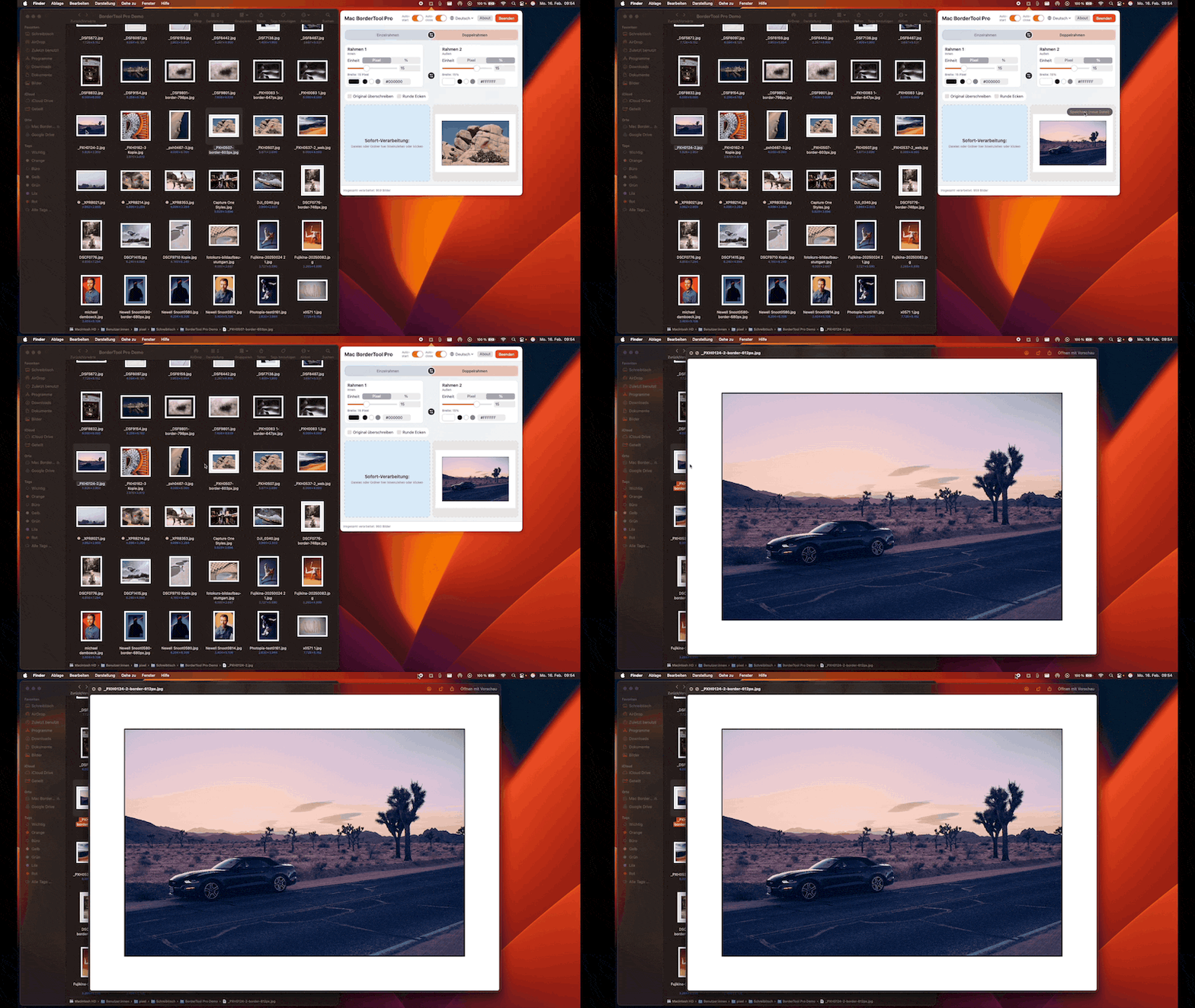
The application, which resides in the Mac menu bar, facilitates a streamlined "drag-and-drop" workflow. It supports a variety of framing styles, including single and double borders, the classic "passepartout" mat effect used in gallery exhibitions, and a specialized Polaroid mode that replicates the asymmetrical base of instant film. The technical architecture of the app allows it to function as a standalone window or as an integrated component of the export process in professional RAW converters. By utilizing the "Open With" functionality in Capture One and Lightroom, photographers can automate the framing process, ensuring that every exported JPEG or TIFF arrives in its final folder with the desired border already applied.
Innovation in Color Theory: The Color Harmony Engine
A standout feature of BorderTool Pro is its "Color Harmony" analysis tool. In traditional darkroom printing, the choice of a mount or frame is often dictated by the tonal values within the photograph. Michael integrated this logic into the software, allowing the app to analyze each image in a batch to derive optimal border colors. The engine can identify dominant tones, vibrant accents, or average colors sampled directly from the edges of the frame.
This algorithmic approach ensures that a batch of diverse images—such as a series from a wedding or a corporate event—does not receive a "one-size-fits-all" border. Instead, the software dynamically adjusts the frame color to complement the specific palette of each individual file. This feature addresses a common criticism of automated framing tools, which often produce sterile or clashing results.
BatchMark Pro: Solving the Scalability of Digital Watermarking
While watermarking is a standard requirement for copyright protection and branding, its implementation at scale is notoriously cumbersome. Existing tools in Adobe Lightroom Classic are often criticized for their lack of flexibility, typically offering only a single text field or limited logo positioning. BatchMark Pro was engineered to provide a multi-layered environment where photographers can stack various elements, including SVG and PNG logos, copyright text, and dynamic metadata.
The application’s layer editor supports nine anchor points and a free-offset system, allowing for precise placement regardless of the image’s orientation or aspect ratio. Furthermore, the inclusion of SVG support ensures that logos remain tack-sharp even when applied to ultra-high-resolution files, such as those produced by medium-format digital systems or high-end scanners.
The Metadata Dilemma: A Tool for Analog Archivists
Perhaps the most specialized feature of BatchMark Pro is its integration of EXIF (Exchangeable Image File Format) variables. This functionality is particularly relevant to the burgeoning community of film photographers who digitize their negatives. When a film negative is scanned, the resulting digital file’s metadata typically reflects the scanner’s technical specifications rather than the original camera and film stock used.
BatchMark Pro allows users to pull from 40 different EXIF placeholders and combine them with custom text. A photographer can create a preset that automatically reads the file’s metadata but overlays custom text such as "Leica M6 • Summicron 35mm • Kodak Portra 400." This creates a seamless way to "re-tag" images during the export process, ensuring that the final digital asset carries the correct historical and technical information.
Development Chronology and Community Integration
The trajectory of BorderTool Pro and BatchMark Pro reflects a modern "agile" development cycle, where user feedback directly dictates the feature set. Following the initial release, the apps garnered attention from major industry publications, including PetaPixel, which characterized the software as "high-end digital framing."
A chronological review of the software’s updates reveals a high level of responsiveness to professional needs:
- Initial Launch: The tools were originally developed for Michael’s internal studio use to handle batch exports for event photography.
- HEIC Integration: Following user requests for iPhone compatibility, HEIC support was integrated and shipped within four days of the initial query.
- UI Scaling: After feedback from users operating 5K and Pro Display XDR monitors, the live preview engine was overhauled to support larger, high-resolution previews.
- Localization: To accommodate a global user base, the applications have been translated into twelve languages, including English, German, and French.
The developer’s commitment to a direct feedback loop—responding personally to every user message without an automated ticketing system—has been a key factor in the software’s adoption among commercial photographers in North America and Europe.
Economic Implications: The Rise of the One-Time Purchase Model
The release of these tools comes at a time of increasing "subscription fatigue" within the creative industry. Many photographers have expressed frustration with the Software-as-a-Service (SaaS) model pioneered by Adobe and followed by other major players. BorderTool Pro and BatchMark Pro are positioned as one-time purchases (€39 each), a move that Michael describes as essential for sustainability while remaining fair to the community.
This pricing strategy reflects a broader trend in the macOS ecosystem, where independent developers are finding success by offering high-utility, specialized tools that do not require recurring monthly fees. For a professional studio, the cost of the software is often recouped through the time saved in a single high-volume project.
Broader Impact on the Professional Workflow
The implications of these tools extend beyond mere time-saving. By automating the "finishing" stage of photography, they allow practitioners to maintain a consistent brand identity across all platforms, from Instagram and personal portfolios to client delivery galleries. The ability to run these processes entirely offline—with the exception of optional GPS reverse-lookup features—also addresses growing concerns regarding data privacy and the security of proprietary visual assets.
In an era where "AI-driven" features often dominate the headlines, BorderTool Pro and BatchMark Pro represent a different philosophy: the refinement of the manual workflow through thoughtful engineering. They do not attempt to replace the photographer’s eye but rather to provide a more efficient vehicle for the photographer’s intent. As the boundary between professional photography and software development continues to blur, tools like these serve as a blueprint for how independent creators can solve the specific frustrations of their own industries.
The success of these applications suggests a robust market for "boutique" software—tools that do one thing exceptionally well, integrated into the existing professional infrastructure of macOS, Lightroom, and Capture One. For the photography community, this represents a shift toward more personalized, responsive, and aesthetically conscious digital tools.