The burgeoning landscape of digital media has ushered in an era where video content reigns supreme, captivating audiences across social platforms, corporate communications, educational platforms, and cinematic productions. As accessibility to sophisticated camera technology expands, a growing number of individuals are transitioning from still photography to the dynamic world of videography, often encountering a distinct set of challenges unique to motion picture capture. Following our recent discourse on rectifying common photographic missteps, this extensive analysis delves into prevalent videography issues, providing actionable, industry-backed solutions to elevate production quality and mitigate common pitfalls.
The Ascent of Video Content and Its Technical Demands
The proliferation of high-definition cameras in smartphones and increasingly affordable mirrorless and DSLR systems has democratized video production, allowing enthusiasts and aspiring professionals to capture compelling visual narratives. However, the technical demands of moving images extend beyond mere exposure and composition. Unlike still photography, video introduces complexities related to temporal consistency, continuous audio capture, and post-production workflows that can significantly impact the final output. Understanding and preemptively addressing these technical hurdles is crucial for anyone aiming to produce polished, professional-grade video content. This article will systematically explore four primary challenges: camera stabilization, audio fidelity, color management, and motion smoothness, offering detailed solutions informed by industry best practices.
Tackling Unstable Footage: The Imperative of Camera Stabilization
One of the most immediate and glaring issues that new videographers confront is shaky footage. The human body, despite its remarkable dexterity, is inherently incapable of holding a camera perfectly still for extended periods, especially when attempting dynamic movements such as pans, tilts, or tracking shots. This inherent instability often results in jarring, unprofessional video that can induce motion sickness in viewers and significantly detract from the content’s perceived quality. While modern cameras often incorporate advanced built-in image stabilization systems (both optical and in-body), these technologies serve as aids rather than comprehensive solutions for all scenarios. For truly smooth, cinematic motion, dedicated stabilization equipment is indispensable.
Understanding Stabilization Technologies:
Camera stabilization has evolved significantly, from mechanical behemoths like the Steadicam, which revolutionized filmmaking in the 1970s, to today’s compact electronic gimbals. The core principle across these systems is to isolate the camera from unwanted movements.
- Built-in Image Stabilization (IBIS/OIS): Many contemporary cameras feature in-body image stabilization (IBIS) or optical image stabilization (OIS) within lenses. IBIS works by physically shifting the camera’s sensor to counteract movement, while OIS moves lens elements. These are highly effective for minor shakes and handheld static shots but struggle with larger, more deliberate camera movements.
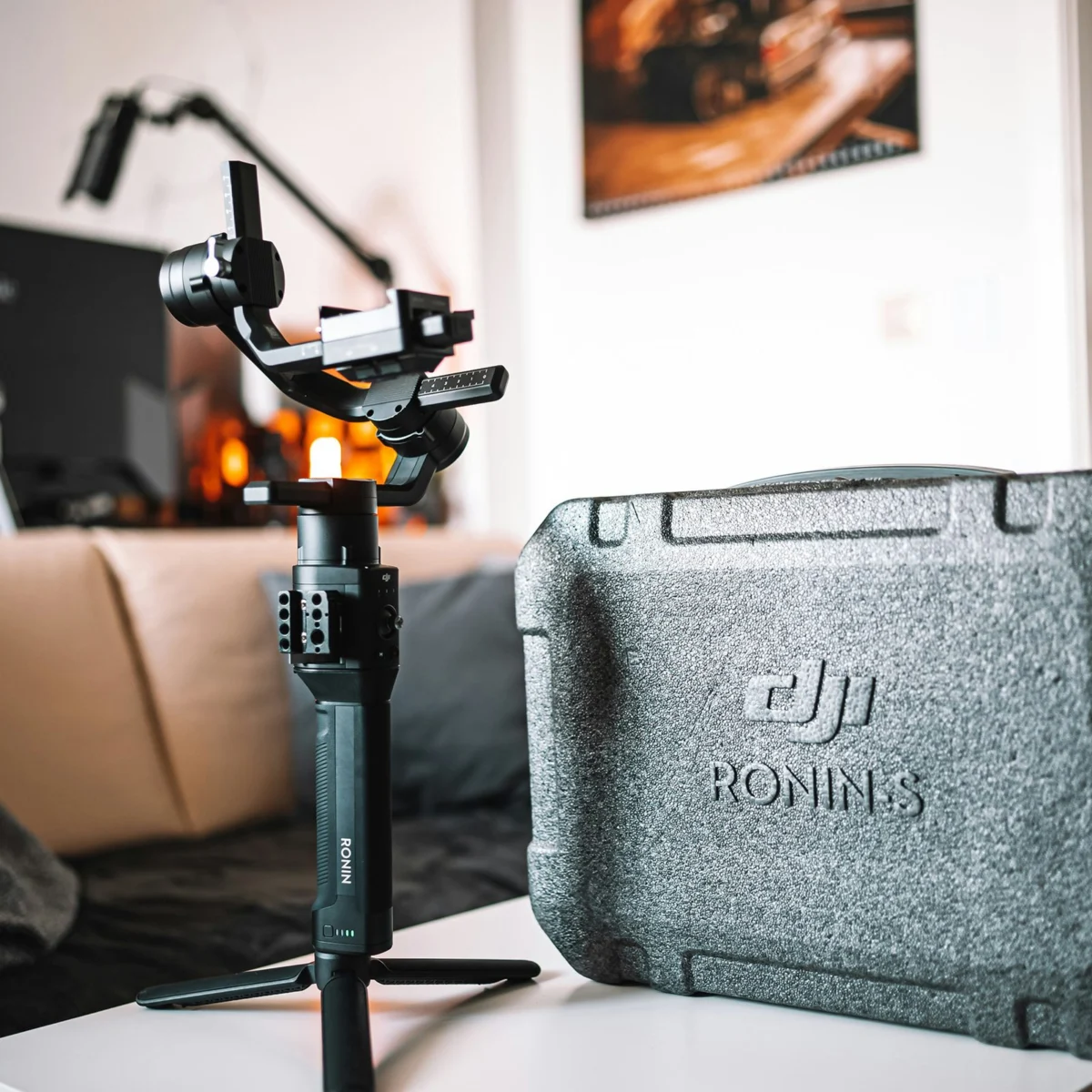
- Electronic Gimbals: These devices utilize brushless motors and sophisticated algorithms across three axes (pitch, roll, and yaw) to actively counteract camera movement, keeping the lens perfectly level and smooth regardless of the operator’s motion. The market offers a wide spectrum of gimbals tailored to different camera sizes and budgets. For smartphone videographers, systems like the DJI Osmo Mobile series provide accessible, high-performance stabilization, allowing for fluid pans, tilts, and even advanced tracking features without significant financial outlay. For users with smaller mirrorless camera systems, the DJI Ronin-SC represents an affordable yet robust option, capable of handling payloads up to 4.4 lbs (2 kg) and offering precise control. Stepping up to heavier professional mirrorless or DSLR setups, the DJI Ronin-S is a recommended choice for cameras weighing over 4.5 pounds (2 kg), providing enhanced motor torque and stability for more demanding cinematic applications.
- Body Rigs and Tripods: For long shooting days or very heavy camera packages, systems like the Easyrig Vario 5 redistribute the camera’s weight from the operator’s arms to their hips, back, and legs, reducing fatigue and allowing for more stable handheld-style shots over extended periods. While gimbals excel in dynamic movement, the fundamental tool for static and controlled movement remains the tripod. Investing in a sturdy tripod equipped with a fluid head (tilt-pan head) is critical for achieving perfectly level, shake-free static shots, as well as smooth, controlled pans and tilts. Fluid heads provide adjustable drag, allowing for consistent, professional-looking camera movements that are impossible to achieve consistently by hand.
Implications of Poor Stabilization:
The impact of shaky footage extends beyond mere aesthetics. Studies in viewer psychology suggest that unstable video can lead to cognitive fatigue and a diminished sense of professionalism, potentially causing viewers to disengage. For businesses, poor video quality can undermine brand credibility. For independent creators, it can hinder audience growth and perception of content value. Conversely, smooth, intentional camera movement enhances storytelling, guides the viewer’s eye, and elevates the production’s overall cinematic quality, directly contributing to viewer retention and message efficacy.
The Unseen Power: Elevating Audio Fidelity
While stunning visuals often grab initial attention, it is often superior audio that maintains viewer engagement. A common, yet critical, mistake novice videographers make is underestimating the importance of sound, often relying solely on the camera’s built-in microphone. These integrated microphones are generally designed for convenience rather than quality, offering limited dynamic range, susceptibility to ambient noise, and a flat, often tinny sound profile. The devastating realization of inadequate audio frequently occurs in post-production, rendering otherwise excellent footage unusable. Addressing audio quality proactively is paramount.
The Primacy of External Microphones and Dedicated Recorders:
The adage "bad audio ruins good video" holds profound truth in the media production industry. Professional videography mandates the use of external audio recording solutions.
- Lavalier Microphones: For interview-style content, podcasts, or situations requiring clear, isolated dialogue, lavalier (lapel) microphones are ideal. These small, omnidirectional microphones clip discreetly onto clothing, positioning them close to the speaker’s mouth to capture direct audio while minimizing room echo and ambient noise. Wireless lavalier systems, such as the Sennheiser G4 or the more compact DJI Mic 2, offer flexibility and freedom of movement for subjects, making them staples in documentary, corporate, and journalistic videography.
- Shotgun Microphones: When the objective is to capture the ambient sound of a scene, record dialogue from a distance, or focus on a specific sound source within a wider shot, a directional shotgun microphone is the preferred tool. Mounted on a camera (like the RODE VideoMic Pro Plus), on a boom pole, or a stand, these microphones isolate sound from the direction they are pointed, effectively rejecting off-axis noise. This makes them invaluable for capturing natural soundscapes, foley, and dialogue in dynamic environments.
- Dedicated Audio Recorders: To ensure the highest fidelity and provide greater control over audio levels, investing in a dedicated audio recorder, such as the Zoom H6 or H4n Pro, is highly recommended. These portable devices offer multiple input channels, professional-grade preamps, and advanced recording features that far surpass the capabilities of most camera audio inputs. Recording audio separately provides a crucial layer of redundancy and allows for a more robust post-production workflow, where audio can be synchronized with video and meticulously mixed.
The Critical Role of Audio Monitoring:
Beyond selecting the right equipment, the most vital step in ensuring good audio is continuous monitoring during the shoot. A high-quality pair of headphones should be an essential part of every videographer’s kit. Monitoring audio live allows the operator to identify and troubleshoot issues like clipping, unwanted background noise, or signal dropouts immediately, preventing costly reshoots or irreversible damage to the final product. Neglecting audio monitoring is akin to shooting blind, leaving critical sound decisions to chance.
Implications of Poor Audio:
The implications of compromised audio are far-reaching. Viewers often tolerate less-than-perfect visuals more readily than poor sound. Muffled dialogue, distracting background noise, or inconsistent levels create a frustrating viewing experience, diminishing the clarity of the message and eroding the professional image of the creator or brand. In contrast, pristine audio enhances storytelling, evokes emotion, and makes content more accessible, particularly for those with hearing impairments when combined with accurate captions.

Navigating Color Science: Understanding Log Footage and Color Grading
A frequent complaint from emerging videographers is that their footage appears "grayed out," lacking contrast, vibrancy, and saturation directly out of the camera. This phenomenon is often attributed to shooting in a "logarithmic" (log) format, a sophisticated feature prevalent in professional and prosumer cameras. While initially disconcerting for those unfamiliar with it, log footage is a powerful tool designed to maximize dynamic range and provide unparalleled flexibility in post-production.
The Purpose of Log Formats:
Camera manufacturers (e.g., Sony’s S-Log, Canon’s C-Log, Panasonic’s V-Log, Fujifilm’s F-Log, Nikon’s N-Log) developed log profiles to address the inherent limitations of digital sensors in capturing the full spectrum of light and shadow detail present in a scene. By compressing the scene’s dynamic range into a relatively flat, desaturated image, log formats preserve significantly more highlight and shadow information than standard video profiles (like Rec. 709). This expanded data range means that extreme bright areas won’t "clip" to pure white, and deep shadows won’t "crush" to pure black, retaining detail that can be recovered and manipulated during color grading. The desaturation is intentional, as color saturation can be easily added back in post-production, allowing for precise control over the final look.
Post-Production Workflow: Color Grading:
The apparent "grayness" of log footage is not a flaw but a feature, demanding a dedicated post-production step known as color grading. During this process, a colorist (or the videographer themselves) uses specialized software to restore contrast, adjust exposure, balance colors, and apply creative stylistic looks.
- LUTs (Look-Up Tables): A common starting point for grading log footage is applying a Look-Up Table (LUT). Many camera manufacturers provide specific LUTs designed to transform their log footage into a standard Rec. 709 color space, providing a neutral, pleasing baseline. From there, further creative adjustments can be made.
- Dynamic Range and Bit Depth: Log recording leverages higher bit depths (e.g., 10-bit or 12-bit compared to standard 8-bit) to capture a wider range of tonal values. This expanded data allows for aggressive color grading without introducing artifacts like banding or posterization, which can occur when pushing 8-bit footage too far.
When to Use Log and When to Avoid It:
While log footage offers immense creative freedom for advanced colorists and cinematic projects, it requires a clear understanding of the post-production workflow. For projects with tight deadlines, limited post-production resources, or a desire for a quicker turnaround, shooting in a standard profile (like Rec. 709) that requires minimal grading might be more appropriate. However, for those seeking maximum control over their final image, particularly in challenging lighting conditions or when aiming for a distinct aesthetic, mastering log workflows is invaluable. Even if shot by mistake, the good news is that log footage can almost always be easily converted to a standard profile, salvaging the colors and contrast.
Ensuring Smooth Playback: Resolving Choppy Video Footage
The visual impact of video is profoundly affected by its temporal characteristics. A common frustration for new videographers is encountering footage that appears "choppy" or lacks the fluid motion expected of professional video. This issue typically stems from one of two primary technical oversights: an incorrect frame rate or insufficient data transfer speeds from storage media.
Frame Rate Fundamentals:
The frame rate (measured in frames per second, or FPS) dictates how many still images are captured and displayed sequentially each second, creating the illusion of motion.
- Standard Frame Rates:
- 24 FPS: Often considered the "cinematic" standard, providing a subtle motion blur that emulates traditional film.
- 25 FPS: Standard for PAL television broadcasts in many parts of the world.
- 30 FPS: The standard for NTSC television broadcasts (North America, Japan) and widely adopted for web content due to its smooth, natural appearance.
- Higher Frame Rates (60 FPS, 120 FPS, etc.): Used for capturing fast-paced action or for creating smooth slow-motion effects when played back at a lower frame rate.
- The 180-Degree Shutter Rule: To achieve natural-looking motion blur at a given frame rate, industry best practice dictates setting the shutter speed to double the frame rate (e.g., 1/48th or 1/50th of a second for 24 FPS). Deviating significantly from this rule (e.g., very fast shutter speeds) can result in a "staccato" or "choppy" look, even at high frame rates, as there is insufficient motion blur between frames. Conversely, very slow shutter speeds can lead to excessive blur.
- Resolution and Frame Rate: While many cameras default to 30 FPS for standard video, it’s crucial to verify settings, especially when working with different resolutions (e.g., 4K, 8K) or specialized shooting modes, which might alter the default frame rate. For general web content and broadcast, a minimum of 30 FPS is highly recommended for smooth playback.
The Role of Storage Media Speed:
The second, often overlooked, cause of choppy footage relates to the write speed of the memory card or external hard drive used for recording. Modern high-resolution, high-bitrate video generates enormous amounts of data very quickly. If the storage media cannot write this data fast enough, the camera will drop frames, resulting in visibly choppy or stuttering footage.
- Understanding Write Speeds: Memory cards and external drives are rated by their read and write speeds, typically listed in MB/s (megabytes per second). For video, the "write speed" is paramount.
- Speed Class Ratings:
- UHS Speed Class (U1, U3): Indicates a minimum sustained write speed (10 MB/s for U1, 30 MB/s for U3).
- Video Speed Class (V6, V10, V30, V60, V90): Specifically designed for video recording, guaranteeing minimum sustained write speeds (e.g., V90 guarantees 90 MB/s). These are crucial for recording 4K and 8K footage with high bitrates.
- Bus Interfaces (UHS-I, UHS-II, CFexpress): Refer to the speed of the interface between the camera and the card. UHS-II cards, with their second row of pins, offer significantly faster speeds than UHS-I. CFexpress cards represent the current pinnacle of speed, essential for raw video recording and high-bitrate codecs.
- Data Rates of Video Codecs: Different video codecs (e.g., H.264, H.265, ProRes, Raw) and resolutions have varying data rates. Recording 4K or 8K video, especially with higher bit depths (10-bit or 12-bit) and less compressed codecs, demands exceptionally fast media. Always consult your camera’s manual for recommended memory card specifications based on your desired recording settings.
- Recommendation: There is no disadvantage to purchasing the fastest memory card or hard drive available, assuming it is compatible with your camera. Faster media ensures reliable recording, accommodates future upgrades to higher resolutions or bitrates, and significantly speeds up data transfer during the offloading process.
Implications of Choppy Footage:
Choppy footage is immediately noticeable and severely degrades the professional appearance of any video. It disrupts the viewer’s immersion, makes action difficult to follow, and conveys a lack of technical proficiency. Resolving this issue ensures a smooth, engaging viewing experience, crucial for maintaining audience attention and effectively communicating the intended message.
Concluding Thoughts: Elevating Your Videography Journey
The journey into videography, whether as a hobbyist or an aspiring professional, is one of continuous learning and technical refinement. The challenges of shaky footage, poor audio, mystifying log formats, and choppy playback are common initial hurdles, but they are entirely surmountable with the right knowledge and tools. By investing in appropriate stabilization equipment, prioritizing external audio solutions, understanding the nuances of color management, and meticulously checking frame rates and storage media speeds, videographers can dramatically elevate the quality of their productions. These foundational technical competencies are not merely about achieving a polished aesthetic; they are about enhancing storytelling, strengthening audience engagement, and ultimately, communicating more effectively through the powerful medium of video. As the demand for high-quality video content continues its upward trajectory, mastering these core principles will serve as an indispensable asset in any creative or professional endeavor.