The evolution of mobile photography has reached a threshold where the distinction between professional digital single-lens reflex (DSLR) cameras and high-end smartphones is increasingly narrow. Central to this professional aesthetic is the "bokeh" effect—a Japanese term referring to the aesthetic quality of the out-of-focus blur in a photograph. For years, achieving a shallow depth of field was the exclusive domain of expensive lenses with wide apertures. However, through a combination of sophisticated hardware and advanced computational photography, Apple has democratized this technique, allowing iPhone users to produce stunning portraits with creamy, blurred backgrounds. This report examines the primary methods for achieving background blur on the iPhone, the technological history of these features, and the broader impact of mobile imaging on the photography industry.
The Technological Evolution of iPhone Depth Sensing
The journey toward professional-grade background blur on the iPhone began in earnest in 2016 with the release of the iPhone 7 Plus. This device was the first in Apple’s lineup to feature a dual-lens camera system, which utilized a wide-angle lens and a telephoto lens in tandem to create a rudimentary depth map. This allowed the "Portrait Mode" feature to identify the subject and artificially blur the background using software algorithms.
In 2017, the iPhone X introduced the TrueDepth camera system, which used infrared dots to map the contours of a human face, significantly improving the accuracy of the blur on the front-facing camera. By 2018, with the release of the iPhone XS and XR, Apple introduced "Depth Control," enabling users to adjust the intensity of the background blur after the photo had been taken. This was a landmark achievement in computational photography, as it simulated the physical adjustment of a lens aperture through software.
The most recent leap occurred with the introduction of the LiDAR (Light Detection and Ranging) scanner on the iPhone 12 Pro and subsequent Pro models. LiDAR measures depth by timing how long it takes for light to reflect back from objects, allowing for instantaneous and highly accurate depth mapping, even in low-light conditions where traditional contrast-based autofocus systems often fail.
Utilizing Portrait Mode for Instant Background Blur
Portrait Mode remains the most efficient method for capturing photos with a blurred background. This mode is currently available on a wide range of devices, including the iPhone 7 Plus, 8 Plus, X series, 11 series, 12 series, 13 series, 14 series, and the latest iPhone 15 models.
Step-by-Step Execution
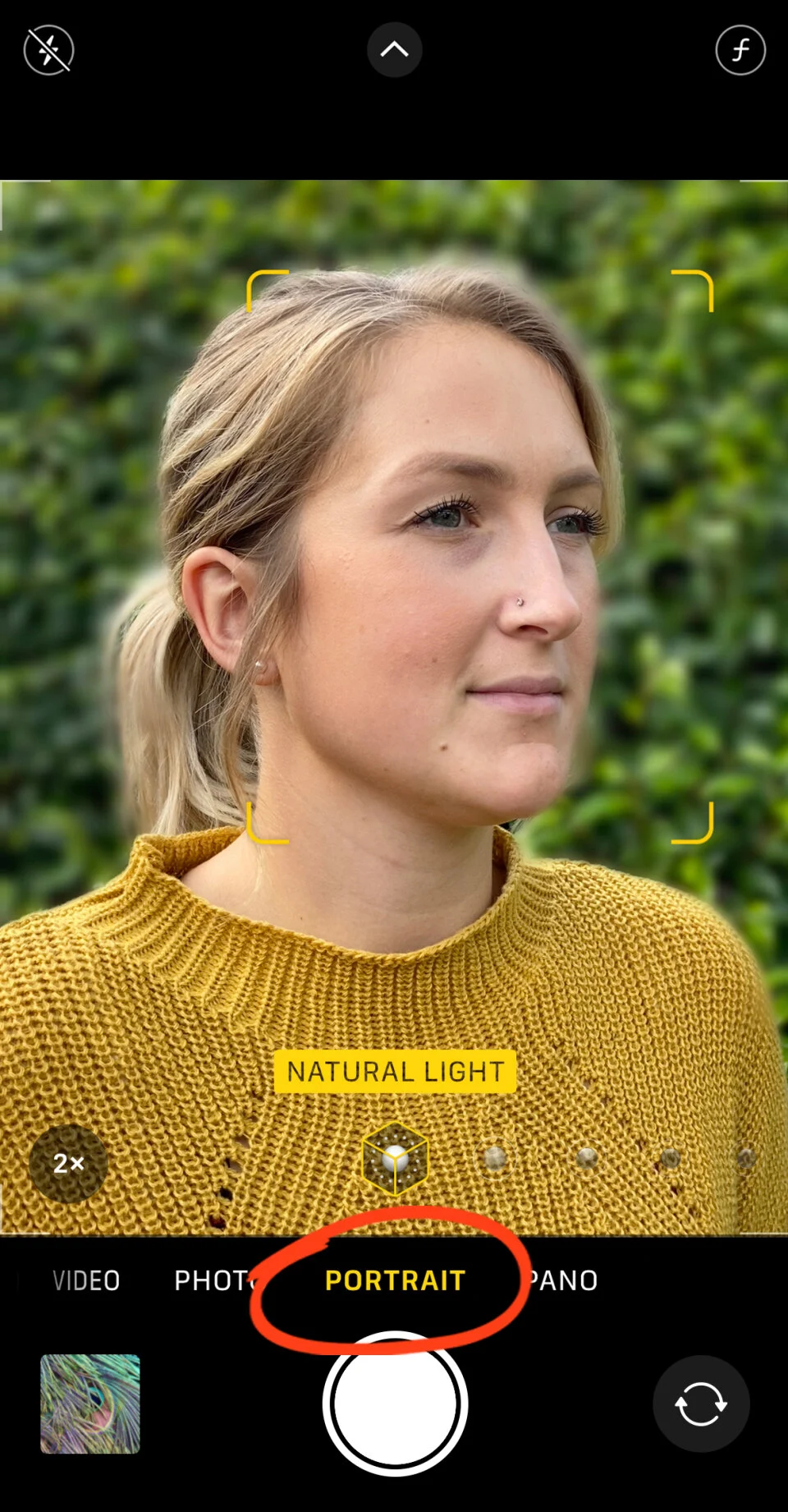
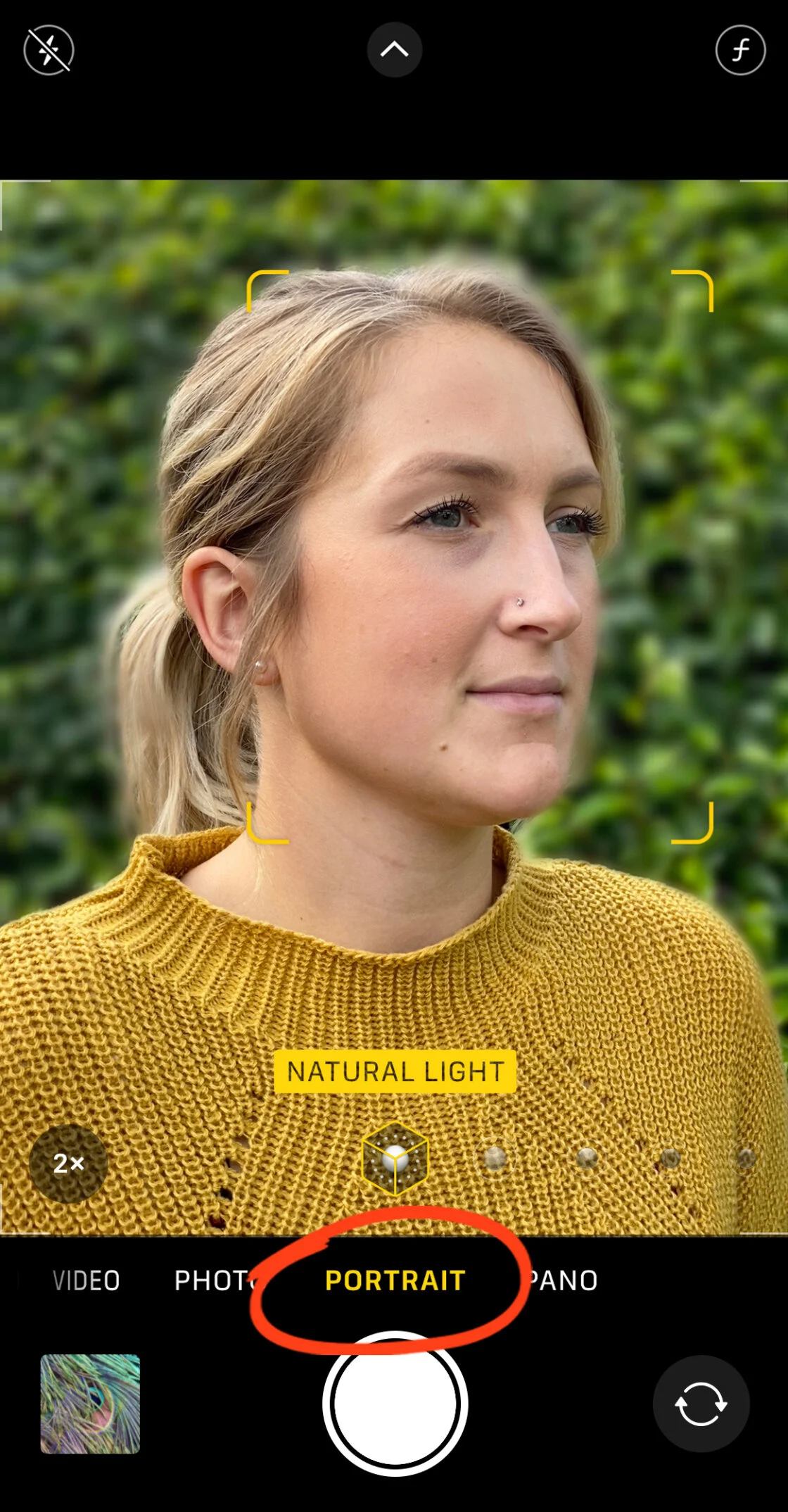
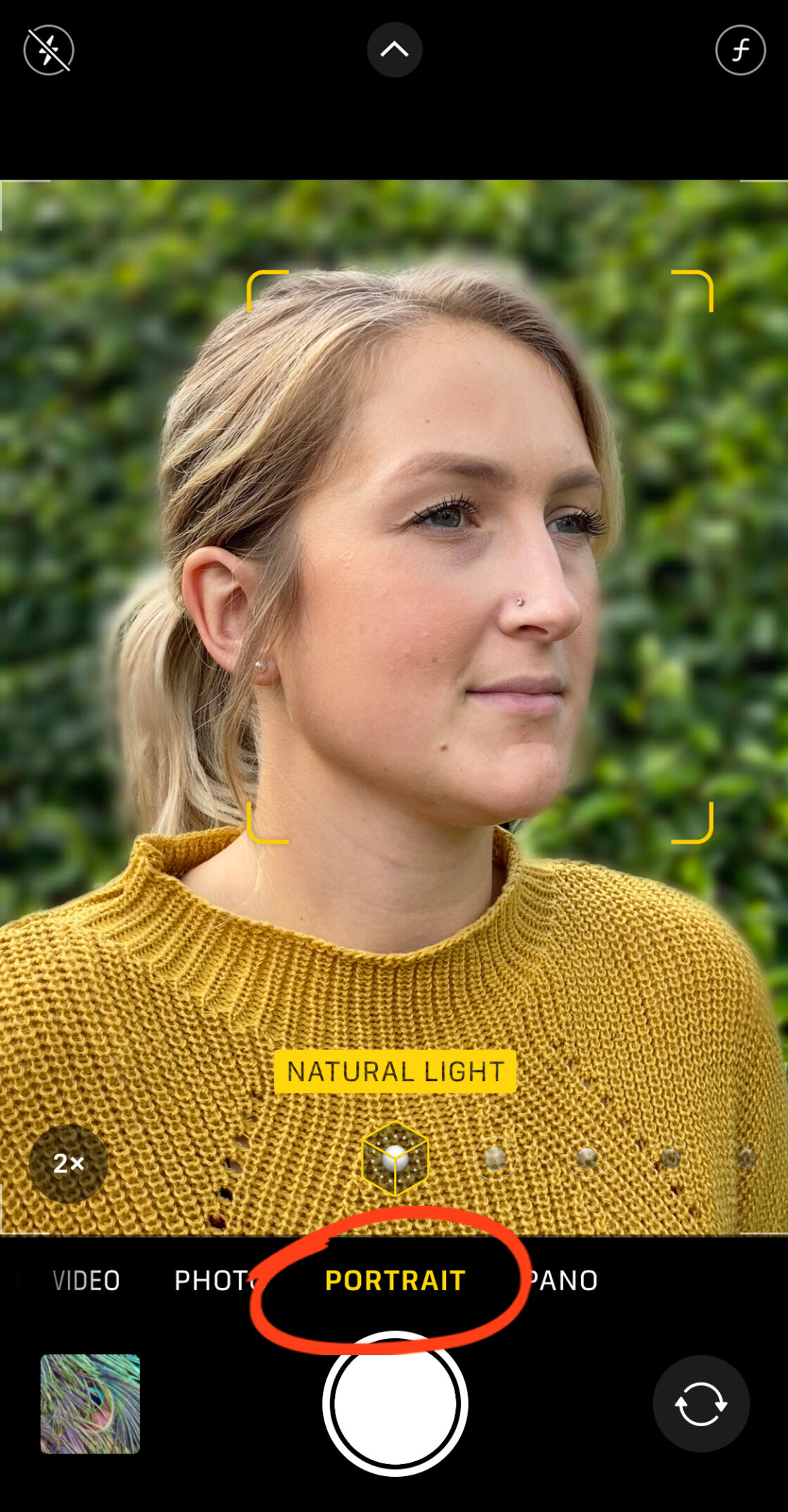
To engage this feature, users must open the native Camera app and swipe to the "Portrait" setting located at the bottom of the interface. The software requires specific conditions to function optimally: the subject should be positioned between two and eight feet from the lens, and there must be sufficient ambient light.
When the camera successfully identifies the subject, a yellow box appears around the face or object, and the background is immediately rendered with a soft blur. On newer models, the screen will display "Natural Light" or a similar lighting effect in yellow, signaling that the depth effect is active. Upon pressing the shutter button, the iPhone’s Image Signal Processor (ISP) executes billions of operations per second to separate the subject from its surroundings, ensuring sharp edges and a realistic transition to the blurred background.
Post-Capture Customization: Depth Control and Lighting
For users with an iPhone XS or newer, the flexibility of Portrait Mode extends into the post-processing phase. By opening a Portrait photo in the Photos app and selecting "Edit," users can access the Depth Control slider, represented by an "f" icon.
In traditional photography, the "f-number" or aperture determines the depth of field. A lower f-number (such as f/1.4) results in a shallower depth of field and more blur, while a higher f-number (such as f/16) keeps more of the background in focus. The iPhone simulates this range, allowing users to fine-tune the blur to their preference. Furthermore, Portrait Lighting—available on iPhone 8 and later—allows for the application of studio-grade lighting effects, such as "Stage Light," which blacks out the background entirely, or "High-Key Light Mono," which creates a professional black-and-white aesthetic against a white backdrop.
The Physics of Optical Blur: The Close-Up Technique
While Portrait Mode relies on software, iPhone users can also achieve background blur through the fundamental laws of optics. This method is particularly useful for users with older iPhone models that lack dual lenses or for those who wish to blur the background of non-human subjects that the software might struggle to recognize.
The physical principle at play is "Shallow Depth of Field." When a camera lens focuses on a subject at a very close range, the distance behind that subject falls out of the focal plane, creating a natural optical blur.
Implementation and Limitations
To execute this, the photographer must physically move the iPhone camera closer to the subject. As the proximity increases, the background will naturally begin to soften. To ensure the camera focuses correctly, the user should tap the screen on the foreground subject, which prompts the lens to lock its focus and adjust the exposure for that specific point.
However, every lens has a "minimum focus distance." If the camera is too close, it will be unable to lock focus, resulting in a completely blurry image. For enthusiasts interested in extreme close-ups—such as detailed shots of insects or flower petals—third-party macro lenses, such as those produced by Moment or Sandmarc, can be attached to the iPhone. These lenses allow the camera to focus at a distance of mere millimeters, producing an incredibly shallow depth of field that rivals professional macro photography.
Third-Party Software Solutions for Post-Processing
For images that were not originally captured in Portrait Mode, or for users seeking more granular control over the blur effect, the third-party app ecosystem offers powerful solutions.
AfterFocus: Precision Masking
AfterFocus is a popular utility that allows users to retroactively apply a depth effect. The app utilizes a "Smart Selection" tool where the user draws a rough line over the subject (Focus) and a line over the background. The app’s algorithm then attempts to define the edges. For complex subjects, such as hair or bicycles, the app provides a "Manual Selection" mode. This allows for pixel-perfect masking, ensuring that only the intended areas are blurred. Users can choose between "Lens Blur," which mimics a standard camera, or "Motion Blur," which adds a sense of speed to the background.

Snapseed: The Dreamy Vignette
Snapseed, a free professional editing tool owned by Google, offers a "Lens Blur" tool that functions differently. Instead of masking a subject, it uses a radial or linear tilt-shift effect. This creates a focused center (or line) with a gradual transition to blur at the edges. This technique is often used to create a "dreamy" or "miniature" effect, drawing the viewer’s eye toward a central point of interest. It is particularly effective for landscape photography or centrally framed portraits where a subtle vignette is desired.
Supporting Data and Market Impact
The impact of these features is reflected in global photography statistics. According to data from Flickr, the iPhone has consistently been the most popular camera used by its community for over half a decade, surpassing dedicated DSLR brands like Canon and Nikon.
The rise of "Computational Photography"—a term popularized by Apple and Google—has shifted the industry’s focus from hardware specifications to AI capabilities. Market research suggests that the mobile photography app market is projected to grow at a compound annual growth rate (CAGR) of over 10% through 2028, driven largely by the demand for professional-grade editing tools on mobile platforms.
Professional photographers have also begun integrating iPhones into their workflows. Statements from renowned photographers often highlight the "frictionless" nature of the iPhone. While a DSLR offers superior raw data, the iPhone provides an "immediate result" that is often sufficient for digital publishing and social media.
Broader Implications and Future Outlook
The ability to blur backgrounds on an iPhone is more than a creative trick; it represents the democratization of high-end visual storytelling. Previously, the "professional look" was gated by the cost of equipment and the technical knowledge required to operate it. Today, a teenager with an iPhone can produce a portrait that, to the untrained eye, is indistinguishable from a photo taken on a $3,000 camera.
Looking ahead, the integration of generative AI is expected to further refine these capabilities. Future iterations of the iPhone will likely use "Semantic Segmentation" to not only blur backgrounds but to recognize specific objects (like trees vs. buildings) and apply different levels of blur based on their distance from the lens, creating a more realistic "bokeh" gradient.
In conclusion, whether through the automated intelligence of Portrait Mode, the physical techniques of close-up photography, or the precision of third-party editing apps, the iPhone has become a formidable tool in the world of photography. By understanding these methods, users can move beyond simple snapshots and begin creating images with the depth, clarity, and professional polish once reserved for the masters of the craft.