The evolution of the iPhone camera has fundamentally altered the landscape of digital photography, transitioning the device from a convenient snapshot tool into a sophisticated instrument capable of producing professional-grade imagery. Central to this transformation is the ability to achieve a shallow depth of field, commonly referred to as "bokeh," which involves keeping a foreground subject in sharp focus while artistically blurring the background. This technique, once the exclusive domain of high-end Digital Single-Lens Reflex (DSLR) cameras equipped with large sensors and wide-aperture lenses, is now accessible to millions of users through a combination of optical physics and advanced computational photography. As mobile imaging continues to dominate social media and digital journalism, understanding the multi-faceted approach to background blur—ranging from native hardware features to third-party post-processing—has become essential for creators seeking to elevate their visual storytelling.
The Rise of Computational Photography and Portrait Mode
The most significant milestone in the iPhone’s quest for professional-grade blur occurred in 2016 with the introduction of the iPhone 7 Plus. This device debuted "Portrait Mode," a feature that utilized the dual-camera system to create a depth map of a scene. Since that inception, Apple has refined the technology through successive generations, incorporating Machine Learning (ML) and, in "Pro" models, Light Detection and Ranging (LiDAR) sensors.
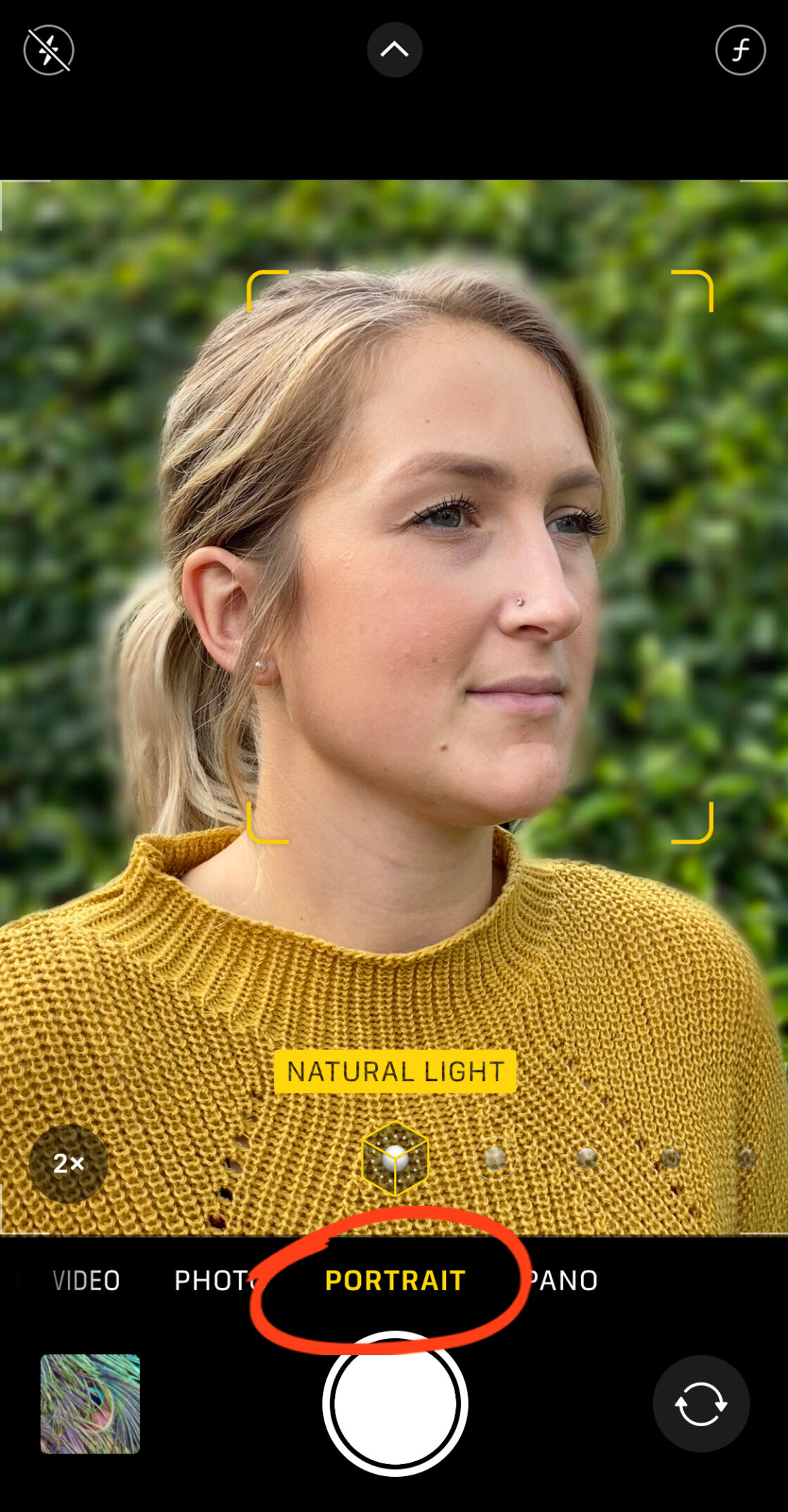
Portrait Mode works by isolating the subject from its surroundings using sophisticated algorithms. The camera’s processor analyzes the disparity between different lenses or uses focus pixels to determine the distance of various objects in the frame. This allows the software to apply a progressive blur to the background, simulating the natural fall-off of light seen in traditional optics. Currently, Portrait Mode is a standard feature on all modern iterations, including the iPhone 12, 13, 14, and 15 series, as well as older models like the iPhone X and 8 Plus.
Operational Mechanics of Portrait Mode
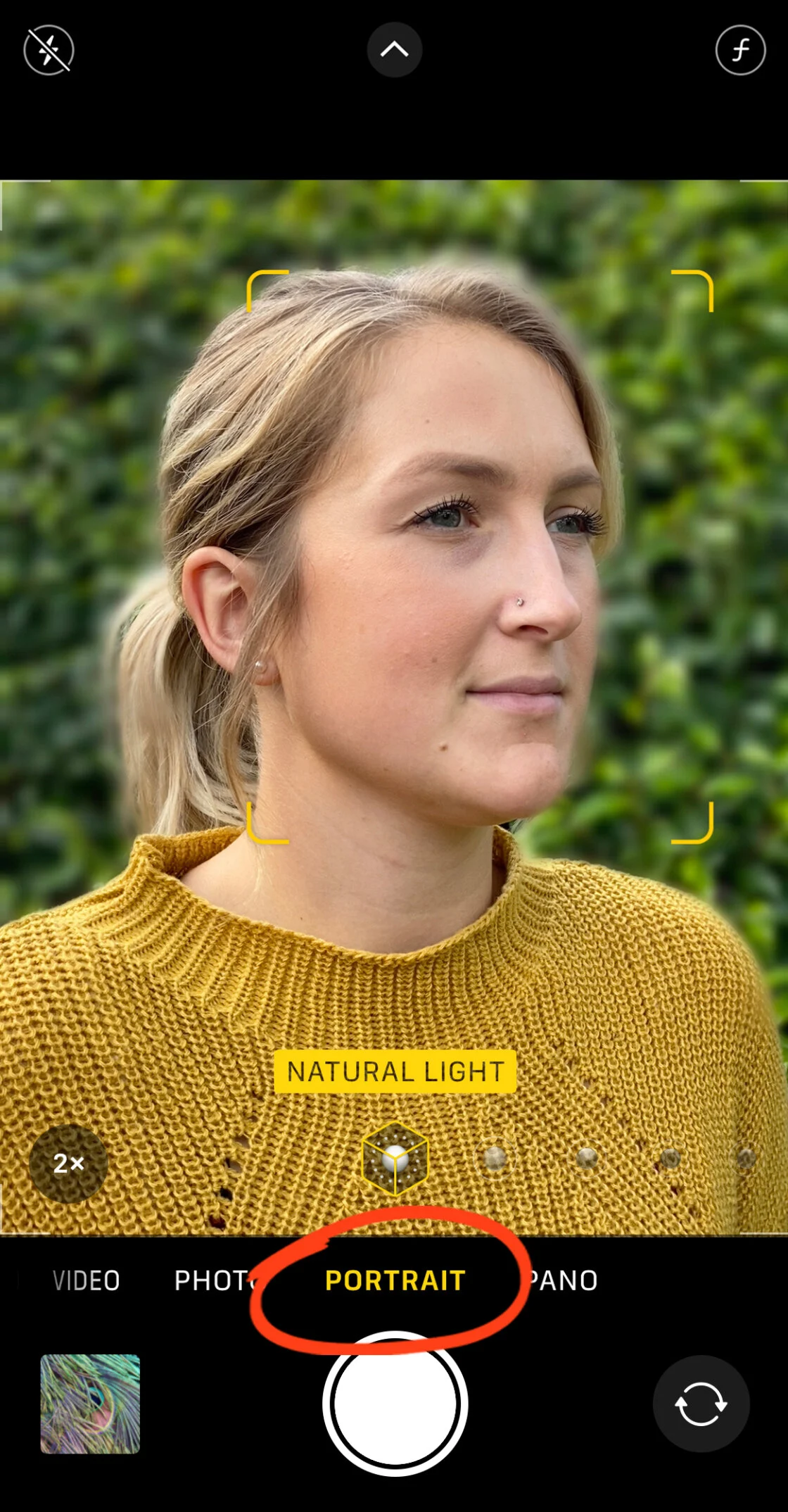
To utilize this feature, users must navigate to the Portrait setting within the native Camera app. The system requires specific environmental conditions to function optimally: the subject should ideally be positioned between two and eight feet from the lens, and there must be sufficient ambient light for the sensors to calculate depth accurately. When the software successfully identifies the subject, the interface displays a yellow "Natural Light" or "Depth Effect" indicator, signaling that the computational blur is ready to be captured.
Post-Capture Depth Control
A pivotal advancement in mobile editing arrived with the iPhone XS, introducing the "Depth Control" slider. This allows photographers to adjust the intensity of the background blur after the image has been recorded. By navigating to the "Edit" menu in the Photos app, users can manipulate the simulated aperture, represented by an f-number (e.g., f/1.4 for maximum blur or f/16 for minimal blur). This non-destructive editing capability ensures that the photographer maintains creative control over the final aesthetic, regardless of the initial capture settings.
Utilizing Physical Optics: The Proximity Method
While computational photography is the most common method for achieving blur on an iPhone, it is not the only way. The fundamental laws of physics provide a secondary, often more natural-looking alternative: proximity. By physically moving the iPhone camera closer to the subject, the photographer creates a shallow depth of field through purely optical means.
The Physics of Subject-to-Background Ratio
The depth of field—the zone of sharp focus—narrows as the distance between the lens and the subject decreases. When an iPhone is placed within inches of an object, the lens is forced to focus at a very short distance, causing objects further away to lose clarity. This method is particularly effective for users with older iPhone models that lack the dual-lens systems required for Portrait Mode.
However, this technique presents challenges. If the camera is placed too close, it may exceed its minimum focus distance, resulting in a completely blurred image. To circumvent this, the "Tap to Focus" feature is critical. By tapping the subject on the screen, the user locks the focus point and directs the camera’s exposure settings to prioritize that specific area. For those seeking even more dramatic results, the integration of third-party macro lenses, such as those produced by Moment or Sandmarc, can further reduce the minimum focus distance, allowing for extreme close-ups with professional-level background isolation.
Advanced Post-Processing: Third-Party Solutions
For images already captured without sufficient blur, or for users seeking a level of precision that the native Apple software cannot provide, the iOS app ecosystem offers powerful alternatives. Two prominent applications in this sector are AfterFocus and Snapseed, each catering to different aspects of the editing workflow.
Precision Mapping with AfterFocus
AfterFocus is designed to replicate the DSLR experience by allowing users to manually define the focus areas. The app utilizes a "Smart Selection" tool where the user draws a rough line over the subject (the "Focus" area) and another over the background. The app’s AI then attempts to find the edges of the subject to apply a mask.
For professional results, the app includes a "Manual Selection" mode. This is vital for complex subjects, such as hair or intricate foliage, where automated algorithms often fail. By using a brush tool to paint a red mask over the foreground, editors can ensure a clean transition between the sharp subject and the blurred background. AfterFocus also provides specialized blur types, such as "Motion Blur," which adds a sense of kinetic energy to stationary subjects, simulating a long-exposure pan.
Creative Framing with Snapseed’s Lens Blur
Developed by Google, Snapseed offers a "Lens Blur" tool that focuses on creating a "dreamy" or "vignetted" effect rather than strict subject isolation. This tool uses a radial or linear tilt-shift gradient. Anything inside the inner circle remains sharp, while the area outside the outer circle is progressively blurred. This is highly effective for central subjects or for adding a vintage, analog feel to a digital photograph. Users can adjust the "Transition" setting to control the smoothness of the blur’s onset and the "Vignette Strength" to darken the edges, further drawing the viewer’s eye to the center of the frame.
A Chronology of iPhone Camera Innovation
The trajectory of the iPhone’s camera capabilities provides context for how background blur became a localized phenomenon.

- 2016 (iPhone 7 Plus): Introduction of the dual-camera system and the first iteration of Portrait Mode.
- 2017 (iPhone X/8 Plus): Introduction of "Portrait Lighting," simulating studio-grade light environments using 3D facial mapping.
- 2018 (iPhone XS/XR): Debut of "Depth Control," allowing for post-capture aperture adjustment.
- 2020 (iPhone 12 Pro): Integration of LiDAR technology, significantly improving depth sensing in low-light conditions and enhancing the accuracy of background/foreground separation.
- 2021-2023 (iPhone 13-15 Pro): Introduction of "Cinematic Mode" for video, bringing the background blur concept to moving images with automatic rack-focusing capabilities.
Market Context and Supporting Data
The shift toward mobile-first photography is supported by industry data. According to reports from the Camera & Imaging Products Association (CIPA), global shipments of digital cameras have declined by over 90% since their peak in 2010. This decline correlates directly with the rise of the "computational camera." Market research suggests that the quality of the camera is a top-three purchasing factor for smartphone consumers.
Apple’s marketing strategy has leaned heavily into this, with campaigns like "Shot on iPhone" emphasizing that the device can produce gallery-quality work. The ability to blur the background is more than a gimmick; it is a tool for visual hierarchy, allowing users to remove distracting elements from cluttered environments—a common scenario in everyday photography.
Broader Impact and Expert Analysis
The democratization of background blur has significant implications for both professional photography and social media culture. Photographers and tech analysts suggest that while the iPhone’s "faked" bokeh is not yet a perfect replacement for high-end glass optics, the gap is closing.
"Computational photography allows us to overcome the physical limitations of small sensors," notes mobile imaging analyst Dr. Michael Hession. "By using multiple frames and depth mapping, the iPhone can simulate an aesthetic that would otherwise require a lens three times the size of the phone itself."
However, this technology also raises questions about the "truth" of an image. Since the blur is a software-generated overlay rather than an optical reality, it represents a shift toward "synthetic" imagery. For journalists and documentarians, the use of Portrait Mode is often a balance between aesthetic appeal and the preservation of the original scene’s context.
Conclusion and Future Outlook
The ability to blur the background on an iPhone is a testament to the convergence of hardware engineering and software intelligence. Whether through the automated ease of Portrait Mode, the physical manipulation of distance, or the granular control of third-party apps, iPhone users now possess the tools to create images that were once impossible without thousands of dollars in specialized equipment.
As Apple continues to integrate more advanced AI and larger sensors into its devices, the distinction between mobile snapshots and professional photography will continue to blur. The future likely holds even more sophisticated depth-mapping techniques, potentially including "Refocusing" capabilities similar to the now-defunct Lytro cameras, where the entire focus plane of an image can be shifted long after the shutter has closed. For now, the current suite of tools provides a robust foundation for any creator looking to master the art of the blurred background.